

Rytr
✓ VerifiedRytr is a budget AI writing assistant with 40+ content templates, 30+ language support, and unlimited generation from $9 per month.
Best For: Freelancers, solopreneurs, and small business owners who need fast short-form copy at the lowest possible cost
The Verdict: Rytr
Rytr earns its place as the best budget AI writing tool for short-form content in 2026. If you need social posts, email copy, product descriptions, and blog outlines generated fast without paying $50 per month, Rytr at $9 is hard to argue against. The template system removes the need to write detailed prompts, which makes it faster to start than general-purpose tools like ChatGPT for predictable content formats.
The honest limitation is clear. Rytr is not built for long-form writing. Outputs past 500 words get repetitive and need significant editing. The My Voice tone matching works inside templates but falls apart on custom formats. And the platform has no SEO integration, no AI visibility tracking, and no agentic features that competitors are adding in 2026. Use Rytr for fast short-form drafts where you plan to edit heavily anyway. Don't expect it to replace a more capable tool for serious content strategy work.
What is Rytr?
Rytr is an AI writing assistant built for speed and affordability. You pick a use case from 40 plus templates, add a short description of what you need, choose a tone from 20 plus options, and Rytr generates a draft in under 5 seconds. The platform covers short-form content types well, including social media captions, email subject lines, product descriptions, ad copy, and blog outlines.
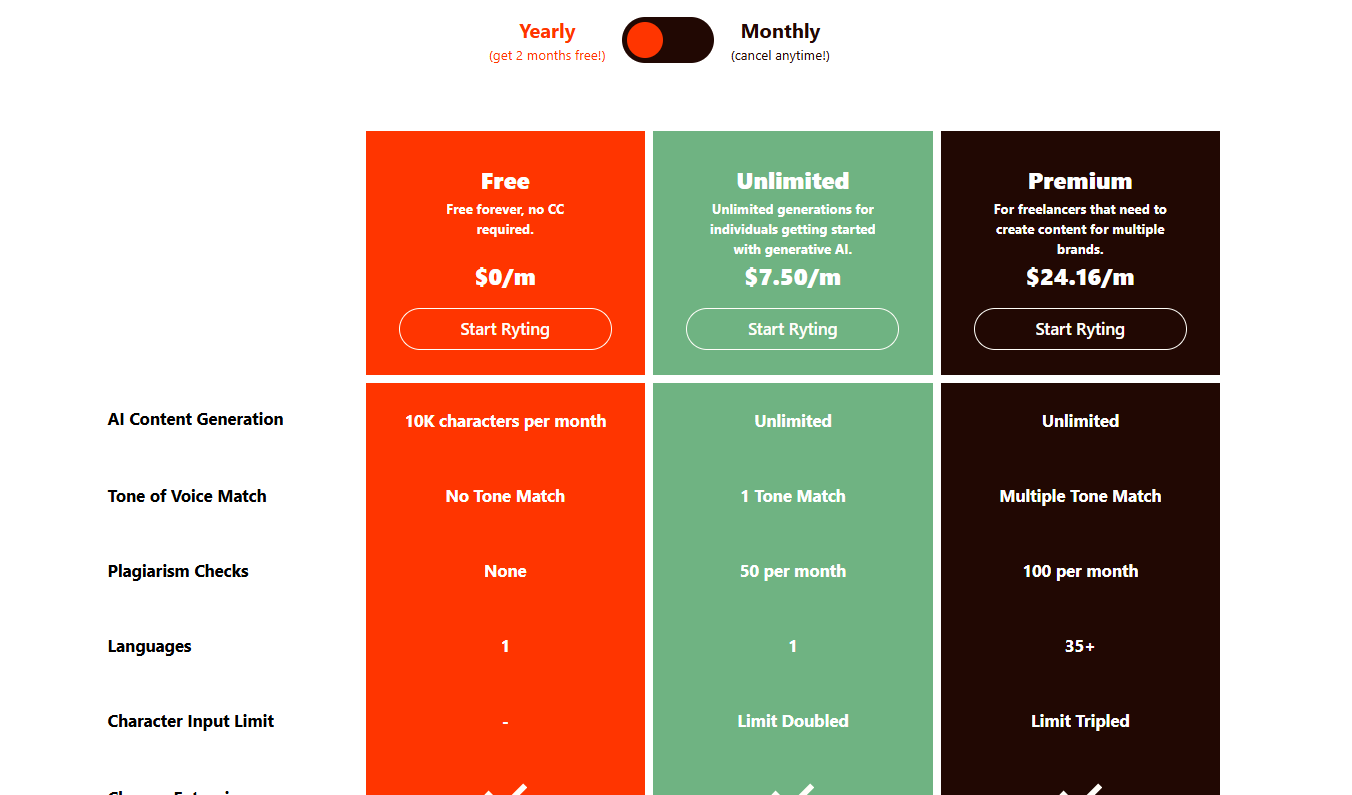
At $9 per month for unlimited generation, Rytr is one of the most affordable AI writing tools in the market as of 2026. The free plan with 10,000 characters per month covers roughly one medium blog post before the limit resets, which is enough to evaluate whether the output quality works for your use case. No credit card is required to start.
The Premium plan at $29 per month adds 30 plus language support, custom use cases you build yourself, and tripled character input limits for feeding longer source material into the generator. Most solo users and freelancers find the $9 Saver plan covers everything they need for routine content tasks.
Who is Rytr Best For?
Freelancers, solopreneurs, and small business owners who need fast short-form copy at the lowest possible cost
Rytr Key Features
Rytr Pricing & Plans
Rytr Review Summary
| Performance Score | B |
| Content Quality | Produces fast, usable short-form drafts that work as starting points but consistently need editing for quality and repetition |
| Interface | Simple template-based layout with low learning curve suitable for non-technical users |
| AI Technology | GPT-based model with template structure and tone parameters applied before generation |
| Purpose | Budget short-form content generation for freelancers and small businesses who prioritize speed and cost over depth |
| Compatibility | Web, Extension |
| Pricing Summary | Free plan with 10,000 characters per month, Saver at $9 per month for unlimited generation, Premium at $29 per month for multi-language and custom use cases |
Rytr Pros & Cons
✅ Pros
- $9 per month Saver plan is one of the cheapest unlimited AI writing tools available in 2026
- Free plan with 10,000 characters per month lets you fully evaluate output quality before paying
- 40 plus templates handle most short-form content types without writing a prompt from scratch
- Chrome extension reduces friction by generating directly inside Gmail, LinkedIn, and Google Docs
- Plagiarism checker included in the paid plan saves a separate subscription to Copyscape
❌ Cons
- Output quality is noticeably weaker on long-form content beyond 500 words compared to Claude or Jasper
- My Voice tone matching breaks down when content moves outside Rytr's template structure
- Chrome extension shows suggestions on demand rather than generating as you type like Grammarly
- Repetitive phrasing appears frequently in outputs requiring manual editing to remove redundancy
- No GEO or AI search visibility tracking, which competitors like Writesonic now include
FAQs
What is Rytr used for?
▼Is Rytr free to use?
▼What platforms does Rytr support?
▼Who is Rytr best for?
▼Does Rytr offer a free trial?
▼More AI Tools You Might Like

Dune is an open data platform that converts natural language prompts into…
View Tool ↗
CertiK provides smart contract security audits, automated formal verification, and real time…
View Tool ↗
Ocean Protocol provides a decentralized data exchange platform for publishing, tokenizing, and…
View Tool ↗
Bittensor is an open source decentralized protocol that incentivizes collaborative machine learning…
View Tool ↗
Token Metrics provides AI crypto analytics, quantitative market ratings, price predictions, and…
View Tool ↗
Cloud analytics platform for exploring live warehouse data, building dashboards, AI apps,…
View Tool ↗
Enterprise data platform with AI agents, Magic ETL, and credit based pricing…
View Tool ↗
BI and AI analytics platform with Ask Zia for conversational queries and…
View Tool ↗