

Taskade
✓ VerifiedTaskade is an AI-powered workspace combining task management, notes, mind maps, outlines, and team collaboration with built-in AI agents for automating workflows.
Best For: Small teams and solopreneurs who want task management, notes, and AI-powered workflow automation in one app without multiple subscriptions
The Verdict: Taskade
Taskade is the strongest all-in-one workspace for solopreneurs and small teams who want to consolidate multiple tools into one subscription. The combination of task management, notes, mind maps, and AI agents in a single $8 per month plan genuinely reduces the number of tools you need open simultaneously. For small teams specifically, the built-in video calling and cross-project search make it competitive with setups that combine Notion, Asana, and Zoom separately.
The limitation is depth. Each individual component, task management, notes, mind mapping, is less powerful than a dedicated tool built exclusively for that function. If your team has sophisticated project management requirements, Asana or Linear will handle them better. If you need advanced note linking, Obsidian or Notion goes deeper. Taskade wins when consolidation matters more than depth in any single category.
What is Taskade?
Taskade is a productivity workspace that combines task management, note-taking, mind mapping, outlines, and team collaboration in one application. The differentiating feature in 2026 is its AI agent builder, which lets you create custom AI agents that automate specific recurring workflows without writing code. You describe what the agent should do, connect it to your data, and let it run tasks like weekly research summaries, meeting agenda drafts, or project status updates automatically.
Six view modes mean you can look at the same project as a simple list, a kanban board, a calendar, a mind map, an outline, or a table depending on what the task requires. Most project management tools force you to commit to one view. Taskade lets you switch between them without reorganizing your data.
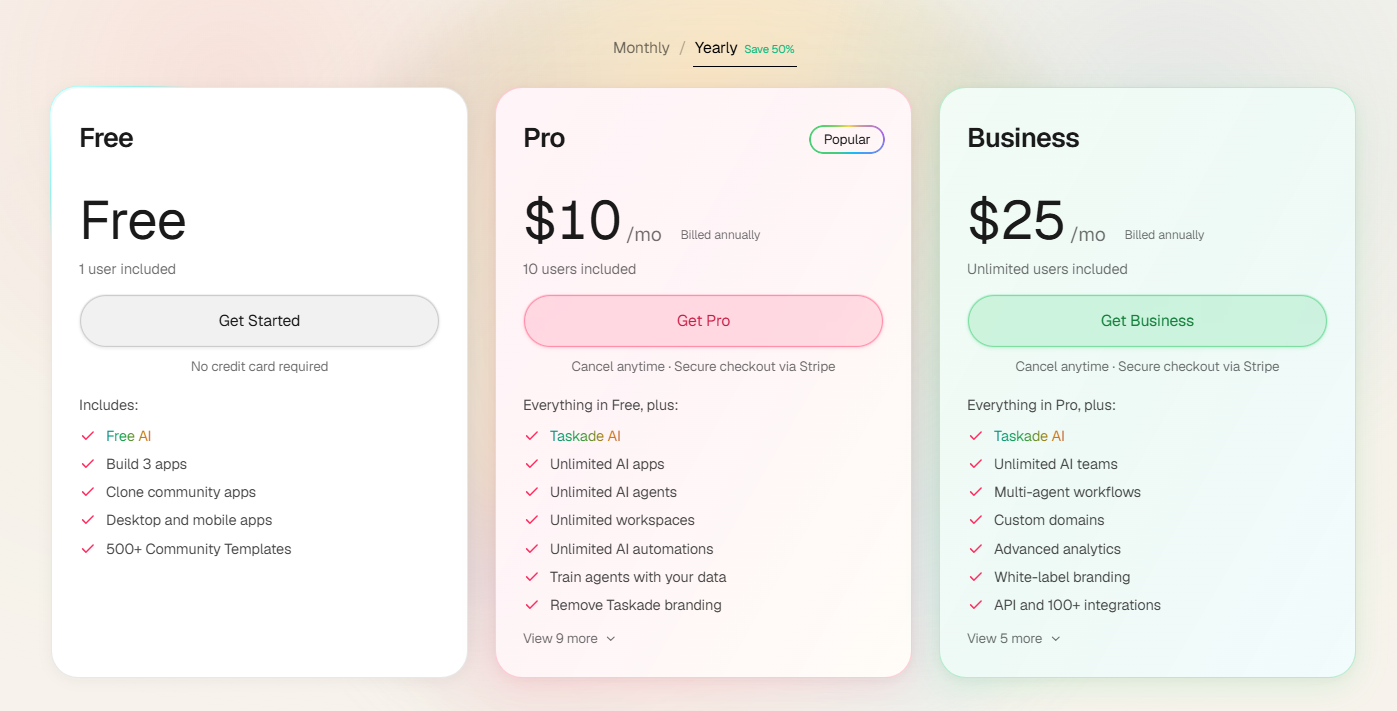
The free plan includes workspace access, basic AI generation, and collaboration features for individual users. Paid plans start at $8 per month billed annually for expanded AI usage, higher storage, and additional agent runs. Built-in video and audio calling removes the need for a separate meeting tool for small teams that conduct quick check-ins.
Who is Taskade Best For?
Small teams and solopreneurs who want task management, notes, and AI-powered workflow automation in one app without multiple subscriptions
Taskade Key Features
Taskade Pricing & Plans
Taskade Review Summary
| Performance Score | B |
| Content Quality | AI task generation and project planning are fast and useful for structured work, though agent outputs need review before deploying on real workflows |
| Interface | Feature-rich workspace with multiple view modes that suits flexible thinkers but can overwhelm users who prefer minimal tools |
| AI Technology | Large language model integration with a custom agent builder layered on top for workflow automation |
| Purpose | All-in-one AI workspace for task management, note-taking, team collaboration, and automated workflow execution |
| Compatibility | Web, Desktop, Mobile, Extension |
| Pricing Summary | Free plan available, paid from $8 per month (Pro) billed annually, team plans at higher pricing |
Taskade Pros & Cons
✅ Pros
- Six view modes in one tool replace multiple separate apps for lists, boards, calendars, and mind maps
- Built-in video calls reduce the need for a separate Zoom or Meet subscription for small teams
- Free plan is genuinely functional with workspace access, AI features, and collaboration for individuals
- AI agent building is accessible to non-developers through a guided setup process
- Cross-platform availability means you can access your workspace from any device without losing functionality
❌ Cons
- AI agent capabilities are less sophisticated than dedicated automation tools like Zapier or Make
- Interface can feel cluttered when managing many active projects across different view types simultaneously
- Some users report that the mind map view and calendar sync have occasional reliability issues
- Enterprise features like SSO and advanced permissions require the higher-tier plans at custom pricing
- AI-generated task lists sometimes miss nuance and require significant editing before they match real project requirements
FAQs
What is Taskade used for?
▼Is Taskade free to use?
▼What platforms does Taskade support?
▼Who is Taskade best for?
▼Does Taskade offer a free trial?
▼More AI Tools You Might Like

Dune is an open data platform that converts natural language prompts into…
View Tool ↗
CertiK provides smart contract security audits, automated formal verification, and real time…
View Tool ↗
Ocean Protocol provides a decentralized data exchange platform for publishing, tokenizing, and…
View Tool ↗
Bittensor is an open source decentralized protocol that incentivizes collaborative machine learning…
View Tool ↗
Token Metrics provides AI crypto analytics, quantitative market ratings, price predictions, and…
View Tool ↗
Cloud analytics platform for exploring live warehouse data, building dashboards, AI apps,…
View Tool ↗
Enterprise data platform with AI agents, Magic ETL, and credit based pricing…
View Tool ↗
BI and AI analytics platform with Ask Zia for conversational queries and…
View Tool ↗