

Otter AI
✓ VerifiedOtter AI is a meeting transcription and AI notes assistant that joins Zoom, Teams, and Google Meet calls to transcribe in real time, generate summaries, and answer follow-up questions.
Best For: Professionals, sales teams, and remote workers who attend multiple meetings daily and need accurate transcriptions, summaries, and action items without manual note-taking
The Verdict: Otter AI
Otter AI is the best-value meeting transcription tool for individual professionals who attend multiple calls daily and want automatic summaries and searchable transcripts. The free plan with 300 minutes per month covers light meeting schedules without any cost. The Pro plan at $8.33 per month is reasonable for full-time professionals who need unlimited transcription and post-call search.
The transcription accuracy is reliable for standard meetings with clear audio, native English speakers, and 5 to 10 participants. It degrades in meetings with heavy accents, overlapping voices, or poor microphone quality. And the OtterPilot bot joining as a visible participant creates friction in sensitive conversations where you don't want an AI recorder announced. For standard professional meetings in English, Otter is one of the most practical tools in this category at this price point.
What is Otter AI?
Otter AI is a meeting transcription tool that joins your video calls as an automated participant and converts spoken words into searchable text in real time. OtterPilot, Otter's AI bot, can attend meetings independently and deliver a summary and action item list to your inbox after the call ends even if you were not present. This makes it useful both as a live transcription aid and as an async meeting replacement for meetings that could have been emails.
After any meeting, the AI Chat feature lets you ask questions about the transcript in plain language. "What did Sarah say about the Q4 budget?" pulls the relevant passage immediately rather than requiring you to read through the full transcript. Speaker identification attributes every spoken sentence to the named attendee in the transcript, which makes attribution clear for action items and follow-up.
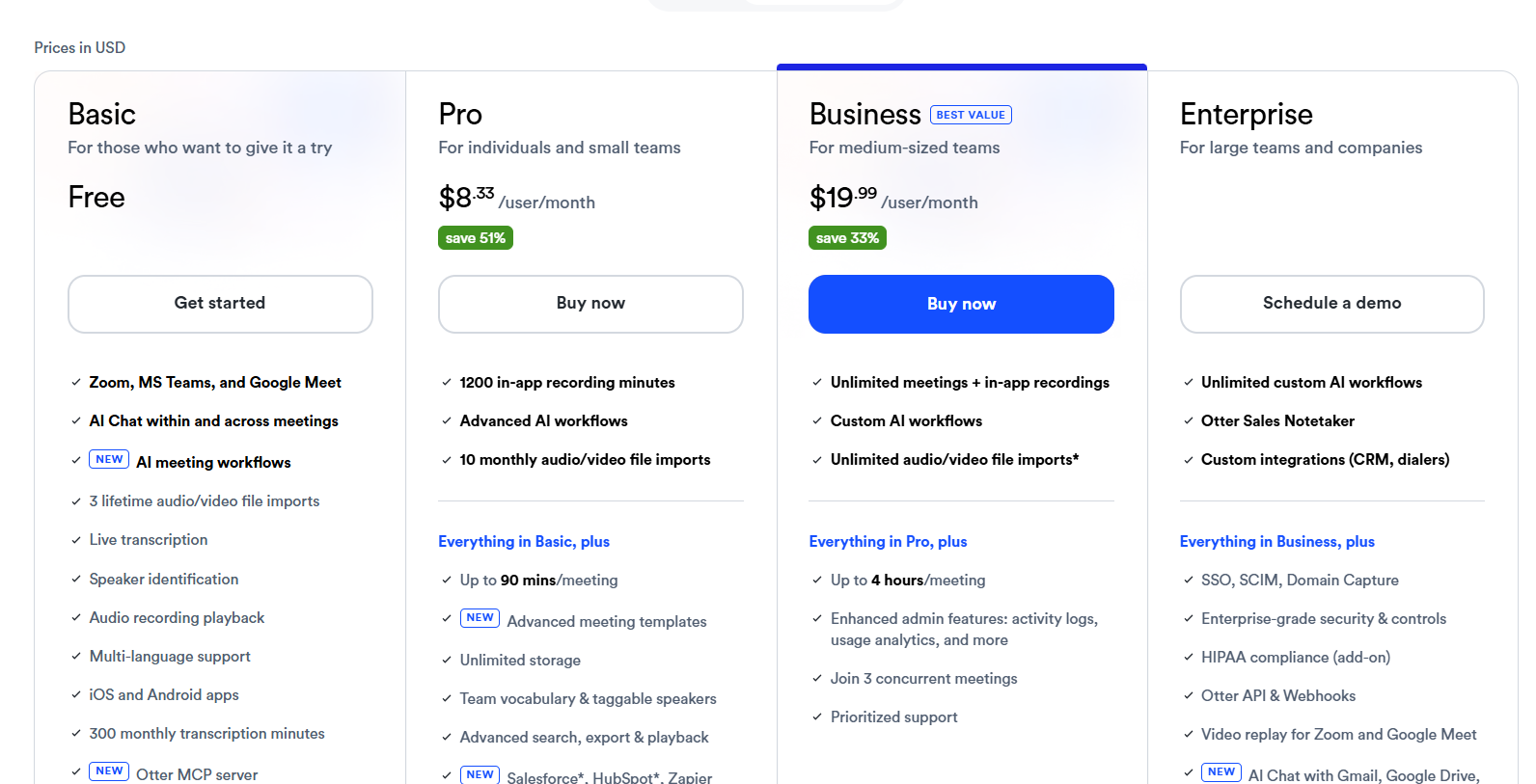
The free plan covers 300 transcription minutes per month with three AI chat exports, which is enough for occasional meeting use. The Pro plan at $8.33 per month billed annually removes the minute limit and increases AI chat exports. The Business plan at $20 per month adds team features including shared workspaces, admin controls, and Salesforce and HubSpot CRM integrations.
Who is Otter AI Best For?
Professionals, sales teams, and remote workers who attend multiple meetings daily and need accurate transcriptions, summaries, and action items without manual note-taking
Otter AI Key Features
Otter AI Pricing & Plans
Otter AI Review Summary
| Performance Score | B |
| Content Quality | Produces accurate transcriptions and clear summaries for standard meetings with clean audio but accuracy drops with accent variety or overlapping speakers |
| Interface | Clean meeting dashboard with transcript, speaker identification, and AI chat panel organized logically for post-meeting review |
| AI Technology | Automatic speech recognition with speaker diarization, natural language processing for summary generation, and conversational AI for transcript chat |
| Purpose | Meeting transcription, summary generation, and action item extraction for professionals who need automated records of spoken conversations |
| Compatibility | Web, Mobile, Extension |
| Pricing Summary | Free plan with 300 minutes per month, Pro at $8.33 per month (annual) for unlimited transcription minutes, Business at $20 per month for team features |
Otter AI Pros & Cons
✅ Pros
- Free plan with 300 transcription minutes per month is enough for occasional meeting use without paying
- OtterPilot attending meetings on your behalf frees you to focus on the conversation instead of note-taking
- AI Chat with past transcripts solves the problem of finding a specific comment from a call three weeks ago
- Speaker identification is accurate enough for meetings with clear audio and up to 10 participants
- HubSpot and Salesforce integrations push meeting summaries directly into CRM records without manual data entry
❌ Cons
- Transcription accuracy drops significantly in meetings with multiple overlapping speakers or heavy accents
- OtterPilot joining as a bot can make some meeting participants uncomfortable, especially in sensitive conversations
- Free plan limits of 300 minutes per month and three AI chat exports get restrictive for daily meeting users quickly
- Action item extraction misses implied tasks and informal commitments that a human listener would catch
- Pro plan at $8.33 per month billed annually is reasonable but the Business plan at $20 per month is required for team-level features
FAQs
What is Otter AI used for?
▼Is Otter AI free to use?
▼What platforms does Otter AI support?
▼Who is Otter AI best for?
▼Does Otter AI offer a free trial?
▼More AI Tools You Might Like

Dune is an open data platform that converts natural language prompts into…
View Tool ↗
CertiK provides smart contract security audits, automated formal verification, and real time…
View Tool ↗
Ocean Protocol provides a decentralized data exchange platform for publishing, tokenizing, and…
View Tool ↗
Bittensor is an open source decentralized protocol that incentivizes collaborative machine learning…
View Tool ↗
Token Metrics provides AI crypto analytics, quantitative market ratings, price predictions, and…
View Tool ↗
Cloud analytics platform for exploring live warehouse data, building dashboards, AI apps,…
View Tool ↗
Enterprise data platform with AI agents, Magic ETL, and credit based pricing…
View Tool ↗
BI and AI analytics platform with Ask Zia for conversational queries and…
View Tool ↗