

Adobe Podcast
✓ VerifiedAdobe Podcast is a free AI audio enhancement and podcast production tool that uses Enhance Speech to remove background noise and improve recording quality to studio standard from any microphone.
Best For: Podcasters, educators, and content creators who want to improve audio quality from home recordings without expensive equipment or post-production knowledge
The Verdict: Adobe Podcast
Adobe Podcast is the strongest free recommendation for home podcasters whose primary problem is audio quality. Enhance Speech alone is worth knowing about for any creator who records in a non-ideal acoustic environment. The results from a USB microphone with room echo processed through Enhance Speech regularly surprise listeners who expect professional studio quality. And the free plan covers this feature without payment for casual users who process a few episodes monthly.
The honest comparison matters. For podcasters who need a complete production suite covering recording, editing, transcription, video integration, and distribution, Descript at $12 per month provides a significantly more complete workflow at only $2.10 more per month than Adobe Podcast Premium. Adobe Podcast is the right tool when Enhance Speech is specifically what you need. Descript is the right tool when you want to replace your entire podcast production stack with one subscription.
What is Adobe Podcast?
Adobe Podcast is Adobe's AI-powered audio tool for podcast creators, built around the Enhance Speech feature that has become the most widely recommended free audio cleanup tool in the podcasting community. You upload any audio recording, Enhance Speech analyzes the voice content and separates it from background noise, room echo, HVAC hum, and microphone artifacts, then delivers a cleaned audio file that sounds like it was recorded in a professional studio. The results are remarkable on voice content and work best on recordings where the speaker's voice is the primary audio element.
The Mic Check tool listens to your microphone input before you start recording and gives specific diagnostic feedback. Rather than telling you "audio quality is poor," it tells you "reduce background noise" or "move away from the wall" with enough specificity to fix the problem in the current session rather than discovering it in post-production.
Studio is the remote recording feature that allows browser-based podcast sessions with guests joining through a link. Each participant's audio is recorded locally on their device and uploaded separately, producing individual high-quality tracks for post-production mixing rather than a single compressed audio stream from a video call.
Who is Adobe Podcast Best For?
Podcasters, educators, and content creators who want to improve audio quality from home recordings without expensive equipment or post-production knowledge
Adobe Podcast Key Features
Adobe Podcast Pricing & Plans
Adobe Podcast Review Summary
| Performance Score | B |
| Content Quality | Enhance Speech produces the best free audio cleanup available with results that match what you would expect from professional noise reduction plugins at no cost |
| Interface | Clean, minimalist web interface that prioritizes accessibility for non-technical users over production depth |
| AI Technology | Adobe's proprietary Enhance Speech v3 neural audio processing model trained on voice-isolation and noise-reduction tasks |
| Purpose | Free AI audio enhancement and browser-based podcast recording for home-studio creators who want studio-quality output without professional equipment |
| Compatibility | Web |
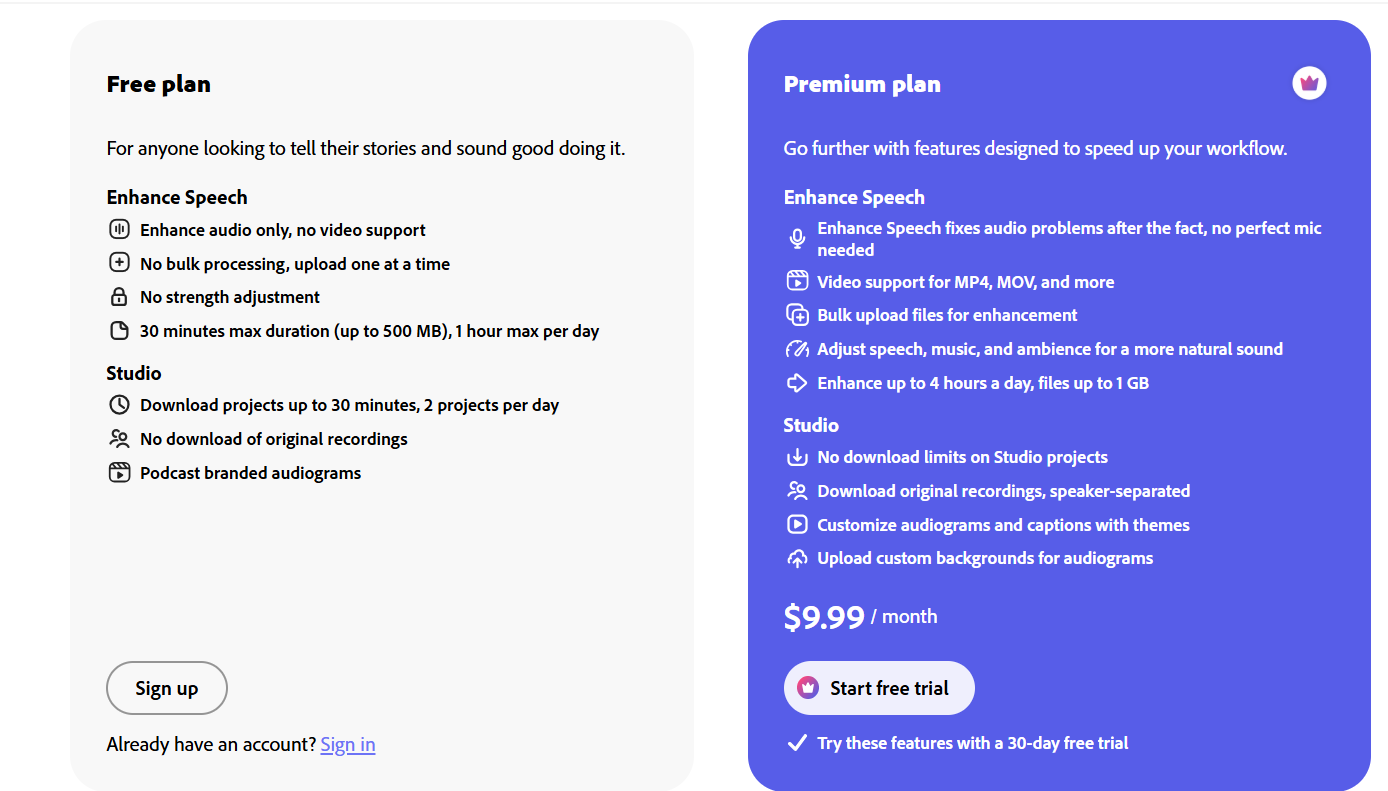
| Pricing Summary | Free plan with daily limits on Enhance Speech and Studio, Premium at $9.99 per month for unlimited processing |
Adobe Podcast Pros & Cons
✅ Pros
- Enhance Speech is the best free audio cleanup tool available for removing bad microphone quality from recordings without technical knowledge
- Mic Check pre-recording diagnostic prevents wasted sessions by catching audio problems before recording begins
- Free plan covers the most-used feature with daily limits that work for occasional users without payment
- Browser-based recording with separate tracks per speaker captures guest audio locally without needing external recording software
- Adobe Creative Cloud integration makes it natural for creators already in the Adobe ecosystem
❌ Cons
- No offline processing which means audio files must be uploaded to Adobe's servers rather than processing locally for privacy-sensitive recordings
- Remote recording lacks 4K video capture and live streaming features available in dedicated platforms like Riverside
- Transcript editing is more basic than Descript's full production suite which also handles video and multitrack editing
- Daily limits on the free plan can be restrictive for creators processing multiple episodes in one session
- Pricing for Premium at $9.99 per month is not competitive as a standalone subscription when Descript at $12 per month includes significantly more production features
FAQs
What is Adobe Podcast used for?
▼Is Adobe Podcast free to use?
▼What platforms does Adobe Podcast support?
▼Who is Adobe Podcast best for?
▼Does Adobe Podcast offer a free trial?
▼More AI Tools You Might Like

Dune is an open data platform that converts natural language prompts into…
View Tool ↗
CertiK provides smart contract security audits, automated formal verification, and real time…
View Tool ↗
Ocean Protocol provides a decentralized data exchange platform for publishing, tokenizing, and…
View Tool ↗
Bittensor is an open source decentralized protocol that incentivizes collaborative machine learning…
View Tool ↗
Token Metrics provides AI crypto analytics, quantitative market ratings, price predictions, and…
View Tool ↗
Cloud analytics platform for exploring live warehouse data, building dashboards, AI apps,…
View Tool ↗
Enterprise data platform with AI agents, Magic ETL, and credit based pricing…
View Tool ↗
BI and AI analytics platform with Ask Zia for conversational queries and…
View Tool ↗