

Adobe Express
✓ VerifiedAdobe Express is a free-first design platform combining drag-and-drop templates with Adobe Firefly AI image generation for creating social media graphics, short videos, PDFs, and print materials without design experience.
Best For: Small business owners, social media managers, and non-designers who want professional-looking branded graphics and short videos with Adobe quality and AI image generation in a simple interface
The Verdict: Adobe Express
Adobe Express is the right tool for small businesses and marketing teams who want Adobe-quality branded graphics with commercially safe AI image generation in an interface simple enough for non-designers. The Firefly IP indemnification is a genuine differentiator for teams producing content for commercial campaigns where legal risk from AI image generation is a real concern. At $9.99 per month, it is meaningfully cheaper than Canva Pro at $18 per month for comparable basic design functionality.
The honest comparison with Canva is nuanced. Canva has more template variety, stronger video features, a larger asset library, and a more established collaborative workflow for teams. Adobe Express wins on Firefly's commercial rights coverage and Adobe ecosystem integration. Choose Adobe Express when you already use Adobe tools or when commercial AI image rights are a primary concern. Choose Canva when template variety, video production, and team collaboration features matter more than IP protection.
What is Adobe Express?
Adobe Express is the accessible design tool in Adobe's product family, positioned between the full professional power of Photoshop and Illustrator and the consumer simplicity of Canva. The platform provides thousands of professionally designed templates for social media formats, print materials, short videos, and PDF documents, all accessible from a drag-and-drop interface that requires no design training.
The Firefly AI image generation integration is the 2026 differentiator that most meaningfully separates Adobe Express from Canva AI. Every Firefly-generated image inside Adobe Express carries full commercial IP indemnification because Firefly is trained exclusively on licensed Adobe Stock and public domain material. Designers and marketing teams who need commercially safe AI images for client work or brand campaigns get legal cover that Canva's AI generation does not provide.
Brand Kit stores your organization's logos, color palettes, and approved fonts and applies them automatically across every new design, ensuring consistent visual identity without manual setup on each project. Content Scheduler allows planning and publishing directly to social media platforms from the same interface where you create designs.
Who is Adobe Express Best For?
Small business owners, social media managers, and non-designers who want professional-looking branded graphics and short videos with Adobe quality and AI image generation in a simple interface
Adobe Express Key Features
Adobe Express Pricing & Plans
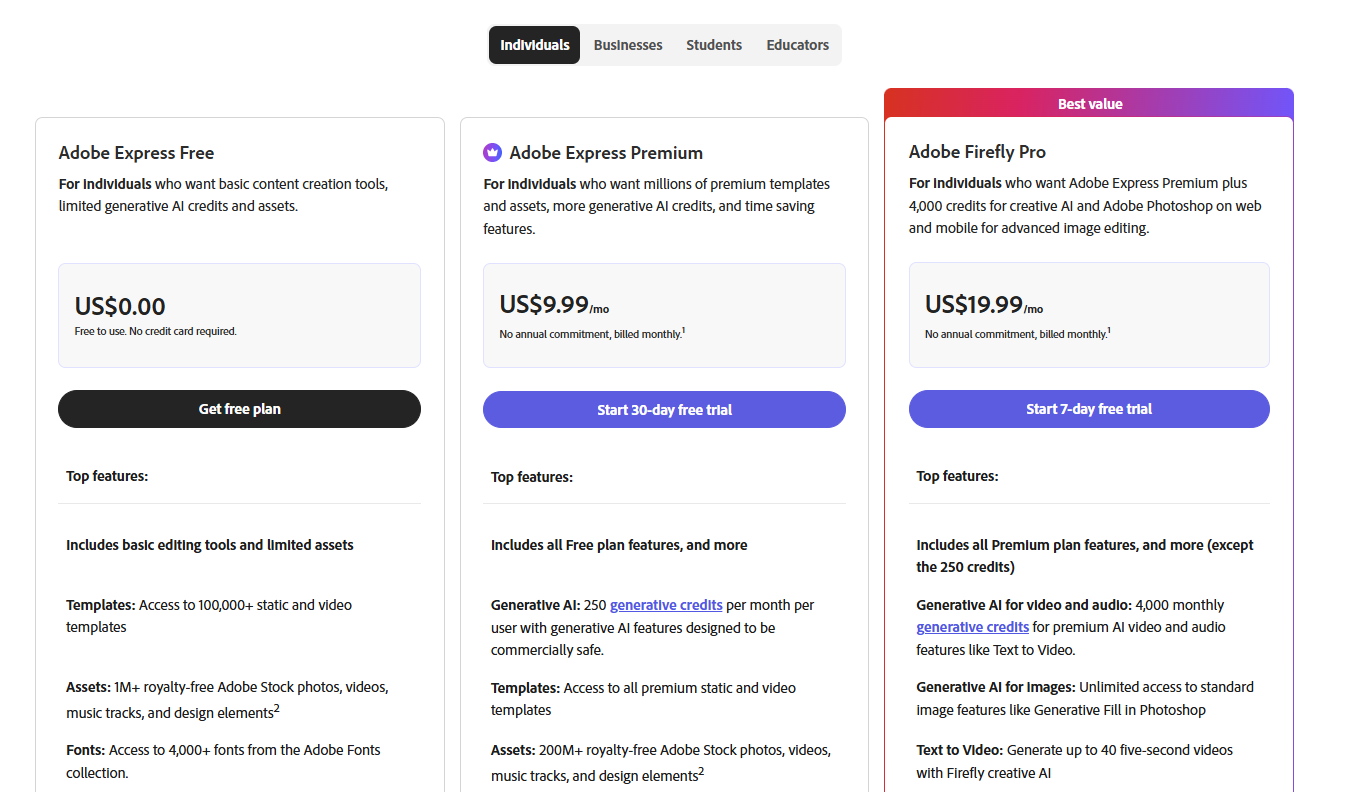
Adobe Express Review Summary
| Performance Score | B |
| Content Quality | Produces professional-quality branded designs with Firefly AI integration that delivers commercially safe generated images with full IP indemnification directly inside design templates |
| Interface | Clean, accessible design canvas that is simpler than full Adobe Creative Cloud tools but more structured than Canva for creators who want Adobe-quality output without learning Photoshop |
| AI Technology | Adobe Firefly image generation integrated into the canvas with background removal and animation effects built on Adobe's Sensei AI platform |
| Purpose | Accessible branded design creation for non-designers and small businesses wanting Adobe quality graphics with AI image generation and social media publishing in one tool |
| Compatibility | Web, Mobile, Extension |
| Pricing Summary | Free plan with core templates and limited Firefly credits, Premium at $9.99 per month for all templates and expanded AI credits, included in Creative Cloud All Apps at $59.99 per month |
Adobe Express Pros & Cons
✅ Pros
- Adobe Firefly integration provides commercially safe AI image generation with IP indemnification inside design templates
- Free plan covers core design features including templates, basic Firefly credits, and design export for casual users
- Brand Kit enforces consistent visual identity across all content without manually applying settings each time
- Content Scheduler combines design and social media scheduling in one subscription for marketing teams
- Adobe Creative Cloud integration makes it natural for teams already using Photoshop or Illustrator
❌ Cons
- Design flexibility is significantly below Canva's free and Pro templates for users who need extensive customization options
- Video features are limited to short social clips rather than the full video editing capability that Canva provides at the Pro tier
- Premium at $9.99 per month is priced identically to Canva's former pricing but Canva now costs $18 per month making Express relatively more competitive
- Firefly credits in the free plan run out quickly for users generating multiple AI images per session
- The interface feels more constrained than Canva for users who need to deviate significantly from provided templates
FAQs
What is Adobe Express used for?
▼Is Adobe Express free to use?
▼What platforms does Adobe Express support?
▼Who is Adobe Express best for?
▼Does Adobe Express offer a free trial?
▼More AI Tools You Might Like

Dune is an open data platform that converts natural language prompts into…
View Tool ↗
CertiK provides smart contract security audits, automated formal verification, and real time…
View Tool ↗
Ocean Protocol provides a decentralized data exchange platform for publishing, tokenizing, and…
View Tool ↗
Bittensor is an open source decentralized protocol that incentivizes collaborative machine learning…
View Tool ↗
Token Metrics provides AI crypto analytics, quantitative market ratings, price predictions, and…
View Tool ↗
Cloud analytics platform for exploring live warehouse data, building dashboards, AI apps,…
View Tool ↗
Enterprise data platform with AI agents, Magic ETL, and credit based pricing…
View Tool ↗
BI and AI analytics platform with Ask Zia for conversational queries and…
View Tool ↗