

Swagger
✓ VerifiedAPI design and documentation platform built around the OpenAPI Specification for fast team collaboration.
Best For: Developers and technical writers needing standardized OpenAPI design and documentation.
The Verdict: Swagger
Swagger remains the absolute industry standard for OpenAPI design and documentation. Its strict validation tools prevent bad code from ever reaching your testing phase. But non technical product managers might struggle heavily with the syntax dense interface.
I highly recommend it for serious engineering teams building scalable web services. If you need a reliable platform to manage complex API contracts, this application deserves a permanent spot in your GuideAiTools stack.
What is Swagger?
Swagger provides a centralized platform for designing and documenting APIs using the OpenAPI Specification. You write your endpoint structures directly in the editor. The system immediately generates interactive documentation that clients can read and test. In my practical testing, the real time error catching saves hours of debugging.
The software connects to your source control repositories to keep specifications perfectly in sync with your codebase. You deploy mock servers instantly. Honestly, most people get this wrong by treating documentation as an afterthought. This software forces you to adopt a design first engineering approach before writing actual logic.
Development teams use SwaggerHub to maintain a single source of truth for data contracts. You set global style guidelines so every developer writes consistent endpoints. It completely eliminates the communication gap between frontend and backend engineers.
Who is Swagger Best For?
Developers and technical writers needing standardized OpenAPI design and documentation.
Swagger Key Features
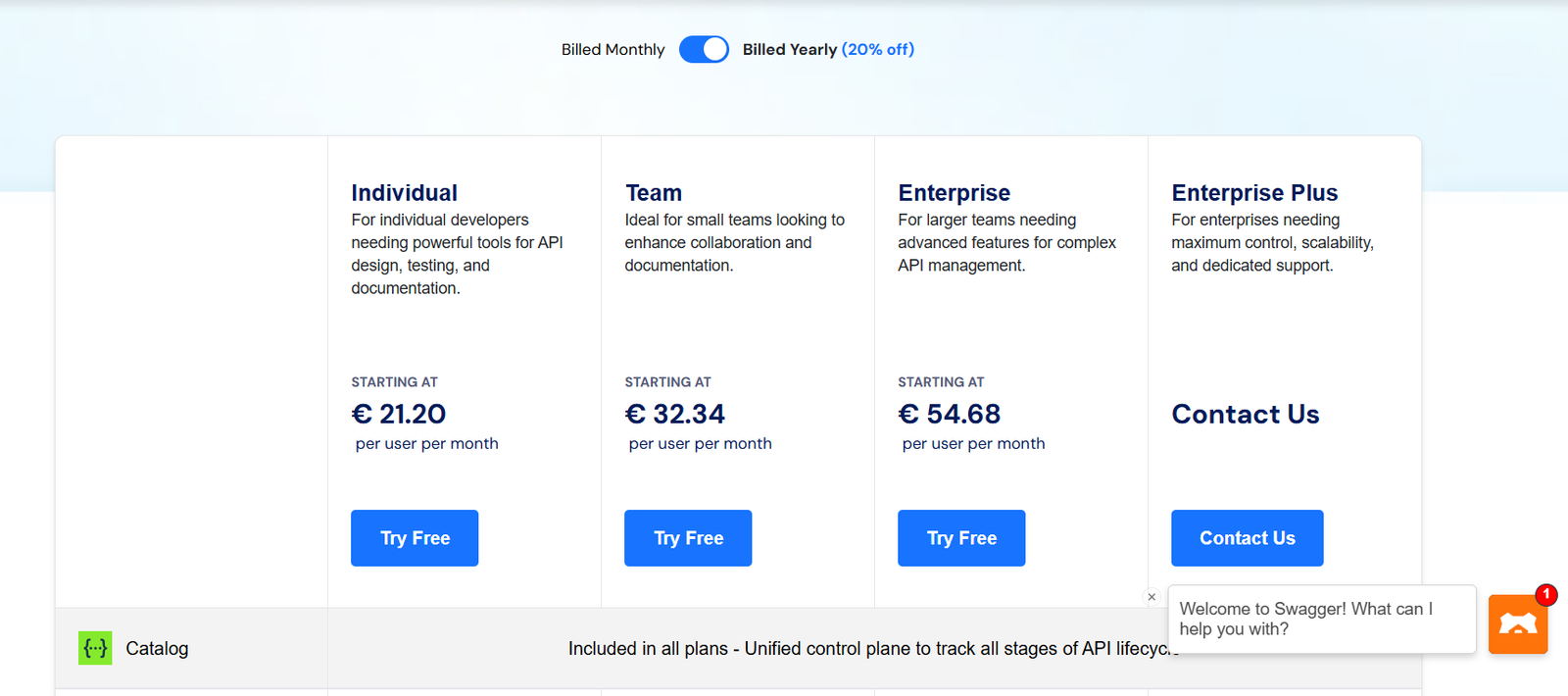
Swagger Pricing & Plans
Swagger Review Summary
| Performance Score | A |
| Content Quality | The auto generated documentation stays accurate and updates instantly with specification changes. |
| Interface | The split screen editor provides immediate visual feedback during code writing. |
| AI Technology | Automated validation flags structural errors before they reach production servers. |
| Purpose | Swagger standardizes how development teams design and test API endpoints. |
| Compatibility | Web, API |
| Pricing Summary | Free basic tier available with professional plans starting at $19 per user per month. |
Swagger Pros & Cons
✅ Pros
- Forces strict adherence to OpenAPI standards
- Speeds up documentation creation significantly
- Generates useful boilerplate code for clients
- Integrates well with existing Git workflows
❌ Cons
- Interface feels overwhelming for non technical users
- Premium team features require expensive monthly subscriptions
- Learning curve stays steep for complex nested schemas
- Mock server occasionally experiences high latency
FAQs
What is Swagger used for?
▼Is Swagger free to use?
▼What platforms does Swagger support?
▼Who is Swagger best for?
▼Does Swagger offer a free trial?
▼More AI Tools You Might Like

Dune is an open data platform that converts natural language prompts into…
View Tool ↗
CertiK provides smart contract security audits, automated formal verification, and real time…
View Tool ↗
Ocean Protocol provides a decentralized data exchange platform for publishing, tokenizing, and…
View Tool ↗
Bittensor is an open source decentralized protocol that incentivizes collaborative machine learning…
View Tool ↗
Token Metrics provides AI crypto analytics, quantitative market ratings, price predictions, and…
View Tool ↗
Cloud analytics platform for exploring live warehouse data, building dashboards, AI apps,…
View Tool ↗
Enterprise data platform with AI agents, Magic ETL, and credit based pricing…
View Tool ↗
BI and AI analytics platform with Ask Zia for conversational queries and…
View Tool ↗