

Sider AI
✓ VerifiedAI browser sidebar for chat, page summaries, translation, PDF reading, automation and web tasks.
Best For: Users who want AI help across websites and devices
The Verdict: Sider AI
Sider AI is a strong browser AI assistant for people who want one tool for reading, summarizing, translation, writing and light automation. Its wide platform support and browser first interface make it more practical than a normal chatbot for daily web work.
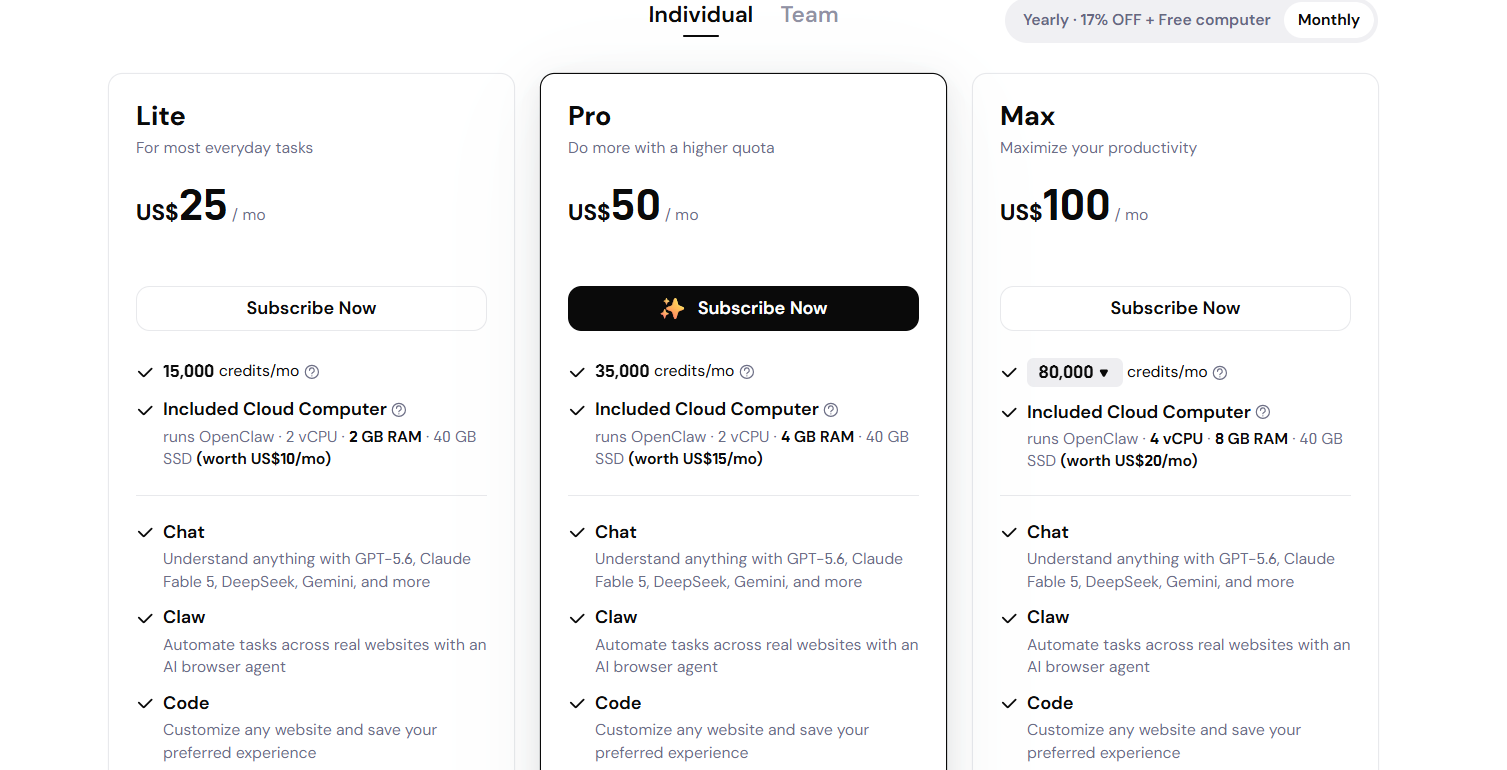
For GuideAITools, Sider should be positioned as a top AI browser assistant for users who need help across websites, PDFs, YouTube and research tasks. The main weakness is pricing clarity. The official pricing page explains credits and plan features, but exact plan prices were not visible in the crawled text, so the listing should say Free to start and ask editors to confirm the live checkout price before adding exact paid pricing.
What is Sider AI?
Sider AI is a browser AI assistant that adds chat, automation, writing, translation and content creation features to your normal web workflow. Its official site describes it as one AI sidebar for everything you do in the browser, with Chat, Claw, Code and Create tools.
The tool works well because it stays close to the page. You can summarize a page, ask questions, translate a PDF, generate content, compare shopping prices, fill forms or research across websites without copying everything into a separate chatbot.
Sider is best for users who want AI everywhere they browse. It supports Chrome, Edge, Mac OS, Windows, iOS and Android, and the site claims more than 10 million active users with over 100,000 5 star ratings.
Who is Sider AI Best For?
Users who want AI help across websites and devices
Sider AI Key Features
Sider AI Pricing & Plans
Sider AI Review Summary
| Performance Score | A |
| Content Quality | Strong for summaries, translation, AI chat, PDF help, YouTube summaries and browser based productivity. |
| Interface | The sidebar layout works well because users can ask AI about the page they are already viewing. |
| AI Technology | Sider connects users with GPT, Claude, Gemini, Grok and other models, plus browser agents for task automation. |
| Purpose | It helps users understand, write, translate, automate and create content while browsing. |
| Compatibility | Web, Mobile, Desktop, Extension |
| Pricing Summary | Sider has free access and paid plans, but the official pricing page text only confirmed that higher plans add more credits and a stronger cloud computer. |
Sider AI Pros & Cons
✅ Pros
- Free access is available
- Works across browser, desktop and mobile apps
- Supports many top AI models in one place
- Strong for summarizing websites, PDFs and YouTube videos
- Useful for reading, writing, translation and research
- Browser agent features can automate repeated web tasks
❌ Cons
- Pricing page did not show exact dollar plan prices in the crawled official text
- Credits can make usage harder to predict
- Heavy users may need higher plans
- Browser automation needs careful review on sensitive tasks
- Some advanced features may feel crowded for basic users
FAQs
What is Sider AI used for?
▼Is Sider AI free to use?
▼What platforms does Sider AI support?
▼Who is Sider AI best for?
▼Does Sider AI offer a free trial?
▼More AI Tools You Might Like

Dune is an open data platform that converts natural language prompts into…
View Tool ↗
CertiK provides smart contract security audits, automated formal verification, and real time…
View Tool ↗
Ocean Protocol provides a decentralized data exchange platform for publishing, tokenizing, and…
View Tool ↗
Bittensor is an open source decentralized protocol that incentivizes collaborative machine learning…
View Tool ↗
Token Metrics provides AI crypto analytics, quantitative market ratings, price predictions, and…
View Tool ↗
Cloud analytics platform for exploring live warehouse data, building dashboards, AI apps,…
View Tool ↗
Enterprise data platform with AI agents, Magic ETL, and credit based pricing…
View Tool ↗
BI and AI analytics platform with Ask Zia for conversational queries and…
View Tool ↗