

Tableau AI
✓ VerifiedTableau is Salesforce's enterprise data visualization and analytics platform with Einstein Copilot AI for natural language querying, predictive modeling, and automated insight generation from business data.
Best For: Enterprise data teams, business analysts, and organizations already using Salesforce who need interactive data visualization with AI-powered natural language querying and predictive analytics
The Verdict: Tableau AI
Tableau is the right analytics platform for enterprise organizations with significant data visualization needs, existing Salesforce infrastructure, and business users who need to access data insights without depending entirely on data teams. Einstein Copilot's natural language querying genuinely enables business users to explore data independently, which is the promise that most self-service analytics tools make but few deliver reliably on complex business questions.
For smaller organizations, startups, and teams without existing Salesforce infrastructure, Power BI at $10 per user per month delivers strong analytics capability at a fraction of Tableau's cost. Julius AI at a lower price point provides conversational data analysis without the enterprise complexity. Tableau earns its premium for organizations where the visualization quality ceiling, Salesforce integration depth, and enterprise governance features justify the per-seat investment.
What is Tableau AI?
Tableau is Salesforce's enterprise business intelligence and data visualization platform, acquired from Tableau Software in 2019 for $15.7 billion. In 2026, Einstein Copilot is the AI layer embedded across Tableau's products that allows business users to ask questions in plain English and receive automatically generated charts, analyses, and explanations without writing SQL or building visualizations manually.
The platform connects to hundreds of data sources from Salesforce CRM data to SQL databases, cloud data warehouses like BigQuery and Redshift, and file sources like Excel and CSV. Dashboards are interactive, allowing users to filter, drill down, and cross-reference data dimensions without rebuilding visualizations for each question. The mobile app provides the same interactive experience on iOS and Android for executives who need dashboard access on the go.
Pulse is Tableau's automated narrative feature that generates written summaries of your most important metrics on a scheduled basis, identifying anomalies and trend changes and explaining them in business language rather than raw numbers.
Who is Tableau AI Best For?
Enterprise data teams, business analysts, and organizations already using Salesforce who need interactive data visualization with AI-powered natural language querying and predictive analytics
Tableau AI Key Features
Tableau AI Pricing & Plans
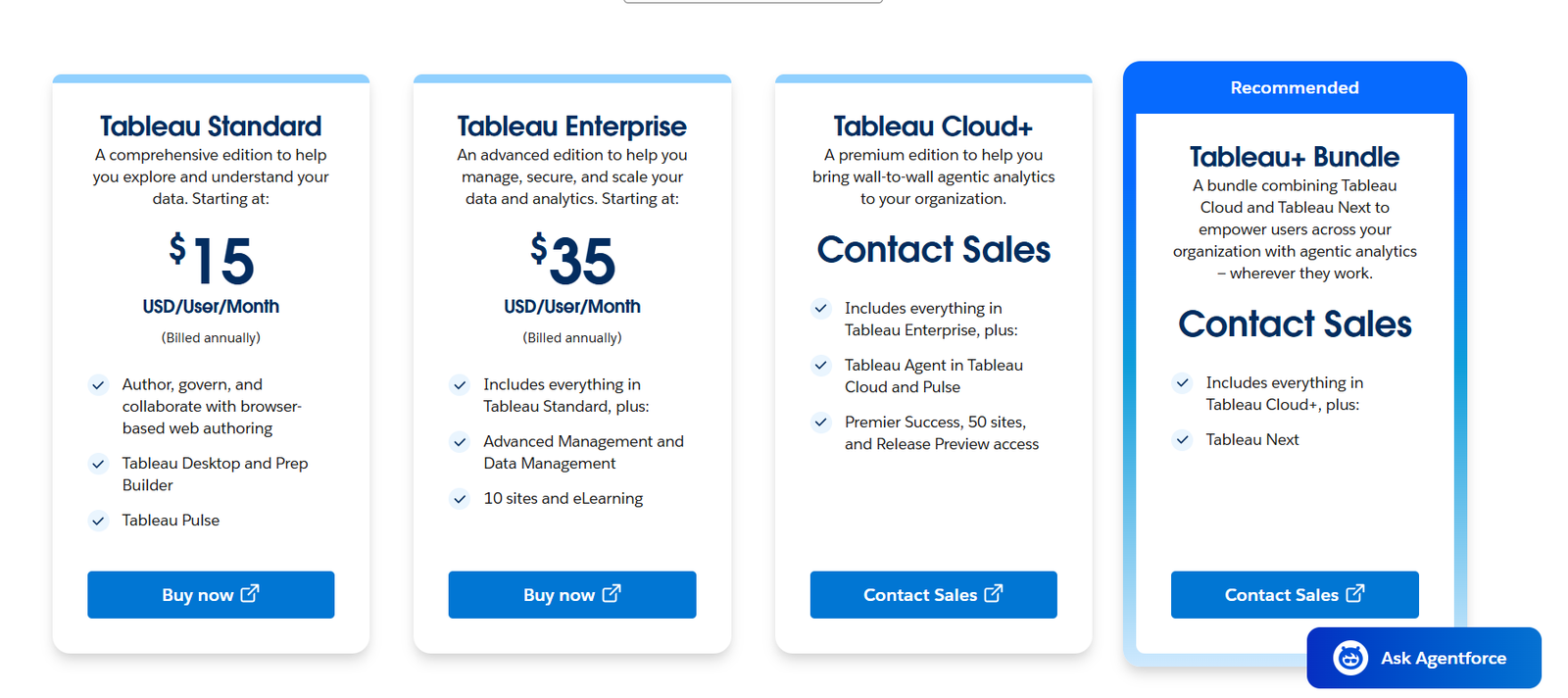
Tableau AI Review Summary
| Performance Score | A |
| Content Quality | Delivers enterprise-grade data visualization with Einstein Copilot providing genuine natural language query capability that makes analytics accessible to business users without SQL or data science expertise |
| Interface | Professional analytics environment with drag-and-drop dashboard building, Einstein Copilot sidebar, and Pulse automated narrative that suits both technical data teams and business stakeholder self-service |
| AI Technology | Salesforce Einstein Copilot integration with natural language processing for query generation, predictive modeling for time-series forecasting, and Pulse for automated metric narrative |
| Purpose | Enterprise data visualization and AI analytics for organizations needing interactive dashboards, natural language querying, and predictive modeling with Salesforce ecosystem integration |
| Compatibility | Web, Desktop |
| Pricing Summary | Free Tableau Public tier, Viewer at $15 per user per month for dashboard access only, Explorer at $42 per user per month, Creator/Tableau+ at $75 per user per month for full AI and authoring features |
Tableau AI Pros & Cons
✅ Pros
- Einstein Copilot democratizes data analysis by allowing non-technical users to ask business questions in plain English
- Industry-leading visualization quality with more chart types and customization options than most competing analytics tools
- Salesforce integration is the most seamless data pipeline available for organizations already on the Salesforce platform
- Tableau Public free tier allows full feature exploration on public data before committing to enterprise pricing
- Large community with extensive learning resources, certified training programs, and third-party extensions
❌ Cons
- Tableau+ pricing at $75 per user per month for the full AI-enabled tier is expensive for small teams and individual analysts
- Implementation requires significant configuration and data preparation before producing valuable analytics for most organizations
- Learning curve for creating polished dashboards is steeper than self-service tools like Power BI despite AI assistance
- Enterprise licensing and Salesforce platform dependency creates lock-in that complicates migration to alternative tools
- Einstein Copilot accuracy on complex multi-dimensional business questions requires validation before presenting to stakeholders
FAQs
What is Tableau AI used for?
▼Is Tableau AI free to use?
▼What platforms does Tableau AI support?
▼Who is Tableau AI best for?
▼Does Tableau AI offer a free trial?
▼More AI Tools You Might Like

Dune is an open data platform that converts natural language prompts into…
View Tool ↗
CertiK provides smart contract security audits, automated formal verification, and real time…
View Tool ↗
Ocean Protocol provides a decentralized data exchange platform for publishing, tokenizing, and…
View Tool ↗
Bittensor is an open source decentralized protocol that incentivizes collaborative machine learning…
View Tool ↗
Token Metrics provides AI crypto analytics, quantitative market ratings, price predictions, and…
View Tool ↗
Cloud analytics platform for exploring live warehouse data, building dashboards, AI apps,…
View Tool ↗
Enterprise data platform with AI agents, Magic ETL, and credit based pricing…
View Tool ↗
BI and AI analytics platform with Ask Zia for conversational queries and…
View Tool ↗