

Hex
✓ VerifiedAI analytics workspace combining SQL and Python notebooks with a conversational Hex Agent for business users.
Best For: Data teams who want AI help without giving up SQL and Python control
The Verdict: Hex
Hex earns its reputation among technical teams that refuse to trade SQL and Python control for a chat box. In my practical testing of how Hex Agent is scoped, grounding answers in actual business definitions instead of letting the AI improvise is what separates it from a basic connected chatbot. Honestly, most teams building AI analytics skip that grounding work entirely, and it shows up later as wrong numbers nobody questioned in time.
The tradeoff is accessibility for non-technical teams. Business users get a real self-serve layer through Slack and conversational queries, but the core product still assumes someone on your team lives in notebooks daily. Per editor pricing on Professional and Team plans also adds up quickly once more than a handful of people need seats, so smaller budgets will feel that scaling cost sooner than they'd like.
What is Hex?
Hex is an AI analytics workspace that lets data teams write real SQL and Python while giving everyone else a conversational way to ask questions. It runs on what the company calls Agentic Notebooks, which is just a fancy way of saying your code and your AI assistant share the same canvas. Hex Agent sits on top of that, grounded in your actual metrics, so a business user typing a question in Slack gets an answer tied to real definitions instead of a generic guess.
The platform tries to solve a problem most tools ignore. Data teams want control, business users want speed, and usually you need two separate tools to satisfy both. Hex Agent, Slack access, and the CLI are the company's answer to that, letting non-technical people ask away while analysts keep their notebooks and version history intact.
This is really built for data teams first, with business user access as the extension rather than the core product. Companies like Notion, Figma, and Ramp use it specifically because their analysts needed a serious coding environment that didn't throw away AI convenience in the process.
Who is Hex Best For?
Data teams who want AI help without giving up SQL and Python control
Hex Key Features
Hex Pricing & Plans
Hex Review Summary
| Performance Score | A |
| Content Quality | Hex Agent answers stay tied to real business definitions instead of drifting into generic guesses. |
| Interface | Notebooks feel natural for technical users, though business users will lean on the AI chat layer more. |
| AI Technology | Combines Hex Agent for conversation with Agentic Notebooks for actual code execution. |
| Purpose | A shared workspace where data teams build and business users ask questions without touching SQL. |
| Compatibility | Web, API |
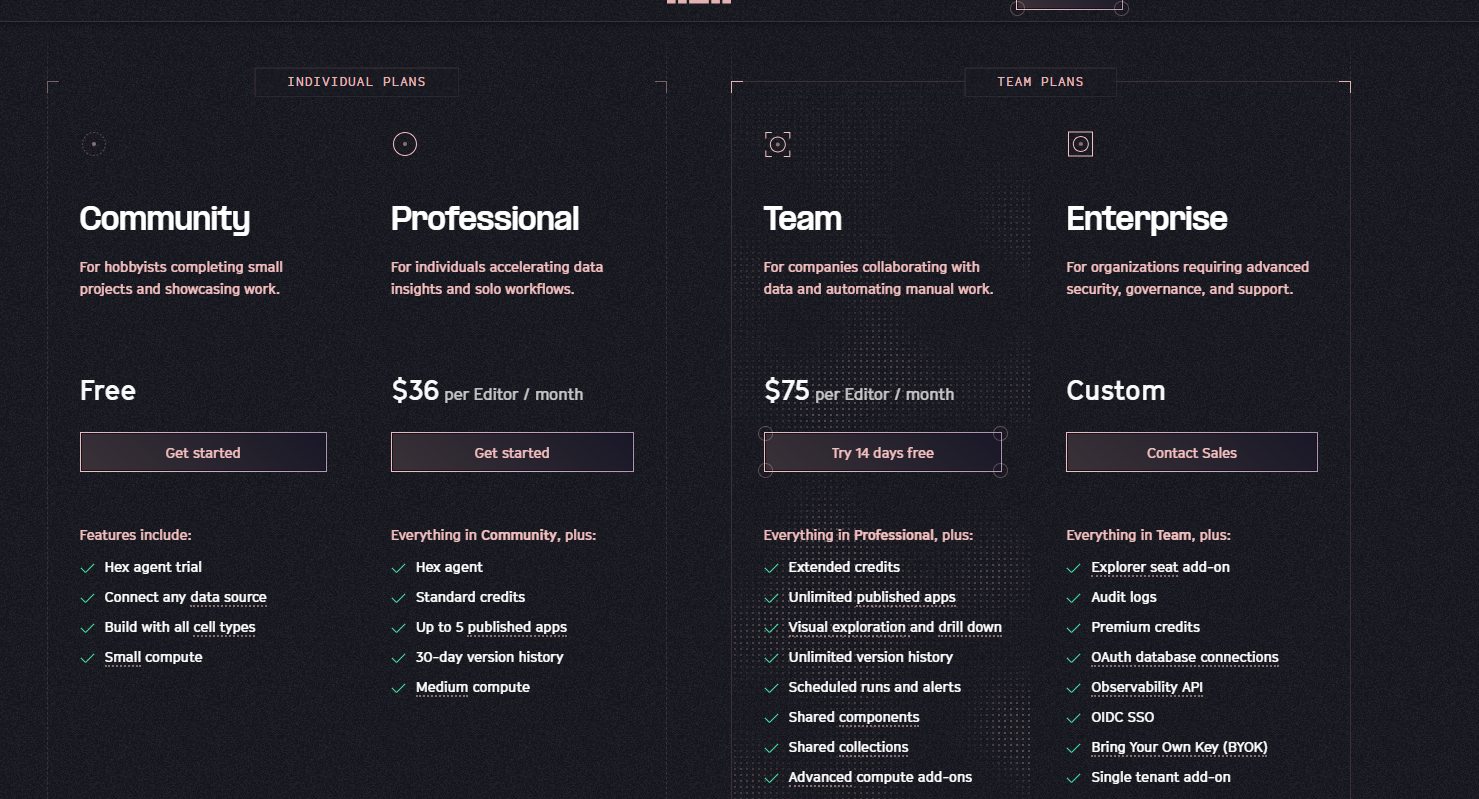
| Pricing Summary | Free Community tier available, with Professional starting at 36 dollars and Team at 75 dollars per editor monthly. |
Hex Pros & Cons
✅ Pros
- You get full SQL and Python control plus AI help, not one or the other
- Hex Agent sticks to your actual business definitions instead of guessing
- Slack and CLI access means less context switching for non technical requests
- Community tier is genuinely usable, not just a crippled trial
- Scheduled Agent Tasks cut down on repetitive manual analysis work
❌ Cons
- Professional and Team plans charge per editor, which adds up fast for bigger teams
- Less approachable for business users who want zero code exposure
- Standard credits on lower tiers can run out faster than expected with heavy AI use
- Enterprise features like SSO and audit logs are locked behind custom pricing
FAQs
What is Hex used for?
▼Is Hex free to use?
▼What platforms does Hex support?
▼Who is Hex best for?
▼Does Hex offer a free trial?
▼What is the difference between Hex Professional and Team plans?
▼More AI Tools You Might Like

Cloud analytics platform for exploring live warehouse data, building dashboards, AI apps,…
View Tool ↗
Enterprise data platform with AI agents, Magic ETL, and credit based pricing…
View Tool ↗
BI and AI analytics platform with Ask Zia for conversational queries and…
View Tool ↗
Google Cloud BI platform with Gemini powered conversational analytics and a LookML…
View Tool ↗
Governed AI analytics platform with Qlik Answers and predictive modeling for enterprise…
View Tool ↗
AI analytics platform with Spotter agents for natural language search, dashboards, and…
View Tool ↗
Cloud financial management platform that automates multi entity accounting, dimensional reporting, and…
View Tool ↗
Autonomous AI accounts payable platform that automates invoice processing, multi-way PO matching,…
View Tool ↗