

Insomnia
✓ VerifiedAPI client for testing REST, GraphQL, gRPC, SOAP, WebSocket, SSE and MCP workflows.
Best For: Developers testing, designing and debugging APIs
The Verdict: Insomnia
Insomnia is a strong API client for developers who need multi-protocol testing and a clean request workflow. The free plan is useful, and the paid plans make sense when a team needs Git sync, RBAC, mock limits and enterprise controls.
The weakness is that Insomnia is still a developer tool. Non-technical users may find it too detailed. But for API design, testing and debugging, it is one of the stronger tools in this category.
What is Insomnia?
Insomnia is a desktop API client for testing, debugging and designing APIs. It supports common API formats and protocols, including HTTP, REST, gRPC, GraphQL, WebSocket, SOAP and SSE.
In practical testing, Insomnia feels best when you work with many requests, environments and API specs. You can keep projects local, sync through Git, or use cloud collaboration depending on your team setup. That flexibility matters more than people think when API collections include tokens, private endpoints and production variables.
Insomnia is mainly for developers, QA engineers, backend teams and API platform teams. It is not a no-code automation tool. It works best when you already understand API requests, headers, authentication and response testing.
Who is Insomnia Best For?
Developers testing, designing and debugging APIs
Insomnia Key Features
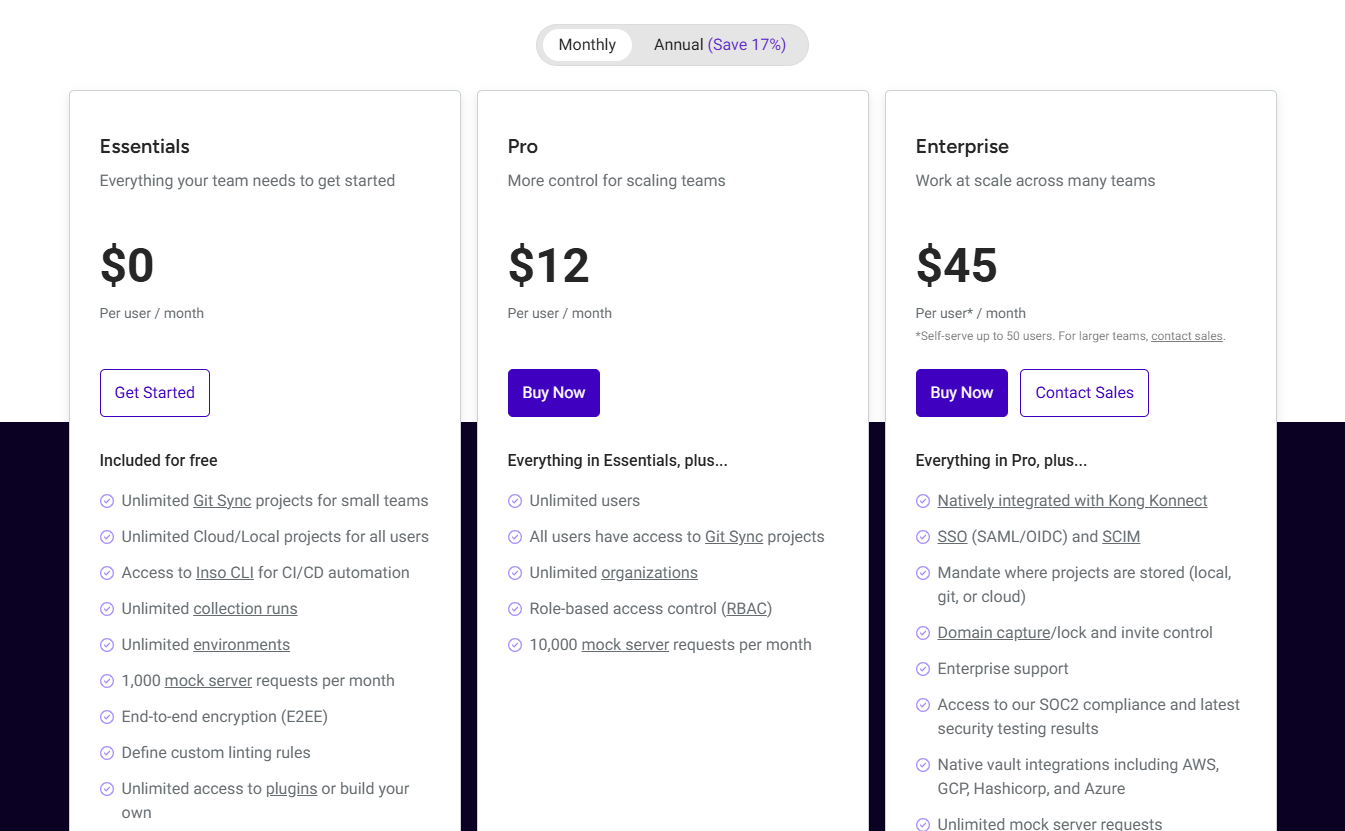
Insomnia Pricing & Plans
Insomnia Review Summary
| Performance Score | A |
| Content Quality | Strong for API debugging, request collections, environments, protocol testing and developer workflows. |
| Interface | The desktop interface is practical for developers who need collections, environments, scripts and test runs in one place. |
| AI Technology | Insomnia includes AI-native API testing features and MCP client support for newer agent related workflows. |
| Purpose | It helps developers design, test and debug APIs before production. |
| Compatibility | Desktop |
| Pricing Summary | Insomnia has a free Essentials plan, Pro at $12 per user per month and Enterprise at $45 per user per month. |
Insomnia Pros & Cons
✅ Pros
- Free Essentials plan is useful for individuals and small teams
- Supports many API protocols in one desktop app
- Good local storage and Git based workflow options
- Strong fit for API debugging and testing
- Pro plan adds better team controls
- Enterprise plan supports SSO, SCIM and storage control
❌ Cons
- Enterprise features can be expensive for small teams
- Some collaboration features require paid plans
- The interface may feel technical for non-developers
- Mostly useful for API teams, not general business users
FAQs
What is Insomnia used for?
▼Is Insomnia free to use?
▼What platforms does Insomnia support?
▼Who is Insomnia best for?
▼Does Insomnia offer a free trial?
▼More AI Tools You Might Like

Dune is an open data platform that converts natural language prompts into…
View Tool ↗
CertiK provides smart contract security audits, automated formal verification, and real time…
View Tool ↗
Ocean Protocol provides a decentralized data exchange platform for publishing, tokenizing, and…
View Tool ↗
Bittensor is an open source decentralized protocol that incentivizes collaborative machine learning…
View Tool ↗
Token Metrics provides AI crypto analytics, quantitative market ratings, price predictions, and…
View Tool ↗
Cloud analytics platform for exploring live warehouse data, building dashboards, AI apps,…
View Tool ↗
Enterprise data platform with AI agents, Magic ETL, and credit based pricing…
View Tool ↗
BI and AI analytics platform with Ask Zia for conversational queries and…
View Tool ↗