

Cursor
✓ VerifiedCursor is an AI-native code editor forked from VS Code that provides full codebase context, multi-file editing, and agent mode for autonomous code generation across complex projects.
Best For: Professional developers and teams working on large codebases who need full project context and autonomous agent mode for complex multi-file coding tasks
The Verdict: Cursor
Cursor Pro at $20 per month is the strongest single-tool recommendation for professional developers who work on complex projects with large codebases. The full codebase context, agent mode, and Background Agents together represent a meaningful productivity improvement over GitHub Copilot's plugin-based approach for developers doing real multi-file software engineering. The 18 percent developer adoption figure reflects genuine value rather than hype.
The credit system change in June 2025 is the honest caveat. What used to be approximately 500 requests per month dropped to roughly 225 effective premium requests at the same $20 price. Many developers migrated to Windsurf as a result and the community remains vocal about the change. For heavy users who regularly exhaust monthly credits, the Pro plan's value proposition requires careful evaluation against usage patterns before committing.
What is Cursor?
Cursor is the most widely used AI-native code editor in 2026, used by 18 percent of professional developers according to Stack Overflow's 2025 survey. Built as a fork of VS Code, it provides the familiar interface of the world's most popular code editor with a deeply integrated AI layer that understands your entire codebase rather than just the current file.
The full codebase context is the core differentiator. When you ask Cursor to add a feature or fix a bug, it reads your entire project including file structure, existing functions, variable names, and dependencies, producing suggestions that actually fit your code rather than generic patterns. Agent mode extends this to autonomous task completion where Cursor creates files, runs terminal commands, reads error output, and iterates until the task is done or it needs your input.
Background Agents, launched in 2026, allow you to run multiple parallel coding sessions simultaneously. You can send a bug fix to a background agent and continue working on a new feature in the main editor without waiting for either to complete. BugBot automatically reviews pull requests when you open them and flags potential issues with inline comments before the code reaches code review.
Who is Cursor Best For?
Professional developers and teams working on large codebases who need full project context and autonomous agent mode for complex multi-file coding tasks
Cursor Key Features
Cursor Pricing & Plans
Cursor Review Summary
| Performance Score | A |
| Content Quality | Provides the most accurate full-codebase-aware code suggestions and agent mode of any consumer AI code editor in 2026 with autonomous task completion that reduces manual iteration significantly |
| Interface | VS Code-familiar layout with AI panels that suit developers already comfortable in the VS Code environment |
| AI Technology | Multi-model architecture with proprietary Cursor models alongside Claude Opus 4.8, GPT-5.6, and Gemini 2.5 Pro accessed through a credit-managed subscription system |
| Purpose | Professional AI-native code editing with full codebase context, autonomous agent mode, and parallel background task execution for complex software development |
| Compatibility | Desktop |
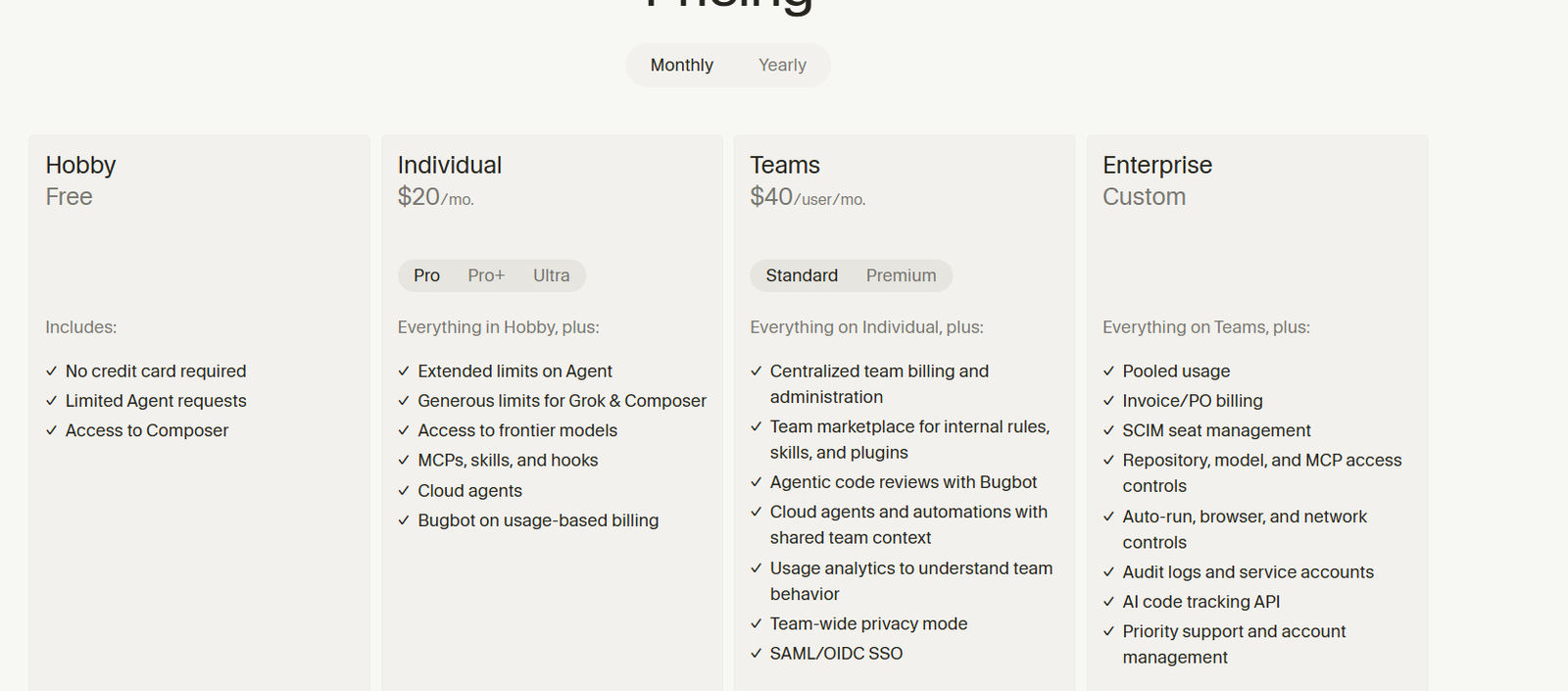
| Pricing Summary | Free Hobby plan with limited requests, Pro at $20 per month for approximately 225 premium requests monthly, Ultra at $200 per month for heavy users, Teams at $40 per user per month |
Cursor Pros & Cons
✅ Pros
- Full codebase context is the feature that makes Cursor meaningfully better than GitHub Copilot for complex multi-file projects
- Agent mode that runs terminal commands and iterates autonomously removes the manual back-and-forth of incremental code generation
- Background Agents running parallel tasks is the most advanced autonomous coding feature available in any consumer IDE in 2026
- Auto model selection optimizes cost and capability without requiring manual model switching mid-task
- 20 percent annual billing discount on Pro reduces the effective monthly rate to $16 per month
❌ Cons
- Credit system change in June 2025 reduced effective monthly requests from 500 to approximately 225 per month at the $20 price point causing significant user frustration
- VS Code fork means it cannot be used as a plugin inside an existing VS Code installation it replaces the editor entirely
- Ultra plan at $200 per month is expensive for developers who need higher limits but cannot justify enterprise pricing
- Teams plan at $40 per user per month is double the individual Pro price which adds up quickly for growing teams
- Agent mode can consume credits rapidly on long autonomous sessions depleting monthly allowances in a few days of heavy use
FAQs
What is Cursor used for?
▼Is Cursor free to use?
▼What platforms does Cursor support?
▼Who is Cursor best for?
▼Does Cursor offer a free trial?
▼More AI Tools You Might Like

Dune is an open data platform that converts natural language prompts into…
View Tool ↗
CertiK provides smart contract security audits, automated formal verification, and real time…
View Tool ↗
Ocean Protocol provides a decentralized data exchange platform for publishing, tokenizing, and…
View Tool ↗
Bittensor is an open source decentralized protocol that incentivizes collaborative machine learning…
View Tool ↗
Token Metrics provides AI crypto analytics, quantitative market ratings, price predictions, and…
View Tool ↗
Cloud analytics platform for exploring live warehouse data, building dashboards, AI apps,…
View Tool ↗
Enterprise data platform with AI agents, Magic ETL, and credit based pricing…
View Tool ↗
BI and AI analytics platform with Ask Zia for conversational queries and…
View Tool ↗