

Mintlify
✓ VerifiedAI documentation platform for developer docs, API playgrounds, search, assistants and agent-ready content.
Best For: Developer teams building AI-ready product docs
The Verdict: Mintlify
Mintlify is a strong choice for modern developer documentation, especially when a team wants docs that work for both humans and AI tools. Its strengths are clean docs presentation, API playgrounds, MCP support, Git sync and AI assistant features.
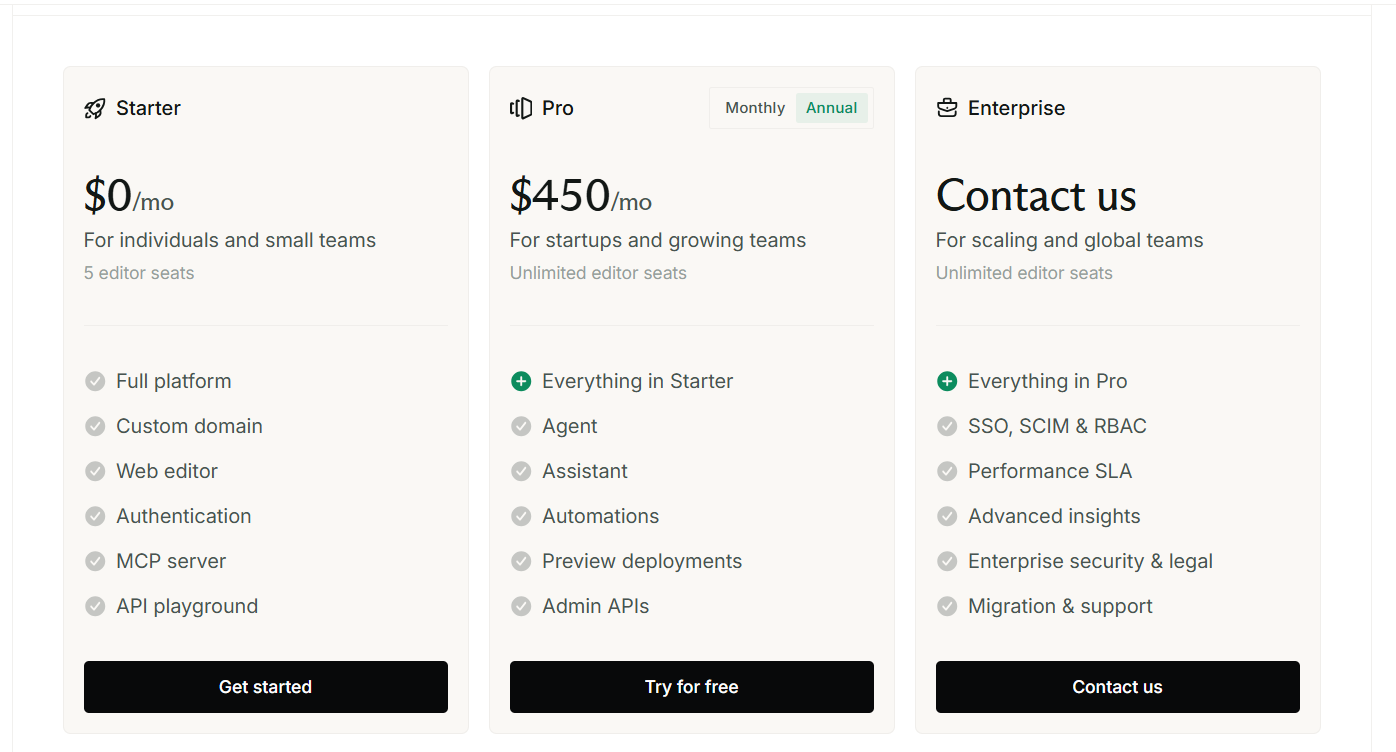
The main weakness is pricing clarity for paid tiers. The free Starter plan is clear, but the Pro dollar amount was not cleanly readable in the extracted official pricing text. For GuideAITools, Mintlify should be positioned as a high-quality AI documentation platform for API-first startups, developer tools and SaaS companies that care about developer experience. It is not the cheapest option for every team, but it fits teams that treat documentation as part of product growth.
What is Mintlify?
Mintlify is an AI documentation platform for building developer docs, API references and agent-ready knowledge bases. It gives teams a web editor, API playground, custom domain, Git sync, search, MCP server and analytics in one documentation workspace.
In practical use, Mintlify works best when the product has APIs, SDKs, technical guides or developer onboarding content. The API playground and MCP support make it more useful than a basic help center because users and AI tools can interact with the docs more directly.
Mintlify is for developer experience teams, founders, SaaS teams and technical writers. It can serve a simple docs site, but its real value appears when docs need search, API references, AI answers and team publishing controls.
Who is Mintlify Best For?
Developer teams building AI-ready product docs
Mintlify Key Features
Mintlify Pricing & Plans
Mintlify Review Summary
| Performance Score | A |
| Content Quality | Strong for developer docs, API docs, searchable references, AI assistant answers and agent-ready documentation. |
| Interface | The web editor and Git workflow make it useful for both developers and documentation teams. |
| AI Technology | Mintlify includes AI assistant, writing agent, MCP server, AI credits and documentation workflows built for AI consumption. |
| Purpose | It helps teams create, publish and improve developer documentation with search, API references and AI support. |
| Compatibility | Web, API |
| Pricing Summary | Mintlify lists a free Starter plan, a Pro plan with AI credits and overages at $0.01 per credit, plus Enterprise custom pricing. |
Mintlify Pros & Cons
✅ Pros
- Free Starter plan is available
- Good fit for developer documentation
- Built-in API playground helps API teams
- AI assistant and agent features support modern docs use cases
- Custom domain is included on Starter
- MCP server support helps AI tools read docs
- Git sync keeps docs closer to developer workflows
❌ Cons
- Pro pricing was not clearly readable in extracted page text
- AI usage depends on credits
- Best value is for software and API teams
- Non-technical teams may need setup help
- Enterprise needs sales contact
- Large docs programs may need credit planning
FAQs
What is Mintlify used for?
▼Is Mintlify free to use?
▼What platforms does Mintlify support?
▼Who is Mintlify best for?
▼Does Mintlify offer a free trial?
▼More AI Tools You Might Like

Dune is an open data platform that converts natural language prompts into…
View Tool ↗
CertiK provides smart contract security audits, automated formal verification, and real time…
View Tool ↗
Ocean Protocol provides a decentralized data exchange platform for publishing, tokenizing, and…
View Tool ↗
Bittensor is an open source decentralized protocol that incentivizes collaborative machine learning…
View Tool ↗
Token Metrics provides AI crypto analytics, quantitative market ratings, price predictions, and…
View Tool ↗
Cloud analytics platform for exploring live warehouse data, building dashboards, AI apps,…
View Tool ↗
Enterprise data platform with AI agents, Magic ETL, and credit based pricing…
View Tool ↗
BI and AI analytics platform with Ask Zia for conversational queries and…
View Tool ↗