

LinearB
✓ VerifiedAI engineering productivity platform for tracking delivery, developer workflows, AI impact and PR automation.
Best For: Engineering leaders measuring delivery and AI impact
The Verdict: LinearB
LinearB is a strong tool for engineering teams that want to measure developer productivity and AI impact with more detail than basic sprint reports. Its strength is action. It does not only show metrics, it also supports workflow automations and AI actions around pull requests.
The weakness is fit. LinearB is not for every small team, and annual billing plus credit usage may need planning. GuideAITools should list LinearB as a strong AI engineering productivity tool for engineering managers, DevEx teams and platform leaders who want clearer visibility into AI assisted coding, delivery speed and team workflow health.
What is LinearB?
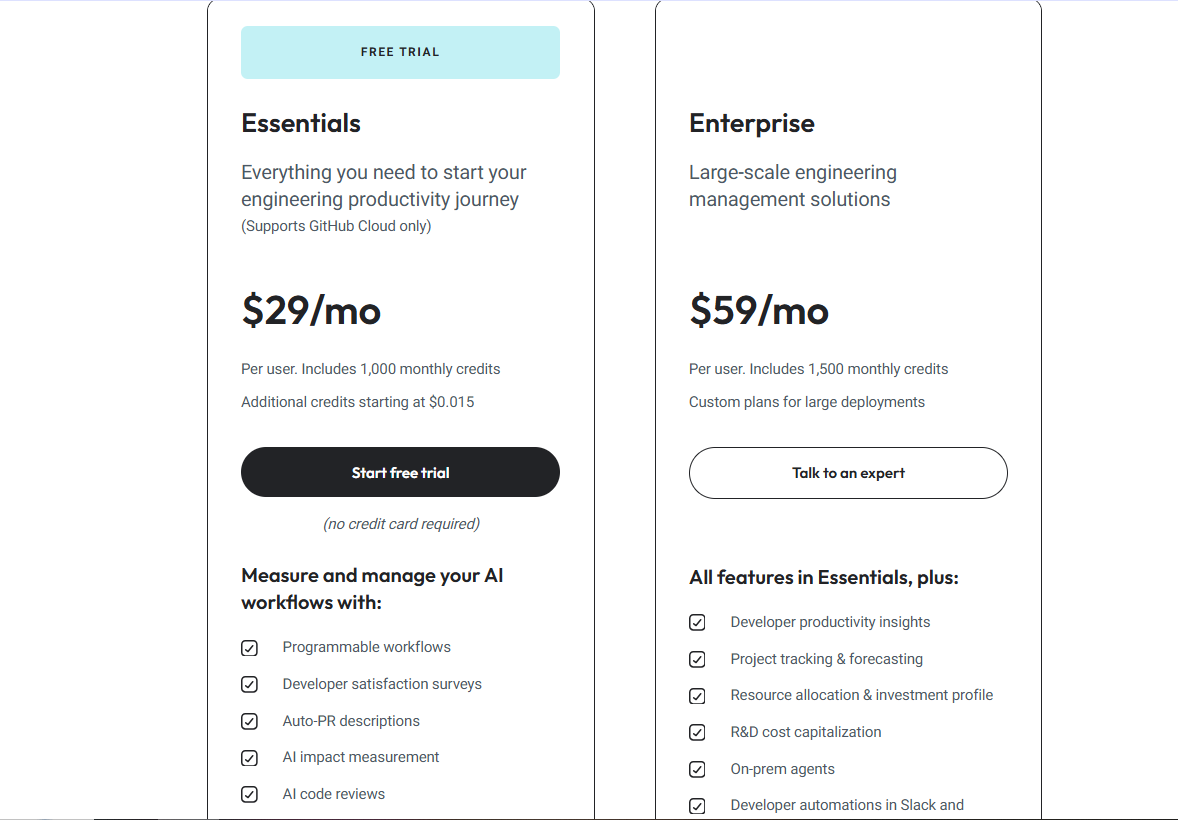
LinearB is an engineering productivity platform that helps teams measure delivery performance, AI impact and developer workflow health. Its pricing page lists AI actions, automation, MCP server capabilities, developer surveys, AI code reviews and AI impact measurement in the trial and Essentials plan.
In practical use, LinearB fits engineering managers who need more than dashboards. It connects code activity, pull requests, delivery metrics, project work and automation so teams can see where work slows down and where AI tools are helping or hurting.
LinearB is best for engineering leaders, DevEx teams, platform teams and software organizations using GitHub, Jira, Slack, Microsoft Teams or related delivery tools. The Essentials trial is currently available for GitHub Cloud users and gives 45 days of access with no credit card required.
Who is LinearB Best For?
Engineering leaders measuring delivery and AI impact
LinearB Key Features
LinearB Pricing & Plans
LinearB Review Summary
| Performance Score | A |
| Content Quality | Strong for AI workflow measurement, pull request automation, developer metrics and engineering delivery insights. |
| Interface | The web dashboard is built for engineering managers who need metrics, team views, automations and delivery reports. |
| AI Technology | LinearB includes AI actions, AI code reviews, MCP server capabilities, AI impact measurement and workflow automation. |
| Purpose | It helps engineering teams understand delivery performance and improve the way developers work. |
| Compatibility | Web, API |
| Pricing Summary | LinearB Essentials costs $29/month per user and Enterprise costs $59/month per user, with annual billing only. |
LinearB Pros & Cons
✅ Pros
- 45-day free trial is available
- No credit card required for trial
- Published pricing is clear
- Good for engineering leaders and DevEx teams
- Tracks AI assisted pull requests and developer productivity
- Automations can act on pull requests
- Enterprise plan adds deeper forecasting and governance
❌ Cons
- No monthly billing is offered
- Essentials supports GitHub Cloud only
- Pricing is per contributor
- Credit usage needs monitoring
- Advanced insights require Enterprise
- Some automations are not supported on every source control system
FAQs
What is LinearB used for?
▼Is LinearB free to use?
▼What platforms does LinearB support?
▼Who is LinearB best for?
▼Does LinearB offer a free trial?
▼More AI Tools You Might Like

Dune is an open data platform that converts natural language prompts into…
View Tool ↗
CertiK provides smart contract security audits, automated formal verification, and real time…
View Tool ↗
Ocean Protocol provides a decentralized data exchange platform for publishing, tokenizing, and…
View Tool ↗
Bittensor is an open source decentralized protocol that incentivizes collaborative machine learning…
View Tool ↗
Token Metrics provides AI crypto analytics, quantitative market ratings, price predictions, and…
View Tool ↗
Cloud analytics platform for exploring live warehouse data, building dashboards, AI apps,…
View Tool ↗
Enterprise data platform with AI agents, Magic ETL, and credit based pricing…
View Tool ↗
BI and AI analytics platform with Ask Zia for conversational queries and…
View Tool ↗