

Swapface
✓ VerifiedDesktop face swap app for Windows and Mac covering images, videos and a live mode that swaps your face on streams and calls.
Best For: Streamers and presenters who need a live face swap, not just files
Swapface Quick Facts
| Free Plan | Yes, 10 image and 10 video face uploads a day |
| Top Feature | Live face swapping for streams and video calls |
| Main Limitation | Credits cannot pay for the live mode, which needs a subscription |
The Verdict: Swapface
Swapface is a specialist, and a clear one. If your face swapping happens live in front of an audience, this is the tool built for you, with a free plan honest enough to learn on. File-only users have cheaper and simpler options elsewhere in this list.
What is Swapface?
Swapface is a desktop app for Windows and Mac that swaps faces in images and videos, and then does the thing almost nobody else in this category does well: it swaps your face live, on a stream or a video call, in real time. In our roundup of the best AI face swap tools it is the live pick, and for presenters and streamers it has no close rival here.
The billing runs on daily allowances rather than a draining balance. The free plan hands out a small set of image and video uploads each day, and the paid tiers raise those numbers while removing the watermark and opening unlimited live work. An open source desktop rival, FaceFusion, offers deeper controls at no cost but no managed live mode, which is the ground Swapface owns.
One rule is printed plainly on its pricing page and worth repeating: credits cannot pay for stream swapping. Occasional file work can ride on a credit block, but the moment live matters, a subscription is the only door.
Who is Swapface Best For?
Streamers and presenters who need a live face swap, not just files
Swapface Key Features
Top Benefits of Swapface
How to Use Swapface
- Download Swapface for Windows or Mac and install it
- Start on the free plan to learn the workflow
- Load a source face and the image or video to change
- Run the swap and export the result
- For live work, connect the app to your stream or call and go live with the swapped face
- Move to a subscription when live mode or higher daily limits matter
Where Swapface Fits: Use Cases
- Streamers playing a character on live broadcasts
- Teachers and presenters appearing as an avatar on calls
- Video creators swapping faces in recorded footage
- Privacy-conscious users keeping media on their own machine
Swapface Pricing & Plans
Swapface Review Summary
| Performance Score | B |
| Content Quality | Convincing real-time swaps tuned for live output, plus solid file work |
| Interface | A desktop app arranged around source face, target and output |
| AI Technology | Real-time face replacement for files, streams and calls |
| Purpose | Live and local face swapping from one desktop app |
| Compatibility | Windows and Mac desktop computers |
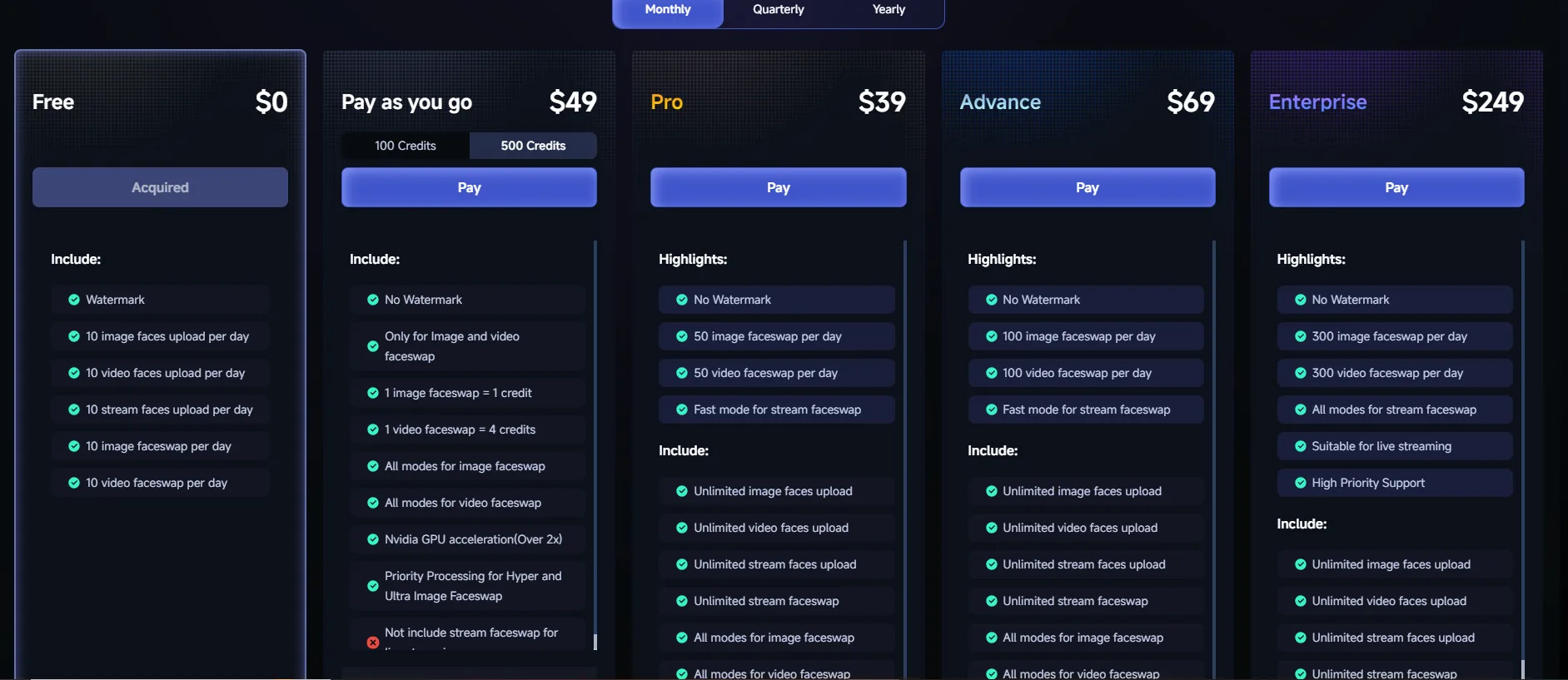
| Pricing Summary | Swapface is free for 10 image and 10 video uploads a day. Pro costs $39 a month or $299 a year, Advance costs $69 a month or $499 a year, and Enterprise costs $249 a month or $999 a year. Pay as you go costs $49 for 100 credits, where an image swap costs 1 credit and a video swap costs 4 credits. |
Swapface Pros & Cons
✅ Pros
- The only tool in this list built around live swapping
- A working free plan with daily allowances
- Desktop processing keeps files off third-party servers
- Pay as you go exists for people who hate subscriptions
- The top tier opens every stream mode with priority support
❌ Cons
- Live swapping cannot be bought with credits
- Free daily allowances run out fast on a project day
- Desktop only, with no browser or phone route
- The best daily limits sit on the priciest tier
Alternatives to Swapface
FaceFusion - Free open source local swapping with deeper controls.
Akool - A cloud platform with live face swap beside avatars and translation.
DeepSwap - Long video swaps in the browser, up to 30 minutes.
Reface - Template swaps on a phone for fast sharing.
FAQs
Is Swapface free?
▼Can Swapface swap a face live?
▼Can I pay for live swapping with credits?
▼How does pay as you go work on Swapface?
▼Which computers does Swapface run on?
▼What does the top plan add?
▼More AI Tools You Might Like

Face swap inside a full AI video platform with avatars, translation and…
View Tool ↗
Face swap, headshots, enhancement and restoration spending one small credit wallet, with…
View Tool ↗
Free online face swap for photos with no watermark, plus video and…
View Tool ↗
The face swap app with over 100 million Play Store installs, built…
View Tool ↗
A photo suite for enhancement, upscaling and restoration with face swap in…
View Tool ↗
Free open source face swap software that runs entirely on your own…
View Tool ↗
Video-first face swap tool that replaces faces in clips up to 30…
View Tool ↗
A full AI media studio where face swap shares one credit pool…
View Tool ↗