

Adobe Firefly
✓ VerifiedAdobe Firefly is a commercially safe AI image and video generator trained on licensed content, with deep Creative Cloud integration for professional creators.
Best For: Designers, marketers, and agencies needing commercially safe AI images with Adobe CC integration
The Verdict: Adobe Firefly
Adobe Firefly is the right choice for any professional who produces AI content for clients and cannot afford copyright ambiguity. The commercial safety guarantee, backed by Adobe's IP indemnification, is a genuine differentiator that no other consumer image generator matches in 2026. Generative Fill inside Photoshop alone justifies the subscription cost for photo editors who currently outsource retouching work.
The honest limitation is output quality on image generation compared to Midjourney. For pure visual aesthetics and photorealism, Firefly produces good images but not the best images. The credit system can also feel restrictive on the Standard plan once video generation enters the workflow. If you already pay for Creative Cloud, Firefly is a straightforward addition. If you do not use Adobe products, the standalone value is harder to justify against cheaper alternatives.
What is Adobe Firefly?
Adobe Firefly is Adobe's generative AI platform for creating images, videos, audio, and design elements from text prompts. It is the only major AI image generator trained exclusively on licensed Adobe Stock images and public domain material, which means every output carries full commercial rights without copyright exposure. This makes it the safest option for agencies, marketing teams, and freelancers producing work for paying clients.
Firefly operates on a credit system and is accessible as a standalone web app at firefly.adobe.com, through iOS and Android apps, and as integrated AI features inside Photoshop, Illustrator, and Adobe Express. Generative Fill, the feature that removes or adds objects inside Photoshop with a text prompt, is widely regarded as the most practical AI editing feature released in 2026. Every output carries Content Credentials metadata that discloses AI generation and tracks edit history.
The platform has expanded well beyond image generation. Firefly now covers text-to-video at 1080p, video translation with lip-sync dubbing, and a Partner Model Hub that lets users access models including Gemini, Veo, Sora, and FLUX from within the Firefly interface. For Creative Cloud All Apps subscribers at $59.99 per month, 4,000 Firefly credits are bundled in at no additional cost.
Who is Adobe Firefly Best For?
Designers, marketers, and agencies needing commercially safe AI images with Adobe CC integration
Adobe Firefly Key Features
Adobe Firefly Pricing & Plans
Adobe Firefly Review Summary
| Performance Score | A |
| Content Quality | Produces clean, commercially safe images with strong prompt accuracy, though it lacks Midjourney's artistic depth |
| Interface | Polished and intuitive web app that feels consistent with Adobe's design language |
| AI Technology | Proprietary diffusion model trained exclusively on licensed Adobe Stock and public domain material |
| Purpose | Commercial-safe image and video generation integrated into professional creative workflows |
| Compatibility | Web, Mobile, API |
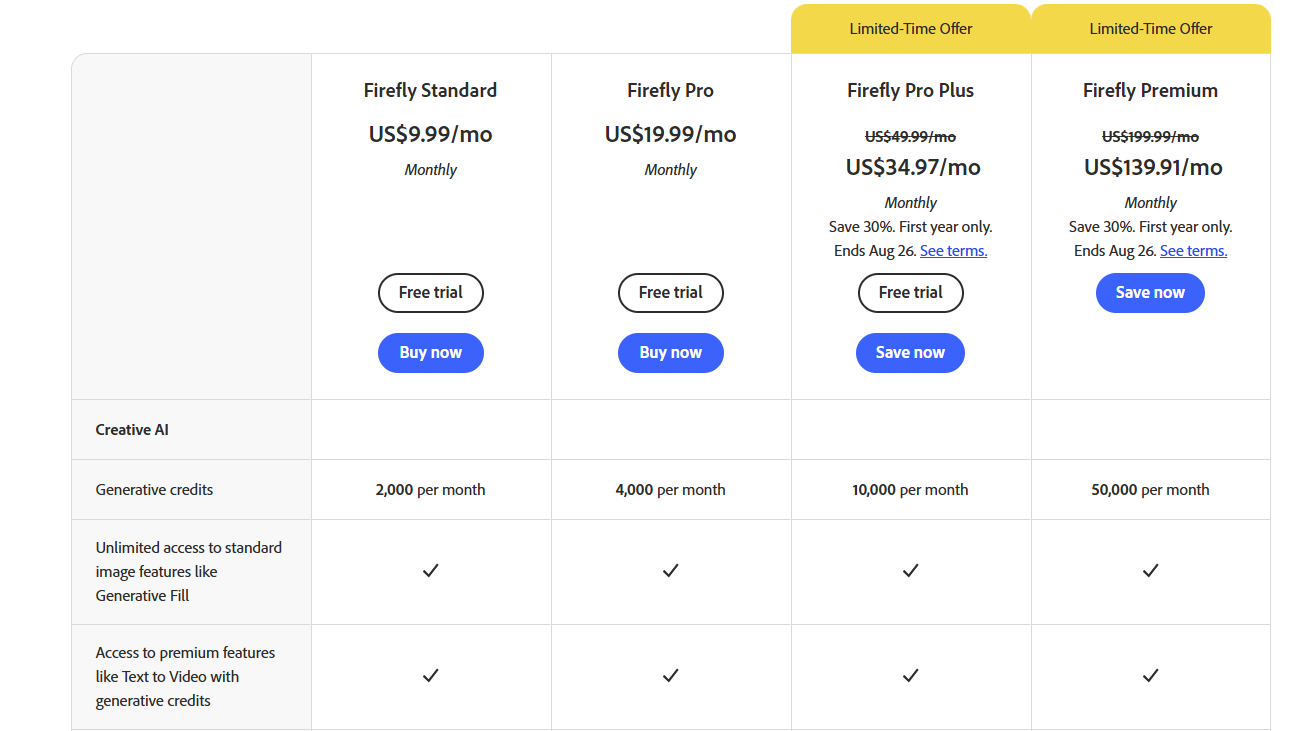
| Pricing Summary | Free with 25 credits monthly, paid plans from $9.99 per month for 2,000 credits with full commercial rights |
Adobe Firefly Pros & Cons
✅ Pros
- Only major AI image generator with full IP indemnification for commercial use
- Generative Fill inside Photoshop is the best object removal tool tested across any image editor
- Content Credentials metadata satisfies disclosure requirements on Meta and LinkedIn
- Creative Cloud All Apps subscribers get 4,000 Firefly credits bundled at no extra cost
- Covers image, video, and audio generation inside one credit system
❌ Cons
- Strict content filters block horror, political, and edgy imagery that other tools handle
- Credit system is complex — premium features like video consume credits fast
- Standalone quality trails Midjourney for pure artistic and photorealistic image output
- Free tier limited to 25 credits per month which runs out quickly in normal use
- Video generation limited to 5-second clips even on high-tier plans
FAQs
What is Adobe Firefly used for?
▼Is Adobe Firefly free to use?
▼What platforms does Adobe Firefly support?
▼Who is Adobe Firefly best for?
▼Does Adobe Firefly offer a free trial?
▼More AI Tools You Might Like

Cloud analytics platform for exploring live warehouse data, building dashboards, AI apps,…
View Tool ↗
Enterprise data platform with AI agents, Magic ETL, and credit based pricing…
View Tool ↗
BI and AI analytics platform with Ask Zia for conversational queries and…
View Tool ↗
AI analytics workspace combining SQL and Python notebooks with a conversational Hex…
View Tool ↗
Google Cloud BI platform with Gemini powered conversational analytics and a LookML…
View Tool ↗
Governed AI analytics platform with Qlik Answers and predictive modeling for enterprise…
View Tool ↗
AI analytics platform with Spotter agents for natural language search, dashboards, and…
View Tool ↗
Cloud financial management platform that automates multi entity accounting, dimensional reporting, and…
View Tool ↗