

Submagic
✓ VerifiedSubmagic is an AI caption and short-form video enhancement tool that adds animated captions, emojis, sound effects, and trending visual styles to existing short video clips for TikTok, Reels, and Shorts.
Best For: Social media creators who already have short clips and want to add professional animated captions and viral-style visual enhancements without learning video editing software
The Verdict: Submagic
Submagic is the best tool in 2026 for adding animated captions and visual polish to short-form video clips that already exist. The caption template library is genuinely the most comprehensive and most aligned with current social media aesthetics. If the gap between your raw vertical clips and what top creators publish is specifically the caption quality and visual engagement layer, Submagic closes that gap faster than any alternative.
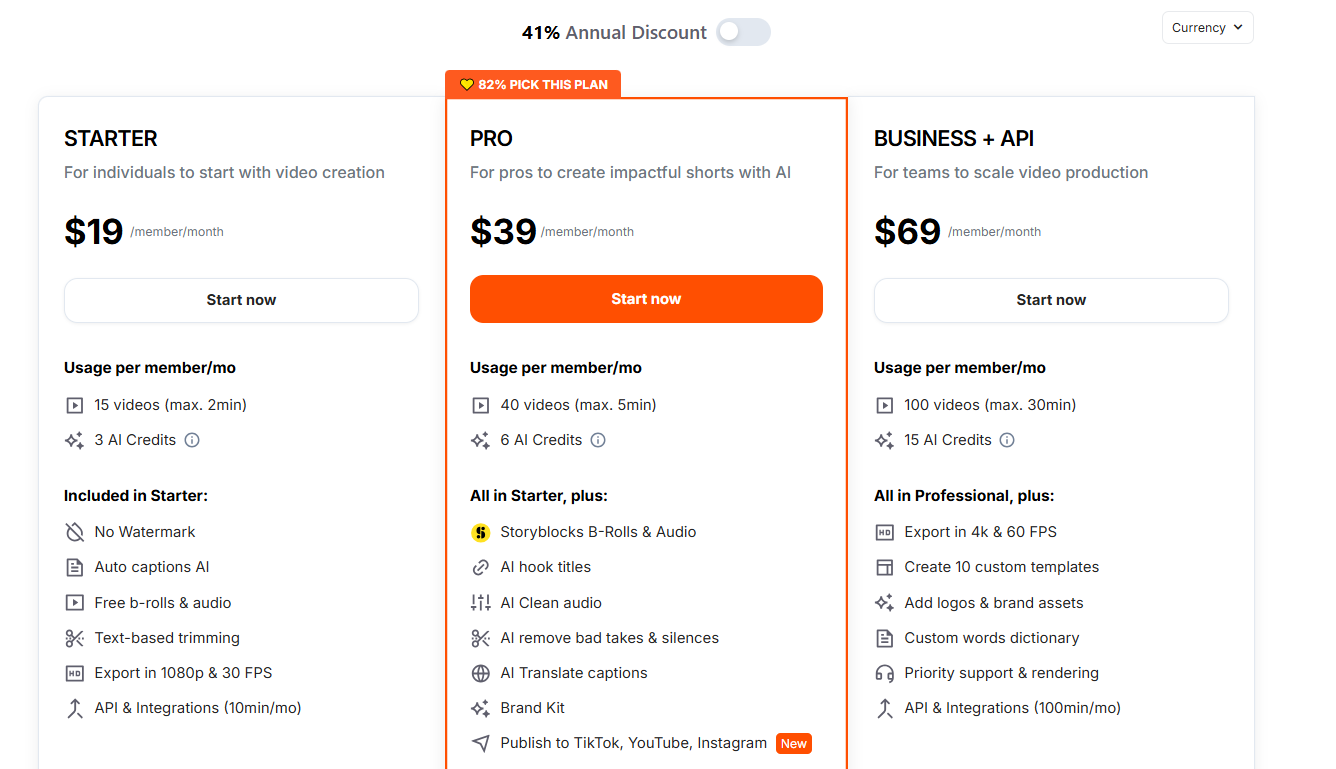
The cost structure requires attention. The base plan at $20 per month covers caption enhancement only. Adding the Magic Clips feature for AI clip extraction from long videos costs an additional $19 per month, bringing the total to $39 per month for the full feature set. At that price, Opus Clip at $29 per month includes clipping and captions in one plan. The honest choice depends on which capability matters more: Submagic's caption quality is higher, Opus Clip's clipping intelligence is more sophisticated. If captions are your bottleneck, Submagic. If finding the right moments is your bottleneck, Opus Clip.
What is Submagic?
Submagic is an AI tool built specifically for the final polish step of short-form video production. The platform assumes you already have your short clip, filmed directly or extracted elsewhere, and its job is making that clip look finished and optimized for social media performance. The caption preset library is what drives the platform's reputation. Submagic hosts the largest collection of animated, viral-style caption templates in any consumer video tool, covering word-by-word highlight animations, color-coded speaker labels, emoji placement, and trending visual styles that match what the top-performing creators on TikTok and Reels actually use.
The core workflow is simple. Upload a clip, select a caption style from the template gallery, review the auto-generated caption timing, and export. One-click restyling applies your chosen template to all clips in a project simultaneously. The magic Clips add-on, available at an additional $19 per month, extends the platform to clip extraction from longer videos for users who want both clipping and caption enhancement in one subscription.
The platform covers 48 languages for caption generation, making it useful for global creator markets beyond English. The mobile app for iOS and Android enables caption application from a phone for creators who film and edit entirely on mobile.
Who is Submagic Best For?
Social media creators who already have short clips and want to add professional animated captions and viral-style visual enhancements without learning video editing software
Submagic Key Features
Submagic Pricing & Plans
Submagic Review Summary
| Performance Score | B |
| Content Quality | Produces the most visually polished animated captions available in any AI short-form video tool with viral-native styles that match what top TikTok creators use |
| Interface | Simple upload-and-enhance workflow with a clear caption template gallery that requires no video editing knowledge |
| AI Technology | Speech-to-text with caption timing synchronization and an animated template rendering engine built for social media aspect ratios |
| Purpose | Animated caption application and short-form video visual enhancement for social media creators who produce vertical content regularly |
| Compatibility | Web, Mobile |
| Pricing Summary | Free trial available, Base at $20 per month, Pro at $40 per month, Magic Clips add-on at $19 per month for AI clipping from long videos |
Submagic Pros & Cons
✅ Pros
- Caption preset library is the most extensive and visually polished collection in any AI caption tool in 2026
- Animated word-by-word captions significantly improve viewer retention on TikTok and Reels compared to static subtitles
- 48 language support covers more markets than most dedicated caption tools in the short-form video category
- One-click restyling across a project saves significant time versus adjusting captions clip by clip
- Mobile app provides full caption application on iOS and Android for creators working from phones
❌ Cons
- Magic Clips AI clipping feature requires an additional $19 per month add-on on top of the base plan cost
- Starting at $20 per month with the add-on adds up to $39 per month before you have AI clipping from long videos included
- Caption accuracy on non-English languages with regional accents is lower than dedicated multilingual tools like Vizard
- No team collaboration workspace on standard plans limiting its usefulness for agency workflows
- Some users report that aggressive caption animations can look overdone compared to platform-native caption styles on certain content types
FAQs
What is Submagic used for?
▼Is Submagic free to use?
▼What platforms does Submagic support?
▼Who is Submagic best for?
▼Does Submagic offer a free trial?
▼More AI Tools You Might Like

Dune is an open data platform that converts natural language prompts into…
View Tool ↗
CertiK provides smart contract security audits, automated formal verification, and real time…
View Tool ↗
Ocean Protocol provides a decentralized data exchange platform for publishing, tokenizing, and…
View Tool ↗
Bittensor is an open source decentralized protocol that incentivizes collaborative machine learning…
View Tool ↗
Token Metrics provides AI crypto analytics, quantitative market ratings, price predictions, and…
View Tool ↗
Cloud analytics platform for exploring live warehouse data, building dashboards, AI apps,…
View Tool ↗
Enterprise data platform with AI agents, Magic ETL, and credit based pricing…
View Tool ↗
BI and AI analytics platform with Ask Zia for conversational queries and…
View Tool ↗