

Vizard AI
✓ VerifiedVizard AI is a transcript-driven video clipping platform that finds the best moments in long recordings, supports 100 plus languages, and includes brand kits and team collaboration for marketing agencies.
Best For: Marketing agencies and content teams processing high volumes of interview and webinar footage who need transcript-based editing with brand consistency across clips
The Verdict: Vizard AI
Vizard AI is the best AI clipping tool for agencies and teams that process many hours of structured interview or webinar footage monthly. The transcript editing workflow is genuinely faster than timeline tools for spoken-word content, the brand kit keeps output consistent across team members, and the per-hour pricing is more economical than per-minute tools at the same spend when processing long recordings.
For individual creators who want the most advanced clip selection and the highest virality prediction accuracy, Opus Clip's multimodal ClipAnything is more sophisticated. And for creators who want the most visually polished captions with animated styles, Submagic's caption library has a stronger collection. Vizard wins on team workflow, pricing efficiency at volume, and language coverage. Choose Vizard when those three factors matter more than peak AI clip intelligence.
What is Vizard AI?
Vizard AI is a video repurposing platform built for teams and agencies that process large volumes of interview, webinar, and podcast footage. The platform's core differentiator is transcript-based editing. Instead of scrubbing a video timeline to find a clip, you read the auto-generated transcript and highlight the text corresponding to the moment you want. Vizard generates the clip from that text selection. For editors who work primarily with spoken-word content and know which quote they want, this workflow is noticeably faster than any timeline-based approach.
The brand kit feature stores custom fonts, colors, caption styles, and logo placement at the team level. Every member generating clips within the workspace applies the same brand settings automatically, which eliminates the inconsistency that manual caption styling creates across large teams. This is the feature that most clearly targets the agency market over individual creators.
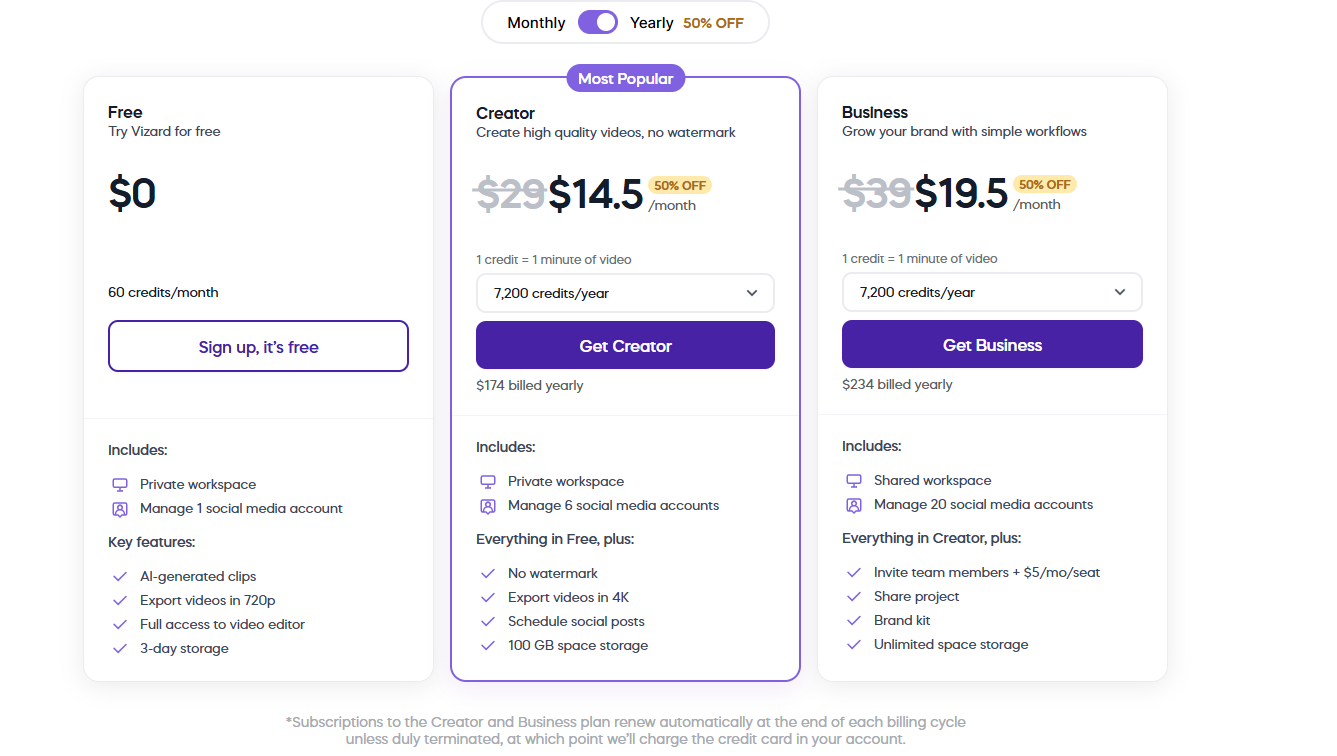
Pricing is based on upload hours rather than source video minutes, making cost more predictable for long recordings. A 90-minute podcast session uses 1.5 hours of upload quota rather than 90 individual credits. The Creator plan at approximately $14.50 per month annually provides 600 minutes monthly of upload capacity. The Business plan at approximately $19.50 per month adds the brand kit, custom fonts, and 20 social account connections.
Who is Vizard AI Best For?
Marketing agencies and content teams processing high volumes of interview and webinar footage who need transcript-based editing with brand consistency across clips
Vizard AI Key Features
Vizard AI Pricing & Plans
Vizard AI Review Summary
| Performance Score | B |
| Content Quality | Produces accurate transcripts and well-timed captions with good clip identification on interview and webinar format that suits its primary target audience |
| Interface | Transcript-first layout that suits editors who think in words rather than timelines, with a clean clip gallery and brand kit management |
| AI Technology | Speech-to-text transcription with AI clip scoring layered on top and brand-aware caption rendering for consistent team output |
| Purpose | High-volume video clipping with transcript editing and brand kit management for marketing agencies and content teams handling multiple clients or projects |
| Compatibility | Web, Mobile, API |
| Pricing Summary | Free plan with limited exports, Creator at approximately $14.50 per month annually for 600 minutes monthly, Business at approximately $19.50 per month annually with brand kits and team workspaces |
Vizard AI Pros & Cons
✅ Pros
- Transcript editing workflow is faster than timeline-based tools for interview and webinar content where you know the key quote you want
- Per-upload-hour pricing is more cost-efficient than per-minute pricing at the same monthly budget for long recordings
- Brand kit enforcement across team members maintains caption consistency that manual approaches never achieve reliably
- 100 plus language support makes it the strongest option for multilingual content teams among AI clipping tools
- API access without enterprise pricing makes it more developer-accessible than Opus Clip
❌ Cons
- Caption customization is less advanced than Submagic for creators focused on viral animated caption styles
- No AI B-roll or stock footage insertion compared to Opus Clip which adds supplemental visual context automatically
- Does not produce as accurate multi-speaker clip identification as Opus Clip on complex panel or roundtable content
- Mobile app functionality is more limited than the full web experience for on-the-go editing
- Free plan restricts exporting and limits usage to a few clips before requiring an upgrade
FAQs
What is Vizard AI used for?
▼Is Vizard AI free to use?
▼What platforms does Vizard AI support?
▼Who is Vizard AI best for?
▼Does Vizard AI offer a free trial?
▼More AI Tools You Might Like

Dune is an open data platform that converts natural language prompts into…
View Tool ↗
CertiK provides smart contract security audits, automated formal verification, and real time…
View Tool ↗
Ocean Protocol provides a decentralized data exchange platform for publishing, tokenizing, and…
View Tool ↗
Bittensor is an open source decentralized protocol that incentivizes collaborative machine learning…
View Tool ↗
Token Metrics provides AI crypto analytics, quantitative market ratings, price predictions, and…
View Tool ↗
Cloud analytics platform for exploring live warehouse data, building dashboards, AI apps,…
View Tool ↗
Enterprise data platform with AI agents, Magic ETL, and credit based pricing…
View Tool ↗
BI and AI analytics platform with Ask Zia for conversational queries and…
View Tool ↗