

InVideo AI
✓ VerifiedInVideo AI is a prompt-to-video platform that generates complete edited videos including script, footage, voiceover, captions, and music from a single text description, with Sora 2 and Veo 3.1 bundled from $25 per month.
Best For: Non-technical content creators, social media managers, and marketers who need complete polished videos from a text prompt without any video editing experience or skill
The Verdict: InVideo AI
InVideo AI is the best prompt-to-video tool for non-technical creators who need consistent video output without learning editing software. The Sora 2 and Veo 3.1 bundling is the most compelling value proposition in the AI video category for creators who want access to both frontier models at a fraction of their standalone cost. For YouTube producers, social media teams, and marketing departments running regular video output, InVideo solves the production bottleneck without requiring a video editor.
The honest limitation is control. InVideo optimizes for speed and accessibility, not precision. AI scripts are formulaic, editing commands need retrying, and the separate credit pools for different features create a confusing limit structure that catches users off guard in the first month. Treat InVideo as a rapid drafting engine that you refine rather than a finished-product machine, and the value is clear. If you need frame-precise control, character consistency across scenes, or talking-head presenter video, Runway ML, Kling AI, or HeyGen are better fits.
What is InVideo AI?
InVideo AI is a video creation platform that takes a text description and produces a complete, edit-ready video with script, footage, voiceover, music, captions, and transitions in a single automated pipeline. The v4 Agent One can generate up to 30 minutes of continuous video from a single prompt, handling every production decision automatically. You refine the result through text commands rather than working on a traditional timeline, making it accessible to people with no video editing background.
The headline feature in 2026 is the integration of both OpenAI's Sora 2 and Google's Veo 3.1 generative video models inside the InVideo pipeline. Accessing either model standalone costs $200 per month through ChatGPT Pro for Sora or several hundred dollars per month through Google AI Ultra for Veo at production volume. InVideo bundles both starting at $25 per month, though meaningful Sora 2 and Veo 3.1 generation requires the Generative tier at $100 per month for the 800 credit monthly allocation.
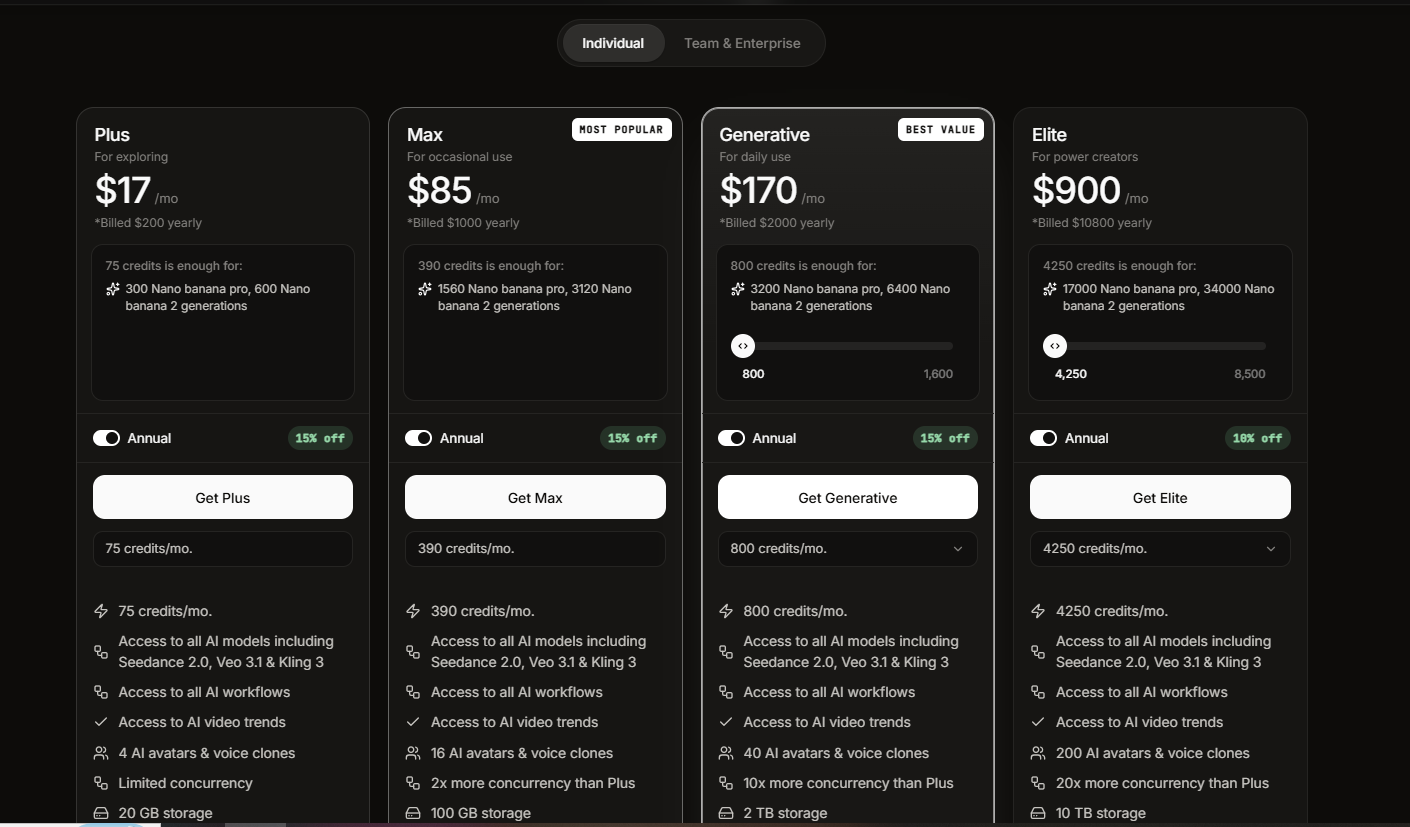
Free plan includes 10 minutes weekly with watermarked 720p exports. Plus at $25 per month covers 50 minutes monthly with watermark-free 1080p. Max at $50 per month expands to 200 minutes. The Generative tier at $100 per month adds Sora 2 and Veo 3.1 generation capacity alongside the standard pipeline.
Who is InVideo AI Best For?
Non-technical content creators, social media managers, and marketers who need complete polished videos from a text prompt without any video editing experience or skill
InVideo AI Key Features
InVideo AI Pricing & Plans
InVideo AI Review Summary
| Performance Score | B |
| Content Quality | Produces complete, distributable videos from prompts with the Sora 2 and Veo 3.1 integrations delivering cinematic-quality AI footage when available on higher tiers |
| Interface | Prompt-driven interface that removes the traditional video editing timeline entirely, replacing it with text commands for a non-editor audience |
| AI Technology | End-to-end AI pipeline combining script generation, generative video models including Sora 2 and Veo 3.1, voice cloning, and automatic caption and music placement |
| Purpose | Complete prompt-to-published-video pipeline for non-technical content creators who need polished video output without any editing background |
| Compatibility | Web, Mobile |
| Pricing Summary | Free with 10 minutes weekly generation and watermarks, Plus at $25 per month for 50 minutes, Max at $50 per month for 200 minutes, Generative at $100 per month for Sora 2 and Veo 3.1 access |
InVideo AI Pros & Cons
✅ Pros
- Only platform bundling both Sora 2 and Veo 3.1 inside one subscription, which would cost $450 plus per month through their standalone products
- Complete end-to-end pipeline from prompt to published video removes the need for separate script writing, editing, voiceover, and subtitle tools
- Voice cloning on Plus plan maintains consistent narration identity across all videos without re-recording
- 50 plus language support handles multilingual content within the same subscription
- Free plan with 10 minutes weekly generation allows genuine platform evaluation before paying
❌ Cons
- AI-generated scripts tend toward generic, safe language that requires significant editing before publishing for brand-voice-sensitive content
- Credit pools for AI minutes, iStock footage, voice clones, and background removals are separate and do not share between each other creating multiple limits to manage
- Editing commands need retrying one in four times on average which adds friction to the refinement process
- Watermarked free exports at 720p resolution make free tier outputs unusable for published professional content
- Sora 2 and Veo 3.1 access with meaningful monthly generation requires the Generative tier at $100 per month for practical volume
FAQs
What is InVideo AI used for?
▼Is InVideo AI free to use?
▼What platforms does InVideo AI support?
▼Who is InVideo AI best for?
▼Does InVideo AI offer a free trial?
▼More AI Tools You Might Like

Dune is an open data platform that converts natural language prompts into…
View Tool ↗
CertiK provides smart contract security audits, automated formal verification, and real time…
View Tool ↗
Ocean Protocol provides a decentralized data exchange platform for publishing, tokenizing, and…
View Tool ↗
Bittensor is an open source decentralized protocol that incentivizes collaborative machine learning…
View Tool ↗
Token Metrics provides AI crypto analytics, quantitative market ratings, price predictions, and…
View Tool ↗
Cloud analytics platform for exploring live warehouse data, building dashboards, AI apps,…
View Tool ↗
Enterprise data platform with AI agents, Magic ETL, and credit based pricing…
View Tool ↗
BI and AI analytics platform with Ask Zia for conversational queries and…
View Tool ↗