

Browse AI
✓ VerifiedNo-code web scraping and monitoring tool that trains robots to extract data, track changes and send results.
Best For: Non-coders scraping and monitoring website data
The Verdict: Browse AI
Browse AI is a strong no-code option for users who want website data without hiring a developer. Its biggest strength is the robot workflow. You teach it once, then reuse the automation for extraction or monitoring.
For GuideAiTools, Browse AI should be recommended to marketers, analysts, ecommerce teams and operators who need reliable website data with less technical effort. The main weakness is credit planning, especially on premium sites or high-frequency monitors. Users should test one robot first before buying more credits.
What is Browse AI?
Browse AI is a no-code web scraping and monitoring platform. Users train robots to open pages, click, log in, extract structured data, capture screenshots and monitor specific website sections for changes.
In practical use, Browse AI is easier than coding a scraper from scratch. You can create robots through Robot Studio or the Chrome extension, then send results to Google Sheets, Airtable, Zapier, API workflows or webhooks. Its API can also run robots and retrieve scraped data programmatically.
Browse AI is best for people who need data but do not want to maintain scraping infrastructure. It fits lead scraping, product monitoring, market research, real estate tracking, ecommerce price checks and competitor monitoring.
Who is Browse AI Best For?
Non-coders scraping and monitoring website data
Browse AI Key Features
Browse AI Pricing & Plans
Browse AI Review Summary
| Performance Score | A |
| Content Quality | Strong for no-code scraping, website monitoring, robot automation, price tracking and structured data extraction. |
| Interface | The robot-based interface is easier than writing scraping code and works well for repeatable extraction tasks. |
| AI Technology | Browse AI uses trained robots, AI scraping workflows, monitoring logic and API access to automate web data collection. |
| Purpose | It helps users extract and monitor website data without building custom scrapers. |
| Compatibility | Web, API, Extension |
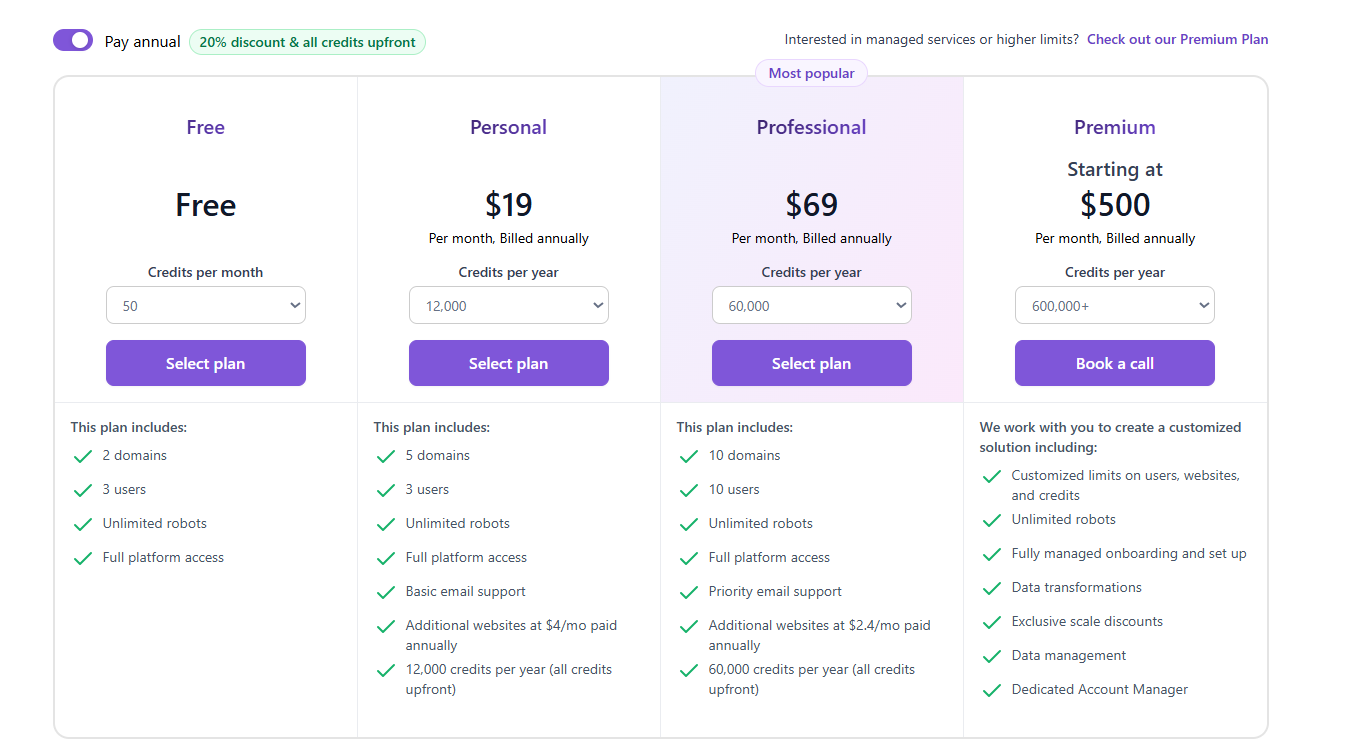
| Pricing Summary | Browse AI has a Free plan, Personal at $19/month, Professional at $69/month and Premium starting at $500/month billed annually. |
Browse AI Pros & Cons
✅ Pros
- Free plan is available
- No coding required for most scraping tasks
- Good for monitoring prices, listings and competitor pages
- Chrome extension helps train robots visually
- API access is available on all plans
- Supports many integrations and workflows
❌ Cons
- Free plan has only 50 credits per month
- Premium sites cost more credits per run
- Unused credits reset after the billing cycle
- Some complex websites still need testing
- Large managed projects start at a higher price
FAQs
What is Browse AI used for?
▼Is Browse AI free to use?
▼What platforms does Browse AI support?
▼Who is Browse AI best for?
▼Does Browse AI offer a free trial?
▼More AI Tools You Might Like

Dune is an open data platform that converts natural language prompts into…
View Tool ↗
CertiK provides smart contract security audits, automated formal verification, and real time…
View Tool ↗
Ocean Protocol provides a decentralized data exchange platform for publishing, tokenizing, and…
View Tool ↗
Bittensor is an open source decentralized protocol that incentivizes collaborative machine learning…
View Tool ↗
Token Metrics provides AI crypto analytics, quantitative market ratings, price predictions, and…
View Tool ↗
Cloud analytics platform for exploring live warehouse data, building dashboards, AI apps,…
View Tool ↗
Enterprise data platform with AI agents, Magic ETL, and credit based pricing…
View Tool ↗
BI and AI analytics platform with Ask Zia for conversational queries and…
View Tool ↗