

Recraft AI
✓ VerifiedRecraft is an AI design platform specialized in vector graphics, logos, and brand assets, producing true scalable SVG output that most image generators cannot match.
Best For: Graphic designers and brand teams needing AI-generated scalable vector graphics and consistent brand assets
The Verdict: Recraft AI
Recraft earns its reputation as the best AI tool for vector graphics and brand design work in 2026. If you regularly produce logos, icons, brand illustrations, or print assets that need to be resized and edited, no other AI generator produces output that is as immediately useful in a professional workflow. The Figma plugin and custom style system are genuinely practical additions that save significant iteration time.
The reliability issues are real and worth knowing before committing. Users report inconsistent dimension controls, occasional project loading problems, and variable quality on the same prompt across different sessions. The SVG output is also not always perfectly clean and may require manual path cleanup in Illustrator. For high-artistic or photorealistic image generation, FLUX.2 or Midjourney are better choices. For structured design work, Recraft stands alone.
What is Recraft AI?
Recraft is an AI image and vector generation platform built specifically for professional design work. Unlike general AI image generators that produce pixel-based raster outputs, Recraft generates native SVG vector files with fully editable paths, meaning the output can be scaled to any size without quality loss and opened directly in Illustrator or Figma. This makes it the only mainstream AI tool that fits naturally into a professional brand design workflow as of 2026.
The platform runs on Recraft's proprietary V4.1 model and provides a canvas-based workspace with inpainting, background removal, creative upscaling, and style referencing built in. Users can upload reference images to establish a custom visual style that persists across multiple generations, which is particularly useful for brand consistency projects. Recraft Studio also gives access to third-party models including Nano Banana, Seedream, GPT Image, and FLUX for users who want to switch models within the same workspace.
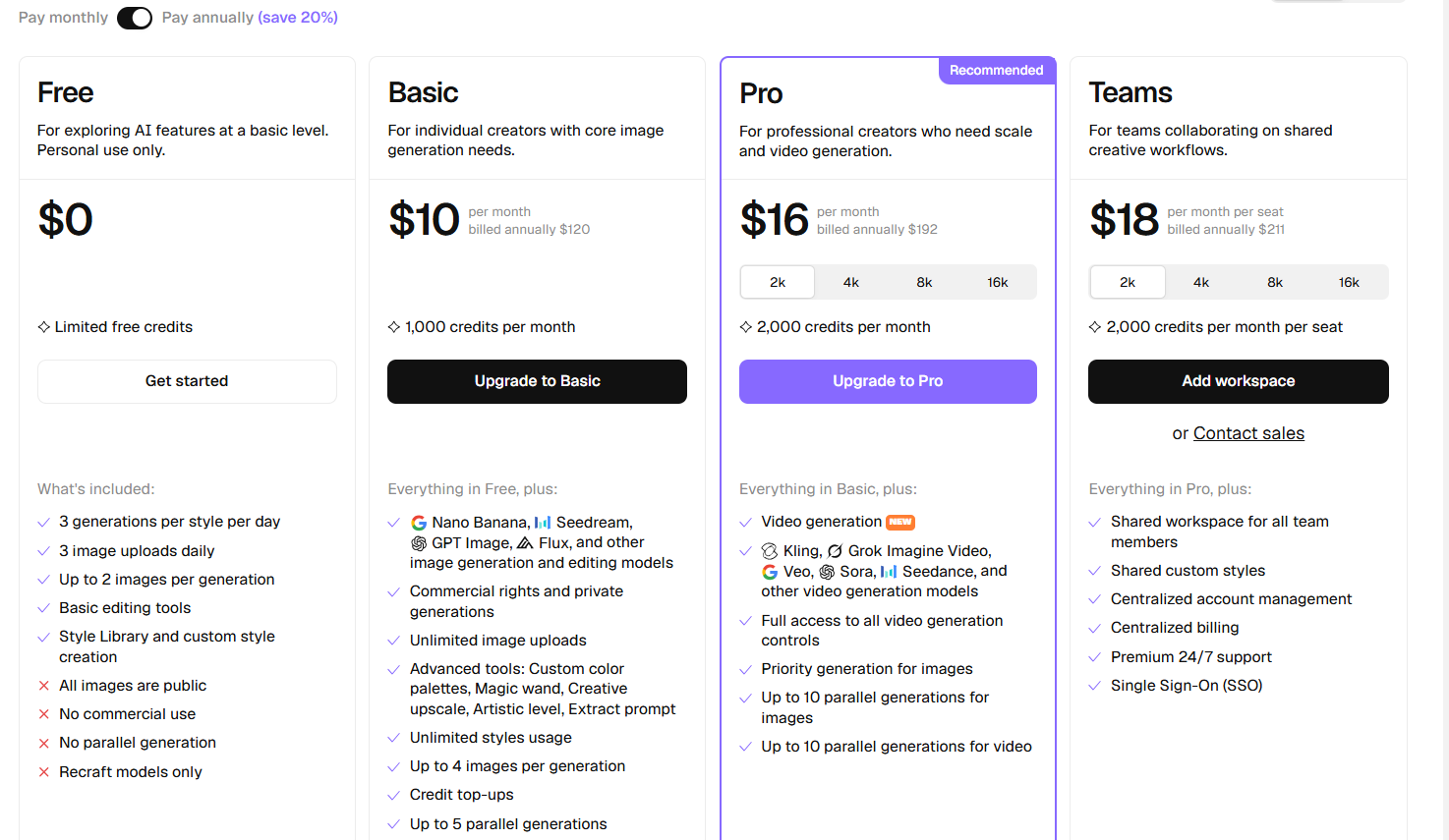
Recraft integrates with professional design tools through Figma and Framer plugins and a Chrome extension, allowing image generation directly inside the tools designers already use. API access is available for development teams building asset generation into their products. The free plan provides 50 daily credits for personal experimentation, while paid plans start at $12 per month for commercial rights, private generation, and 1,000 credits.
Who is Recraft AI Best For?
Graphic designers and brand teams needing AI-generated scalable vector graphics and consistent brand assets
Recraft AI Key Features
Recraft AI Pricing & Plans
Recraft AI Review Summary
| Performance Score | B |
| Content Quality | Produces strong structured design assets and vectors with variable reliability on complex prompts |
| Interface | Modern infinite canvas workspace that feels closer to a design tool than a prompt box |
| AI Technology | Proprietary Recraft V4.1 model optimized for vector and raster design output with multi-model access via Recraft Studio |
| Purpose | Professional brand-consistent vector graphic generation for designers and creative teams |
| Compatibility | Web, API, Extension |
| Pricing Summary | Free with 50 daily credits, paid plans from $12 per month with commercial rights, private generation, and 1,000 credits |
Recraft AI Pros & Cons
✅ Pros
- Only mainstream AI tool that outputs genuine editable SVG files — not rasterized traces
- Brand style system maintains visual consistency across multiple generations in one project
- Free tier with 50 daily credits covers light personal and experimental use
- Figma plugin integrates generation directly into existing design workflows
- API access allows programmatic vector and raster generation for development teams
❌ Cons
- SVG output sometimes requires manual cleanup before it is production-ready
- Image dimension controls are inconsistent — sizes can change unexpectedly after generation
- Reliability issues reported by users including project loading failures and unpredictable output quality
- Free tier images are public — not suitable for client work without a paid plan
- Not suitable for photorealistic photography-style output where Midjourney or FLUX.2 are stronger
FAQs
What is Recraft v3 used for?
▼Is Recraft free to use?
▼What platforms does Recraft support?
▼Who is Recraft best for?
▼Does Recraft offer a free trial?
▼More AI Tools You Might Like

Cloud analytics platform for exploring live warehouse data, building dashboards, AI apps,…
View Tool ↗
Enterprise data platform with AI agents, Magic ETL, and credit based pricing…
View Tool ↗
BI and AI analytics platform with Ask Zia for conversational queries and…
View Tool ↗
AI analytics workspace combining SQL and Python notebooks with a conversational Hex…
View Tool ↗
Google Cloud BI platform with Gemini powered conversational analytics and a LookML…
View Tool ↗
Governed AI analytics platform with Qlik Answers and predictive modeling for enterprise…
View Tool ↗
AI analytics platform with Spotter agents for natural language search, dashboards, and…
View Tool ↗
Cloud financial management platform that automates multi entity accounting, dimensional reporting, and…
View Tool ↗