

Squarespace
✓ VerifiedSquarespace is a visual website builder known for its designer templates, AI layout tools, and built in ecommerce capabilities.
Best For: Creative professionals, boutique brands, and local businesses wanting polished visual websites.
The Verdict: Squarespace
Squarespace is the undisputed industry standard for anyone who values visual elegance and reliable performance in a website builder. The sheer quality of the templates, combined with the flexibility of the Fluid Engine, makes it easy to build a site that looks like it cost thousands of dollars in custom development.
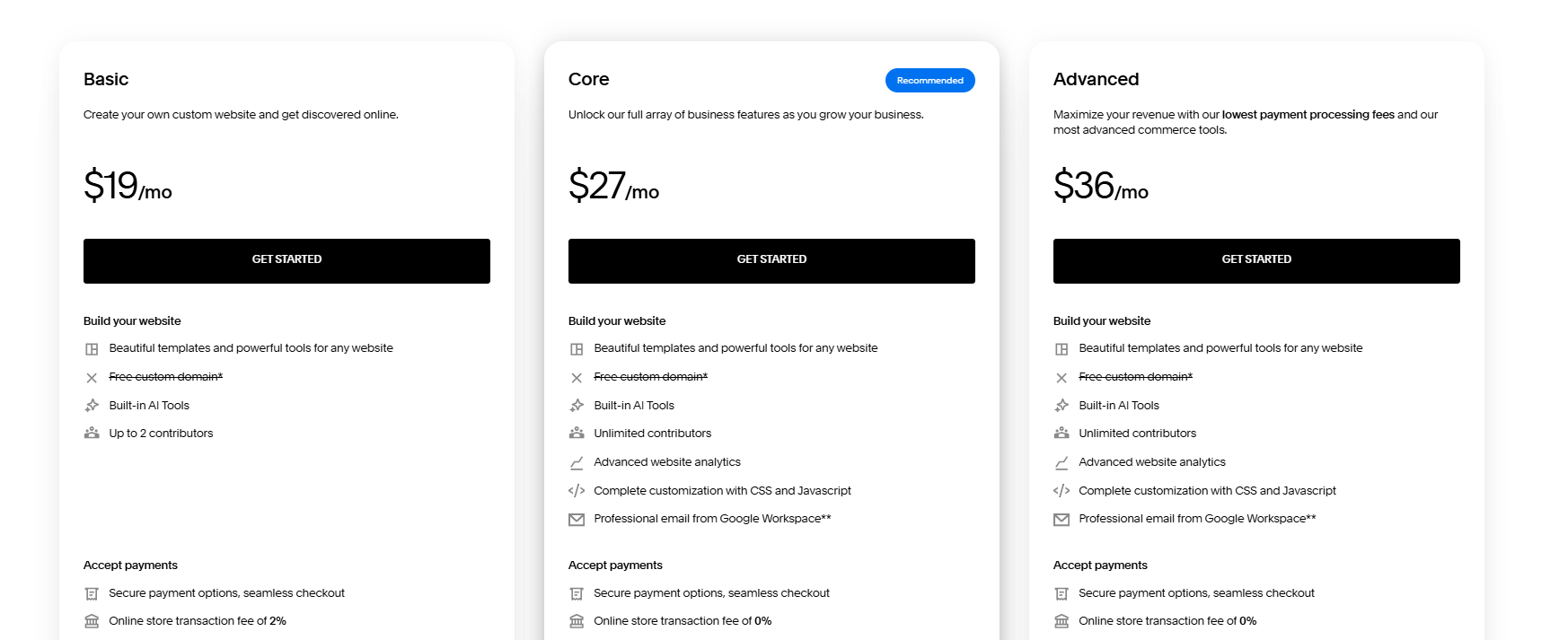
Honestly, most people get this wrong by choosing the lowest plan for an active store. The basic tier charges a two percent transaction fee on product sales, meaning serious shops should immediately pick the Core or Advanced tier to eliminate that fee. But if you want a portfolio or boutique store that turns heads, this builder is worth every penny.
What is Squarespace?
Squarespace is a website creation and hosting platform celebrated for its refined design templates and intuitive visual editor. You select a professionally designed foundation or use the Blueprint AI system to generate a custom layout based on your business type. The platform bundles cloud hosting, domain registration, and ecommerce capabilities into a single cohesive interface.
The editor operates on the Fluid Engine grid system, allowing you to drag elements freely across the screen without breaking mobile responsiveness. You can sell physical products, manage appointment calendars, send customer invoices, and gate exclusive digital content behind paid memberships. For creators comparing top options in our AI website builder guide, this visual polish gives your brand immediate credibility.
This platform targets photographers, creative agencies, restaurant owners, and boutique retailers who prioritize visual aesthetics. In my practical testing, the native blogging tools and built in email marketing make it simple to run an entire digital presence without patching together third party plugins.
Who is Squarespace Best For?
Creative professionals, boutique brands, and local businesses wanting polished visual websites.
Squarespace Key Features
Squarespace Pricing & Plans
Squarespace Review Summary
| Performance Score | A |
| Content Quality | The design layouts and template styling set the visual benchmark for the industry |
| Interface | The Fluid Engine grid provides creative freedom while keeping layouts responsive |
| AI Technology | Blueprint AI structures functional site wireframes and starter copy from short prompts |
| Purpose | Squarespace enables creators and businesses to publish visually stunning websites and online stores |
| Compatibility | Web, Mobile |
| Pricing Summary | Paid plans range from $19 to $36 per month with discounts available on annual commitments |
Squarespace Pros & Cons
✅ Pros
- Templates provide the highest visual design quality in the website builder market
- Fluid Engine allows flexible drag and drop customization within a clean grid
- Built in invoicing and member areas reduce reliance on third party plugins
- All plans include 24 7 customer support through live chat and email
- Mobile editing apps let you update content and check sales on the go
❌ Cons
- No permanent free tier available once the 14 day trial expires
- Basic plan charges a 2 percent transaction fee on online store sales
- Editor has a steeper learning curve than simple automated section builders
- Third party plugin extension marketplace is smaller than WordPress
- Custom code integration is completely locked behind Core and Advanced plans
FAQs
What is Squarespace used for?
▼Is Squarespace free to use?
▼How much does Squarespace cost per month?
▼Does Squarespace charge transaction fees on sales?
▼Is Squarespace good for SEO?
▼Can I add custom code to Squarespace?
▼How does Squarespace compare to WordPress for beginners?
▼More AI Tools You Might Like

KAYAK's conversational AI search lets you chat your way to flights, hotels,…
View Tool ↗
Tripadvisor's AI trip builder creates custom itineraries from your saves, powered by…
View Tool ↗
Free AI travel assistant that lives in WhatsApp and Messenger, answering trip…
View Tool ↗
Free AI trip planner that turns your interests and budget into a…
View Tool ↗
Free trip planner that puts your itinerary, map, bookings, and budget in…
View Tool ↗
AI trip planner backed by human travel advisors who check your itinerary,…
View Tool ↗
Personal AI travel assistant that learns your style, builds mapped itineraries, tracks…
View Tool ↗
Dubai property intelligence with building level prices, rental yields and price forecasts,…
View Tool ↗