

PandaDoc
✓ VerifiedCreate proposals, quotes, and contracts with eSignatures built in. PandaDoc takes documents from draft to signed deal in one place.
Best For: Sales teams that send proposals and need fast signatures
The Verdict: PandaDoc
PandaDoc is the best all rounder for teams that live on proposals and contracts. The templates, analytics, and built in eSignatures compress a messy multi tool process into one clean flow, and the free eSign plan lowers the barrier to try it. The honest catch is per user pricing: costs climb quickly with headcount, and the best rates demand annual billing. Small sales teams will love it. Large ones should negotiate Enterprise.
What is PandaDoc?
PandaDoc is a document platform for sales teams. It combines proposal creation, quoting, contract management, and legally binding eSignatures in one workflow. Instead of drafting in Word, emailing a PDF, and chasing signatures in a separate app, the whole deal happens inside PandaDoc. The standout features are the template library and the analytics. Reusable content blocks and pricing tables turn proposal writing from an hour into minutes, and open tracking tells you the moment a client reads your quote so you can follow up at the right time. CRM integrations push everything back to HubSpot or Salesforce automatically. AI features now help draft and summarize documents, though the core value remains the workflow, not the AI. Pricing is per user, which is fine for small teams and painful for large ones. The free eSign tier is a genuinely useful entry point if signatures are all you need.
Who is PandaDoc Best For?
Sales teams that send proposals and need fast signatures
PandaDoc Key Features
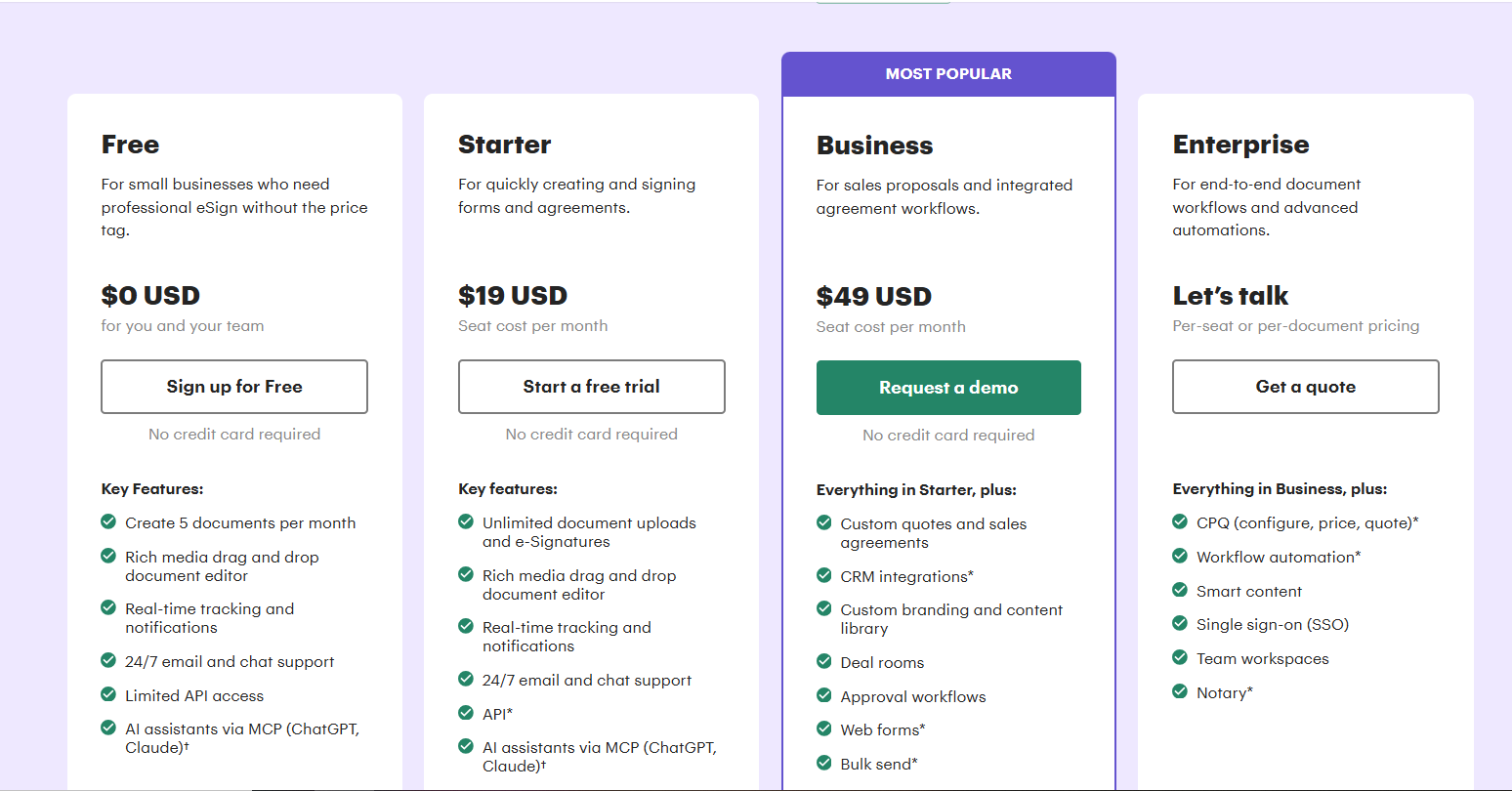
PandaDoc Pricing & Plans
PandaDoc Review Summary
| Performance Score | A- |
| Content Quality | Templates look professional and the builder keeps branding consistent. |
| Interface | Polished drag and drop editor that sales teams learn in a day. |
| AI Technology | AI drafting assistance plus smart content and analytics. |
| Purpose | Creating, sending, and signing sales documents and proposals. |
| Compatibility | Web, iOS, Android, API, HubSpot, Salesforce, Pipedrive |
| Pricing Summary | Free eSign tier, paid plans from $19 per user per month billed annually, 14 day trial. |
PandaDoc Pros & Cons
✅ Pros
- Free eSign plan covers basic signing needs
- Templates cut proposal creation time sharply
- Analytics show exactly when a client opens your quote
- Strong CRM integrations for sales workflows
- 14 day trial on paid plans with no credit card games
❌ Cons
- Per user pricing scales fast as your team grows
- Essentials at $19 per user per month jumps to $35 on monthly billing
- Advanced features like bulk send sit on higher tiers
- Can feel heavy if you only need simple signatures
- Annual commitment needed for the best prices
FAQs
Is PandaDoc free?
▼How much does PandaDoc cost?
▼Is there a free trial?
▼Are PandaDoc signatures legally binding?
▼Does PandaDoc integrate with HubSpot?
▼Can clients pay inside a PandaDoc document?
▼More AI Tools You Might Like

KAYAK's conversational AI search lets you chat your way to flights, hotels,…
View Tool ↗
Tripadvisor's AI trip builder creates custom itineraries from your saves, powered by…
View Tool ↗
Free AI travel assistant that lives in WhatsApp and Messenger, answering trip…
View Tool ↗
Free AI trip planner that turns your interests and budget into a…
View Tool ↗
Free trip planner that puts your itinerary, map, bookings, and budget in…
View Tool ↗
AI trip planner backed by human travel advisors who check your itinerary,…
View Tool ↗
Personal AI travel assistant that learns your style, builds mapped itineraries, tracks…
View Tool ↗
Dubai property intelligence with building level prices, rental yields and price forecasts,…
View Tool ↗