Best AI Icon Generator Tools in 2026

The best AI icon generator for a product team is Recraft, because it builds matching UI icons and hands back real SVG files you can edit. Need one app icon instead? Appicons.ai is the cheapest complete pack. At GuideAITools we verified every price below from official pricing pages.
That said, the right pick splits by job, and the split matters more than the brand name. A founder shipping one app and a designer feeding a design system are not buying the same thing.
Your app needs forty icons that look like family. Stock libraries give you forty strangers. From what I have seen, that mismatch is where most teams lose their first week: the icons look fine one by one, then clash in the sidebar. The tools below fix different parts of that problem. Some generate a full set from a text prompt and a reference image. Some only make app icons. Two are libraries with a generator bolted on. Read the job first, the tool second.
Quick picks: the right AI icon maker for each job
Short on time? Start here.
- UI icon set that matches: Recraft
- App icon pack with every store size: Appicons.ai
- Complete paid app icon pack: AI Icon Creator
- Free start with no card: Iconly, on its one time token pot
- Ownership you can resell: IconifyAI
- Icons inside a bigger asset library: IconScout or Icons8
If your icon job is part of a wider image workflow, the GuideAITools AI image tools category is worth a look before you commit to a specialist.
Best AI icon generators compared
Two tables. The first lines the tools up by job and entry price. The second does the math nobody else does: what one finished icon actually costs once credits, tokens and download limits enter the picture. Credits make headline prices lie, and you only see it when you divide.
| Tool | Best for | Output formats | Free plan | Starting price |
|---|---|---|---|---|
| Recraft | UI icon sets with real SVG | SVG, PNG | Yes, Recraft owns the output | $12/mo monthly billing |
| IconScout AI Icon Generator | Icons inside a full asset library | SVG, PNG | Limited library access | $14.99/user/mo, annual only |
| Iconikai | Pay as you go app icons | PNG, full size packs | Free daily generations | $5 credit pack |
| IconifyAI | Full ownership, including resale | PNG, SVG | No | $17 credit pack |
| Iconly | Design system consistency | SVG, PNG | 300 one time tokens | $25/mo |
| Appicons.ai | App icon pack with dark and tinted variants | PNG, full size packs | First icon free | $5 credit pack |
| Icons8 | Library plus generator mix | PNG, SVG | Yes, with attribution | $15/mo |
| Freepik AI Icon Generator (now Magnific) | Existing Freepik teams | PNG, SVG | Limited | $20/mo monthly billing |
| Envato AI Icon Maker (GraphicsGen) | Inside an asset subscription | PNG, SVG | No | $16.50/mo, annual billing |
| AI Icon Creator | Complete paid app icon pack | PNG, app icon packs, SVG on Pro | 30 free credits | $14.90/mo monthly billing |
What one finished icon costs, worked from the verified credit rates:
| Tool | The math | Cost per icon | Cost per 30 icons |
|---|---|---|---|
| Iconikai | $5 buys 300 credits, one generation costs 2 credits and returns 2 variants | About $0.02 | About $0.50 |
| Appicons.ai | $5 buys 40 credits, 1 credit makes 1 icon | About $0.13 | About $3.75 |
| IconifyAI | $17 buys 80 credits, 1 credit makes 1 icon | About $0.21 | About $6.38 |
| AI Icon Creator | Lite at $14.90/mo brings 400 credits, 10 credits make 1 icon | About $0.37, about $0.30 billed yearly | About $11.10, about $9.00 billed yearly |
The 10 best AI icon generator tools, one by one
Recraft: best for UI icon sets with real SVG

Recraft is the pick when the job is a set, not a single icon. You describe the set, point it at a reference image, and it generates icons that share stroke weight and corner radius, then exports native vector paths instead of traced pictures. That editability is the whole game for a design system.
Pricing summary: free plan, then Basic at $12 a month billed monthly or $10 billed annually with 1,000 credits, Pro from $20 a month, Teams from $22 per seat. The catch: Recraft keeps ownership of free plan output, so free icons are fine for a mockup and risky in a shipped product.
IconScout AI Icon Generator: best inside a full asset library
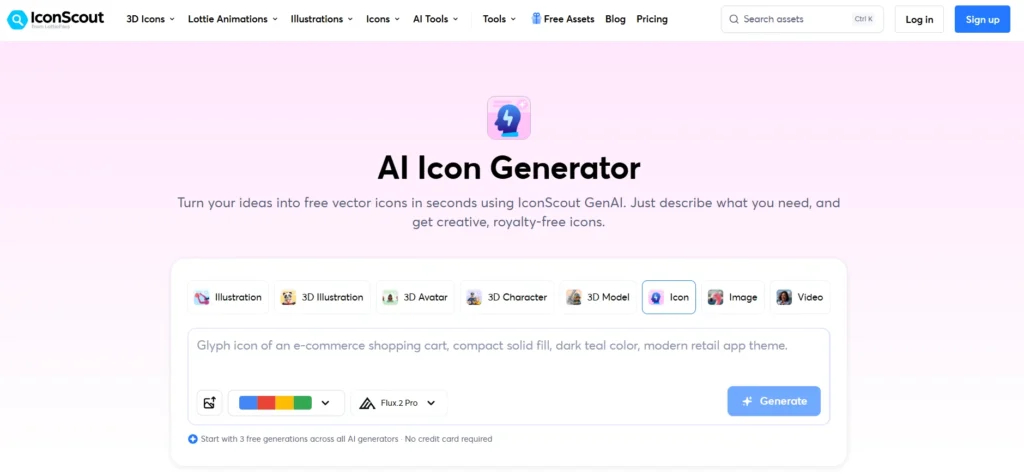
IconScout makes sense when icons are one asset type among many for your team. The generator sits inside a large library of icons, illustrations and stock, and the depth means you often find a matching icon instead of generating one.
Pricing summary: Individual at $14.99 per user a month, Teams at $24.99, Teams+ at $54.99 per five users. Read the billing line twice. Every figure is billed annually, because IconScout sells annual plans only.
Iconikai: best pay as you go app icon pick

Iconikai skips the subscription entirely. You buy credits, generate app icons with style controls, and stop when the job is done, which suits a founder who ships one app a year. Each generation costs 2 credits and returns 2 variants, so its per icon math is the kindest in this list.
Pricing summary: free daily generations to start, then packs from $5 for 200 credits plus 100 bonus credits, and $10 for 500 plus 200 bonus. The weakness is the flip side of the model: heavy iteration burns credits quietly, and a month of tweaking can cost more than a flat subscription.
IconifyAI: best when you need full ownership

Most generators rent you a license with fine print. IconifyAI sells the icon outright: full ownership, including resale rights, under its commercial license terms. That makes it the natural pick for theme sellers and template shops.
Pricing summary: credit packs only, $17 for 80 credits, $24 for 200, $37 for 450, and 1 credit makes 1 icon. What you give up is depth. Its style controls and set consistency tools are thinner than Recraft’s, so buy it for the rights, not for the most polished set workflow.
Iconly: best for design system consistency

Iconly is built for the team that already has a design system in Figma and needs new icons to obey it. Generation leans on normalization: shared grids, consistent stroke and sizing rules, so a set holds together across dozens of icons.
Pricing summary: a free account with 300 one time tokens, then Pro at $25 a month or $150 a year, and Max at $50 a month or $300 a year. Two honest limits: the free tokens are a single pot, not a monthly refill, and Pro costs more than most rivals.
Appicons.ai: best app icon pack with dark and tinted variants

Appicons.ai does one job and does it completely. It generates your app icon, then builds the full pack around it: every store size, the dark mode icon and the tinted icon variants iOS now asks for. For a solo developer on a store deadline, that completeness beats a general tool.
Pricing summary: the first icon is free, then one time packs, $5 for 40 credits, $10 for 100, $25 for 300, $45 for 600, no subscription at all. The limit is scope. It makes app icons only, so the moment you need a matching UI icon set for inside the app, you are shopping again.
Icons8: best mix of library and generator

Icons8 is the old hand in this list: a huge icon library in consistent house styles, with a generator for the gaps. The practical win is speed. Search first, generate only what is missing.
Pricing summary: free downloads with attribution, then an Icons plan at $15 a month for 100 downloads, and Icons plus Illustrations at $21 a month. The free tier carries the catch: free downloads need an attribution link, which many commercial apps cannot comfortably ship, and paid plans cap downloads.
Freepik AI Icon Generator (now Magnific): best for existing Freepik teams

Freepik’s icon generator now lives inside Magnific, and the honest read is that it is a platform feature, not a specialist tool. If your team already pays for Freepik stock, generating icons in the same account is convenient.
Pricing summary: Premium at $20 a month billed monthly or $14.50 billed annually, Premium+ at $45 or $33.75, Pro Starter at $110 or $82.50. Two warnings. Prices shift by region, so your figure may differ from a teammate’s abroad. And a general platform never matches a dedicated tool on set consistency.
Envato AI Icon Maker (GraphicsGen): best inside an asset subscription

Envato’s icon maker, GraphicsGen, arrives as part of an Elements subscription. Judged as a standalone icon tool it would be a hard sell. Judged as one more reason to keep an Elements plan your team already uses, it is nearly free.
Pricing summary: Core from $16.50 a month billed annually, Plus from $39 a month, with AI credits that scale by tier. The weakness is that bundling cuts both ways. Cancel Elements and the icon maker goes with it, and the credit allowance suits occasional use, not full sets every sprint.
AI Icon Creator: best complete paid app icon pack

AI Icon Creator is the specialist the app icon roundups keep circling back to, and its pricing page is unusually plain about what you get. Describe the app, pick from 21 curated styles, refine one area without starting over, and download every iOS, Android and web size in one pack.
Pricing summary: 30 free credits on sign-up, about 3 icons, no card needed. Lite runs $14.90 a month billed monthly, or $11.90 billed yearly at $142.80 a year, with 400 credits a month, about 40 icons at 10 credits each. Pro is $29.90 monthly or $23.90 yearly at $286.80 a year, with 1,000 credits. Max is $59.90 monthly or $47.90 yearly at $574.80 a year, with 2,400 credits. Credit packs start at $4.99 for 100 credits. The trade-off is tier gating: SVG export and PSD layers sit on Pro, and Lite lists both as not included.
Free AI icon generator plans: what free really gets you
Free is where this market gets slippery. A free plan tells you the price and hides the rights, and the rights decide whether your icon can ship.
- Recraft free: generate all you like, but Recraft owns the output. Fine for pitches, wrong for production.
- Icons8 free: usable output, with an attribution link attached to every download.
- Iconly free: 300 tokens, once. A real taste of the tool, then the pot is empty.
- Iconikai: free generations every day, the most generous free route here.
- AI Icon Creator: 30 free credits, about 3 icons, no card. Enough to judge the style quality before paying.
- Appicons.ai: your first icon is free, pack and all.
Honestly, most teams mess this up by falling for the longest free tier and reading the license later. The safe pattern is simple: prototype free, then pay for clear ownership before the icon ships.
AI app icon generator picks for iOS and Android
An app icon is a production file, not a picture. The master is 1024×1024, square, opaque, with no rounded corners, because the iOS App Store and Google Play apply their own masks. Apple has added layers to the job: a dark mode icon, tinted icon variants, and layered files built in Icon Composer for the Liquid Glass look. Android wants an adaptive icon that survives different mask shapes. The Human Interface Guidelines and Material Design both publish exact specs, and the specialists export the Xcode asset catalog sizes in one pack. Appicons.ai and Iconikai lead here.
Need a favicon instead? AI favicon generator options
Favicons live or die at 16 pixels. A busy app icon shrunk down turns to mud, so design the favicon as its own simple mark: one shape, two colors at most, readable at 16×16. You need ICO output or a full size pack with the small web sizes included. The app icon packs from Appicons.ai and AI Icon Creator carry those web sizes, so one purchase can cover the store icon and the browser tab together.
AI icon generator SVG output: who gives you real vector files
Three different things get called SVG in this market. Native vector output means the tool draws real vector paths you can restyle and scale inside your design system. Traced output means a raster picture was converted after the fact, and the paths are lumpy. And some tools print SVG on the pricing page while the free tier only exports PNG.
Recraft is the clearest native vector story here. AI Icon Creator exports SVG too, but only from the Pro tier up. The fallback, running a general AI image generator tools pick and tracing the result by hand in Figma, works for one mark. For a 40 icon set it falls apart, because no two traces share a stroke logic.
How we picked, and what a good icon set needs
At GuideAITools we compared these tools on output formats, style consistency, free plan terms and prices verified from official pricing pages. One name from early drafts of this list is missing on purpose: Icon Generator AI, whose site has been down with a server error, and we do not rank tools you cannot open.
A good icon set is boring in the right ways. One 24px grid. One stroke weight. One corner radius. One metaphor per concept, drawn the same way every time, with a transparent background so icons sit on any surface. A reference image of your existing icons is the fastest way to hold a new set to the old line. Google publishes the reference most designers work from in its Google Material Design icon guidelines.
Teams building the wider brand kit around their icons will also want the AI graphic design tools category, and if the mark you actually need is a logo rather than an icon, start with AI logo generator tools instead.
FAQs
What is the best AI icon generator?
For a matching UI icon set, Recraft. For a single app icon, Appicons.ai on price or AI Icon Creator on pack completeness. The best pick follows the job, which is why this guide splits the list.
Is there a free AI icon generator I can use for commercial work?
Yes, with conditions. Icons8 free downloads carry attribution, and Iconikai gives free daily generations. Read the license line before shipping, because Recraft’s free plan keeps ownership of the output with Recraft.
Can an AI icon generator export real SVG files?
Some can. Recraft generates native vector output, and AI Icon Creator exports SVG on its Pro tier. Others trace a raster image into paths, which looks similar and edits badly. Check which kind you are getting first.
How much does an AI icon generator cost per icon?
From about 2 cents on Iconikai’s credit packs to about 37 cents on AI Icon Creator’s Lite plan, with Appicons.ai near 13 cents and IconifyAI near 21 cents. The data table above shows the math from verified credit rates.
Can I use AI generated icons in a commercial app?
Usually yes on a paid plan, and the license decides. IconifyAI sells full ownership including resale. Recraft’s free plan is the exception here: ownership stays with Recraft, so ship from a paid tier.
What size should an app icon be?
Start from a 1024×1024 master, square and opaque, with no rounded corners drawn in. The stores mask the corners themselves, and the app icon tools export the smaller sizes, the Xcode asset catalog and the Android adaptive icon from that master.
Can an AI generator match the style of my existing icon set?
The set-focused tools can. Recraft and Iconly accept a reference image and hold new icons to its stroke, grid and mood. Single app icon tools are weaker here.
Conclusion
Decide by job and the list shortens itself. Building a UI icon set? Start with Recraft, and test Iconly if your design system lives in Figma. Shipping one app? Appicons.ai for the cheapest complete pack, AI Icon Creator for the paid pack with every size handled, IconifyAI when the icon will be resold.
When you are ready to build the app itself, the AI app builder tools category is the next stop, and teams working on product diagrams should read the GuideAITools roundup of the best AI diagram generators. Pick the tool that fits the job, pay for clear rights, and ship.

Related Blog Posts