

Pixlr
✓ VerifiedBrowser based photo editor with layers, one click AI background removal, generative fill and expand, free to start with no install.
Best For: Bloggers, sellers and social creators who need fast photo fixes without installing software
Pixlr Quick Facts
| Founded | 2008 |
| Free Plan | Yes, with ads and daily save caps |
| Top Feature | One-click AI background removal |
| Main Limitation | Layer depth and precision sit below desktop editors |
The Verdict: Pixlr
Pixlr is the easiest recommendation in this category for anyone whose photos live online. It starts free, opens anywhere, and its AI tools cover the jobs most people actually open an editor for, from cutting out a product to filling a missing corner of a scene. Step up to a paid tier when the ads and the daily save cap start costing you time, not before. And keep the boundary clear in your head: the day your work needs print level control, you are shopping for a desktop editor, and Pixlr becomes the quick tool beside it rather than the main one.
What is Pixlr?
Pixlr is an online photo editing suite that runs in the browser, built around a simple promise: open a tab and start editing, with no install and no account needed for the first job. It pairs a quick AI driven editor with a fuller layer based one, and it is the free pick in our guide to the best AI image editor tools because its free tier does real work instead of teasing a checkout.
The AI shelf is the widest in this category. Background removal, object removal, Generative Fill and Expand cover the daily photo jobs, and behind them sits a row of outside models for generation: Flux and Recraft for images, Kling and Veo for video, plus face swap, upscaling and an instruct editor that follows plain written directions. The trade for that breadth is depth. Selections, masks and color control are serviceable rather than precise, and a professional retoucher will feel the ceiling within an hour.
The pricing design is honest about where the money is. The free tier carries ads and a daily cap on saves, and the paid tiers mostly sell relief from those two limits plus a monthly pool of AI credits and access to every model. For bloggers, sellers and social creators who live in a browser, that is usually the right shape of deal.
The Company Behind Pixlr
Pixlr started in Sweden in August 2008, when developer Ola Sevandersson put a photo editor in the browser at a time when editing meant installing heavy desktop software. It began as a Flash application, grew a large free audience, and was bought by Autodesk in 2011 for its consumer creative lineup. In 2017 Autodesk sold Pixlr to 123RF, part of the Inmagine Group, and Sevandersson came back to run the product he had created. Under Inmagine the suite was rebuilt for the modern web, moved to subscriptions on top of the free tier, and has since been reworked around AI, with image, video and audio models from outside providers sitting inside the same browser workspace.
Who is Pixlr Best For?
Bloggers, sellers and social creators who need fast photo fixes without installing software
Pixlr Key Features
Top Benefits of Pixlr
How to Use Pixlr
- Open pixlr.com in a browser and drop in a photo, or start from a blank canvas
- Pick a starting point, Pixlr Express for quick AI jobs or Pixlr Editor for layered work
- Run one-click tools such as background removal, or select an area and describe a Generative Fill
- Add text, overlays and templates from the library if the image is headed for social media
- Save the result, keeping an eye on the free tier daily save cap during long sessions
Where Pixlr Fits: Use Cases
- Background removal for marketplace and shop product photos
- Quick social media images, covers and collages
- Blog and article featured images on a deadline
- Filling or extending a photo that is the wrong shape for its slot
- Face swaps and light creative edits for campaigns
- Cleaning up screenshots and scans for documents and decks
Pixlr Pricing & Plans
Pixlr Review Summary
| Performance Score | B |
| Content Quality | Everyday edits come out clean for web use, with AI cutouts and fills that hold up at social and store sizes. |
| Interface | Two doors in, a quick Express side for AI jobs and a fuller Editor with layers, both understandable within minutes. |
| AI Technology | A model marketplace as much as an editor, routing generation to Flux, Recraft, Kling, Veo, Stable Diffusion and others from one account. |
| Purpose | Fast browser based photo editing and AI generation for people who publish online every day. |
| Compatibility | Web, Mobile, Desktop |
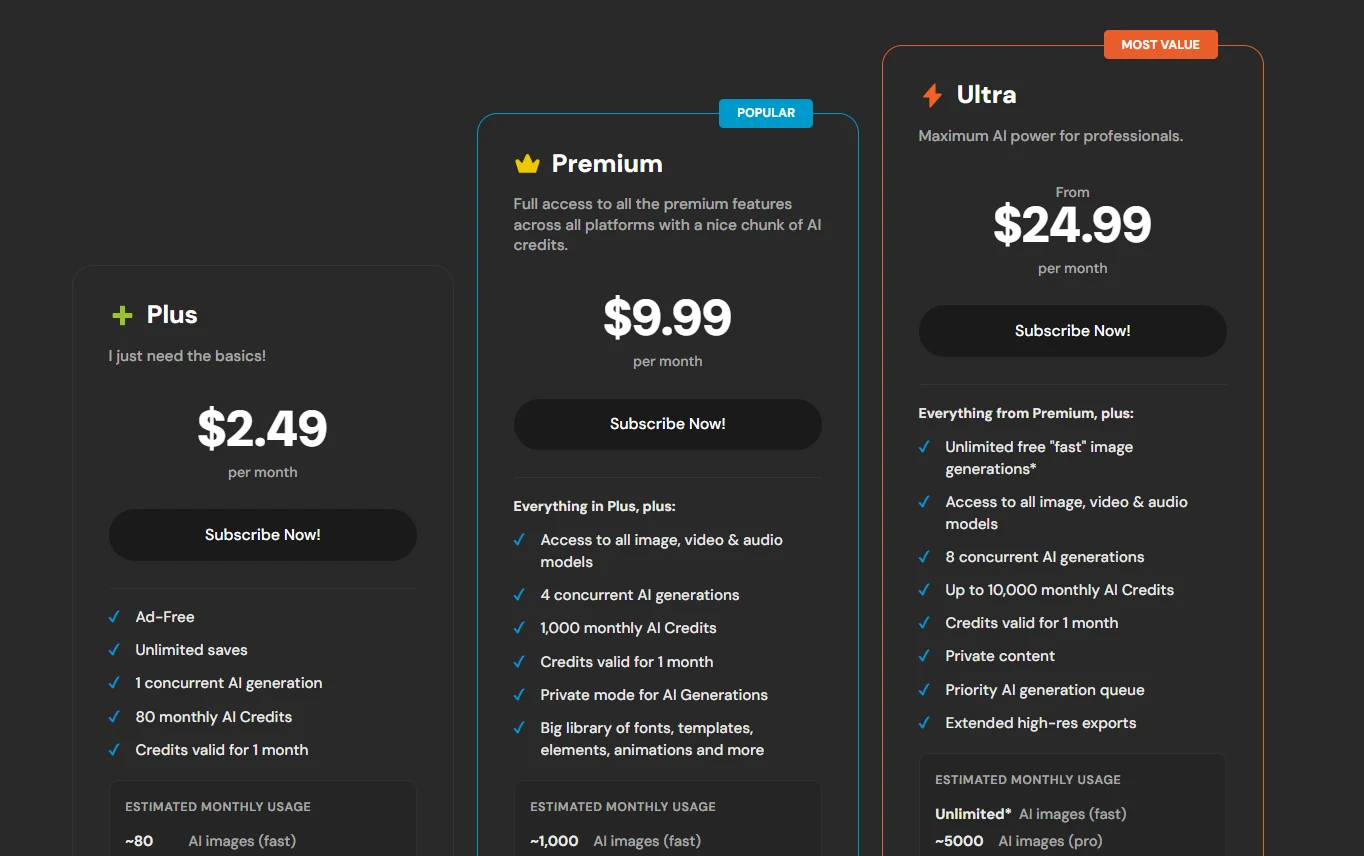
| Pricing Summary | Pixlr is free to start, Plus runs $2.49/month or $1.99/month billed yearly, Premium is $9.99/month or $7.99/month billed yearly, and Ultra starts at $24.99/month or $19.99/month billed yearly. |
Pixlr Pros & Cons
✅ Pros
- Free tier is strong enough for real work, not a demo
- Opens instantly in a browser with no install and no account needed to start
- AI toolset is wide, from cutouts and fill to video generation
- Paid plans are among the cheapest in this category
- Familiar layer based layout for anyone who has used a desktop editor
- Free for education use, which schools and classes can lean on
❌ Cons
- Free tier runs ads and caps how many saves you get each day
- Subscription AI credits reset each cycle instead of building up
- Fine control, masking and color work sit a level below desktop editors
- Subscriptions bought directly from Pixlr come with no refunds
- The full set of AI models sits on the higher plans, not the free tier
Alternatives to Pixlr
Adobe Photoshop - The professional standard for layers, masking and retouching depth, at a professional subscription price.
Canva AI - Design first browser tool built around templates, stronger for finished posts than for photo repair.
Photoroom - Mobile first editor for product photos, with batch backgrounds aimed at sellers.
Fotor - Browser editor with batch background removal and a large template library.
FAQs
What is Pixlr?
▼Is Pixlr really free?
▼How much does Pixlr cost?
▼What AI tools does Pixlr include?
▼Can Pixlr replace Photoshop?
▼Does Pixlr work on phones?
▼Do Pixlr AI credits roll over?
▼More AI Tools You Might Like

Desktop photo editor sold for one payment, known for one-click AI sky…
View Tool ↗
Social creative platform for photo and video posts, packed with templates, stickers,…
View Tool ↗
Adobe photo editor with layers, masking and Firefly AI tools like Generative…
View Tool ↗
Phone-first AI editor for sellers that cuts products out, adds shadows and…
View Tool ↗
AI photo editor for e-commerce that removes backgrounds, rebuilds shadows and turns…
View Tool ↗
AI creative workbench that routes one photo through many image models for…
View Tool ↗
Desktop AI photo repair tool that denoises, sharpens, unblurs and upscales photos,…
View Tool ↗
Online photo editor with batch background removal, AI replace and expand tools,…
View Tool ↗