

Photoroom
✓ VerifiedAI photo editor for e-commerce that removes backgrounds, rebuilds shadows and turns phone snaps into listing ready product images.
Best For: Online sellers and marketplace stores that need clean product photos at volume
Photoroom Quick Facts
| Founded | 2019 |
| Free Plan | Yes, personal use only |
| Top Feature | Background removal built for product photos |
| Main Limitation | Free plan licence does not cover commercial use |
The Verdict: Photoroom
Photoroom is the strongest tool in this category for sellers. If your photos exist to move products, its cutouts, shadows and batch flow will save more hours than any general editor here, and the entry price is low enough that a solo seller can justify it from the first week.
Start on Pro if you sell every week, and watch your export count in the first month, since that number, not the feature list, decides whether you need Max. If your editing is mostly personal photos and social posts, a general editor will fit you better.
What is Photoroom?
Photoroom is an AI photo editor built for one job: turning product photos into listing images that sell. It runs on phones and on the web, and in our guide to the best AI image editor tools it is the pick for sellers, because everything in the app points at the same output, a clean product shot sized for a marketplace.
The workflow is a short pipeline. The background remover cuts the product out, AI Shadows rebuild the contact shadow that makes a cutout believable, and AI Backgrounds can drop the product into a generated studio scene instead of a flat color. Brand colors, logos and templates live in a Brand Library so a whole catalogue looks related, and Batch mode pushes the same recipe across hundreds of images. The heavier generative work, AI fashion models, product videos and video ads, runs on a monthly credit pool, while the core tools cost no credits at all on paid plans.
The honest limits are focus and licences. This is not where you retouch a wedding or build a composite, and the free plan is for personal use, which means a working store belongs on a paid plan from the first listing. Exports are also capped per month, so very large catalogues need to watch the counter or step up a tier. Inside its lane, though, very little comes close.
The Company Behind Photoroom
Photoroom was founded in Paris in 2019 by Matthieu Rouif and Eliot Andres. Rouif had been a product manager at GoPro and kept hitting the same slow job, cutting products out of photos by hand for listings. Andres brought the machine learning side. The company went through Y Combinator in 2020 and built the product around that single pain point first, then widened it into a full visual editor for commerce.
The bet worked. The app has passed 150 million downloads, the company raised 64 million dollars in total, including a 43 million dollar Series B in February 2024 led by Balderton Capital, and it now works out of Paris and New York, training its own models for product photography instead of renting general purpose ones.
Who is Photoroom Best For?
Online sellers and marketplace stores that need clean product photos at volume
Photoroom Key Features
Top Benefits of Photoroom
How to Use Photoroom
- Upload a product photo from your phone or computer
- Let the background remover cut the product out, then choose a white, transparent or AI generated backdrop
- Add AI Shadows so the product sits naturally in its new scene
- Apply your Brand Library colors and a marketplace template for the right size
- Export the single image, or run the same recipe across the whole catalogue in Batch mode
Where Photoroom Fits: Use Cases
- Marketplace listings for Amazon, eBay, Etsy and Shopify sellers
- Second hand and resale photos cleaned up for faster sales
- Catalogue wide background consistency for growing stores
- Social ads and product videos made from still photos
- Fashion items shown on AI models instead of a photo shoot
- Food and menu photos brightened for delivery apps
Photoroom Pricing & Plans
Photoroom Review Summary
| Performance Score | A |
| Content Quality | Listing images come out consistent and clean, with shadows and backdrops that look shot rather than pasted. |
| Interface | Mobile first and very direct, with the web app mirroring the same flow for desk based work. |
| AI Technology | Proprietary models trained for cutouts, shadows and product scenes, with credit based generative tools for backgrounds, fashion models and video. |
| Purpose | Turning product photos into listing ready images and ads for online selling. |
| Compatibility | Web, Mobile, API |
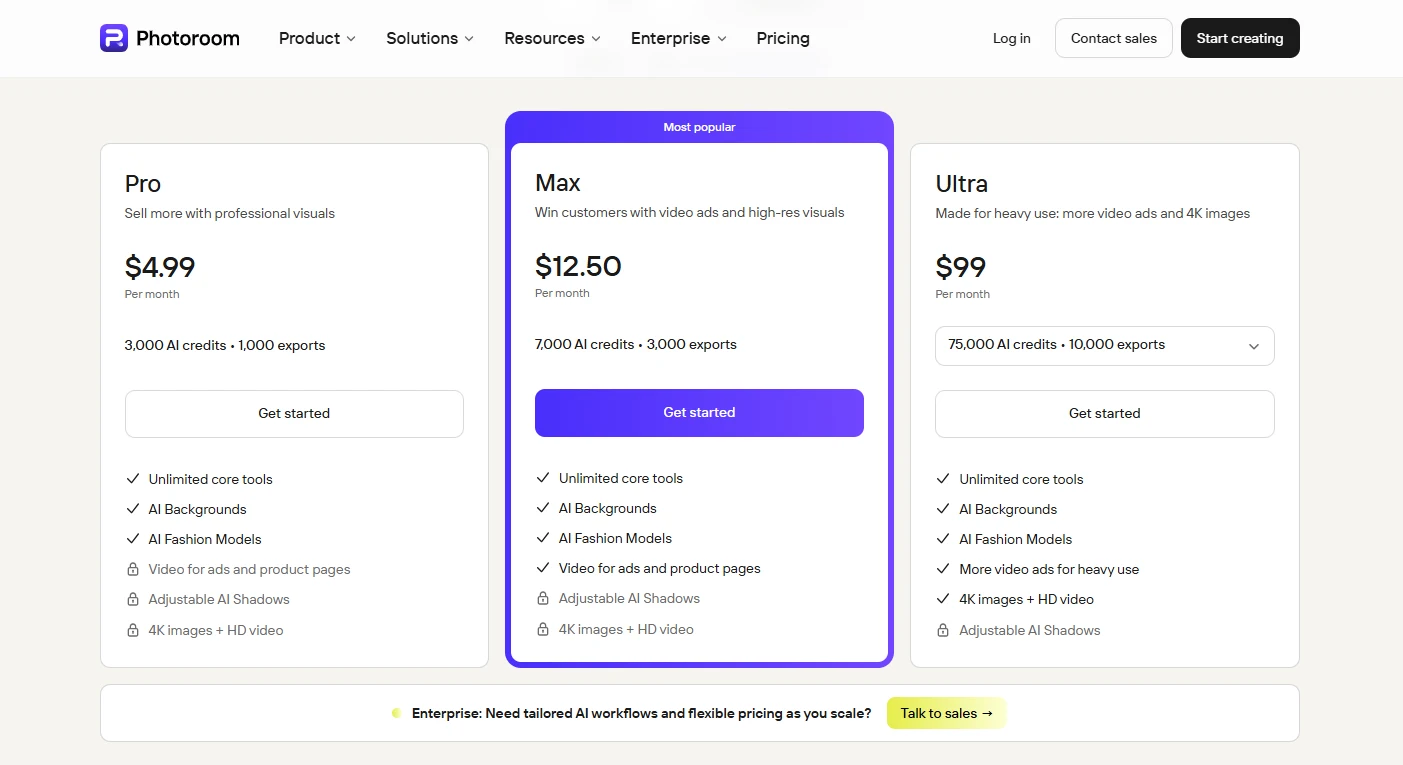
| Pricing Summary | Photoroom Pro runs $4.99/month billed monthly or $2.99/month billed yearly with 8,000 AI credits and 1,000 exports a month, Max is $12.50/month or $6.99/month billed yearly with 25,000 credits and 3,000 exports, and Ultra is $99/month or $82.50/month billed yearly with 75,000 credits and 10,000 exports. |
Photoroom Pros & Cons
✅ Pros
- Fastest route in this category from a phone photo to a listing image
- Background removal quality is genuinely strong on product edges
- Batch mode and templates fit real catalogue work, not just single images
- Core editing tools are unlimited on paid plans and cost no credits
- Entry price is low enough for a solo seller to justify in week one
- A refund window of one week after purchase, by the company's own policy
❌ Cons
- Free plan covers personal use only, so sellers need a paid plan from day one
- Monthly export caps pause your output when you hit them
- The API is a separate subscription, not part of the app plans
- General photo editing is thin beside its product work
- Credit heavy tools like AI backgrounds and video ads can drain a pool quickly
Alternatives to Photoroom
Adobe Photoshop - The full professional editor, with total control and far more weight than a product photo workflow needs.
Pixlr - Free browser editor with background removal and generative tools for mixed everyday work.
Pixelcut - Rival product photo app with background removal and AI photo shoots aimed at sellers.
Canva AI - Template driven design tool that many sellers pair with a cutout app for finished listing graphics.
FAQs
What is Photoroom?
▼Is Photoroom free?
▼How much does Photoroom cost?
▼What counts as an export in Photoroom?
▼Does Photoroom have an API?
▼Can Photoroom edit photos in bulk?
▼Is Photoroom good for general photo editing?
▼More AI Tools You Might Like

Online photo editor with batch background removal, AI replace and expand tools,…
View Tool ↗
Phone-first AI editor for sellers that cuts products out, adds shadows and…
View Tool ↗
Desktop AI photo repair tool that denoises, sharpens, unblurs and upscales photos,…
View Tool ↗
Browser based photo editor with layers, one click AI background removal, generative…
View Tool ↗
Desktop photo editor sold for one payment, known for one-click AI sky…
View Tool ↗
Adobe photo editor with layers, masking and Firefly AI tools like Generative…
View Tool ↗
Social creative platform for photo and video posts, packed with templates, stickers,…
View Tool ↗
AI creative workbench that routes one photo through many image models for…
View Tool ↗