

Fotor
✓ VerifiedOnline photo editor with batch background removal, AI replace and expand tools, templates and collages, free to start in a browser.
Best For: Sellers and social creators who need batch background removal and quick designs in a browser
Fotor Quick Facts
| Founded | 2012 |
| Free Plan | Yes, exports at standard resolution |
| Top Feature | Batch background removal |
| Main Limitation | Full resolution exports and batch AI work need a paid plan |
The Verdict: Fotor
Fotor is the practical pick for people who edit photos as part of selling or posting, not as a craft in itself. Its batch cutout alone justifies the paid tier for a small store, and the free plan is generous enough to learn whether the tool fits before any money moves. Skip it if your work is fine retouching or print production at a professional level, where a desktop editor earns its price. For web sized work at volume, Fotor is hard to beat on time saved per dollar.
What is Fotor?
Fotor is an online photo editor and light design tool that runs in the browser, with apps for Windows, Mac, iOS and Android. In our guide to the best AI image editor tools it is the all-rounder entry, and the feature sellers notice first is batch background removal, a whole folder of product photos cut out in one run.
Around that headline sits a wide, friendly editor: one-click fixes, portrait retouch, object removal, AI Replace for swapping content with a prompt, AI Expand for outpainting, collages, templates and a large shelf of stock photos, stickers and fonts. The generative side runs as a model marketplace, with image and video models from several providers priced in credits on one balance, and an AI Agent that takes editing instructions in chat. Depth is the trade. Fine masking, layers and color control are serviceable rather than precise.
The free plan is honest for screen work, unlimited editing and watermark-free exports at standard resolution, and the paid tiers sell what sellers and heavy users actually need: full resolution, batch AI power, storage and a monthly credit pool that rolls over for a few months instead of vanishing. For small stores and social creators, that is a sensible shape.
The Company Behind Fotor
Fotor is made by Everimaging, a software company in Chengdu, China that started in 2009 as an HDR imaging research outfit. It launched Fotor in 2012 as a free, cloud-based photo editor at a time when browser editing meant a handful of sliders, and the tool took off quickly on ease of use, reaching a million users across web and mobile within its first months. The company has kept that shape ever since: a free editor that does real work, paid tiers selling resolution, batch power and storage, and in recent years a marketplace of outside AI models for image and video generation running on one credit balance. Everimaging remains an independent, privately held company, backed by investors such as Legend Capital and Lenovo Capital.
Who is Fotor Best For?
Sellers and social creators who need batch background removal and quick designs in a browser
Fotor Key Features
Top Benefits of Fotor
How to Use Fotor
- Open fotor.com and upload a photo, or a whole folder of them for batch work
- Run the one-click fixes first, background removal, object removal or the AI enhancer
- Use AI Replace or AI Expand where the photo needs new content rather than a fix
- Add text, stickers and template elements if the image is headed for social media
- Export at the size you need, keeping the free plan standard resolution limit in mind
Where Fotor Fits: Use Cases
- Product photo batches for small online stores
- Social media posts, covers and collages
- AI headshots and profile avatars
- Blog images and quick marketing graphics
- Photo gifts and family collages
- Extending photos to fit banners and different aspect ratios
Fotor Pricing & Plans
Fotor Review Summary
| Performance Score | B |
| Content Quality | Everyday photos and product shots come out clean at full resolution, and the batch cutouts hold up at listing sizes. |
| Interface | Bright, friendly and template led, closer to a design tool than a darkroom, and quick to learn. |
| AI Technology | A marketplace of outside image and video models on one credit balance, plus its own background, replace and expand tools. |
| Purpose | Fast online photo editing and light design for people who publish and sell on the web. |
| Compatibility | Web, Desktop, Mobile |
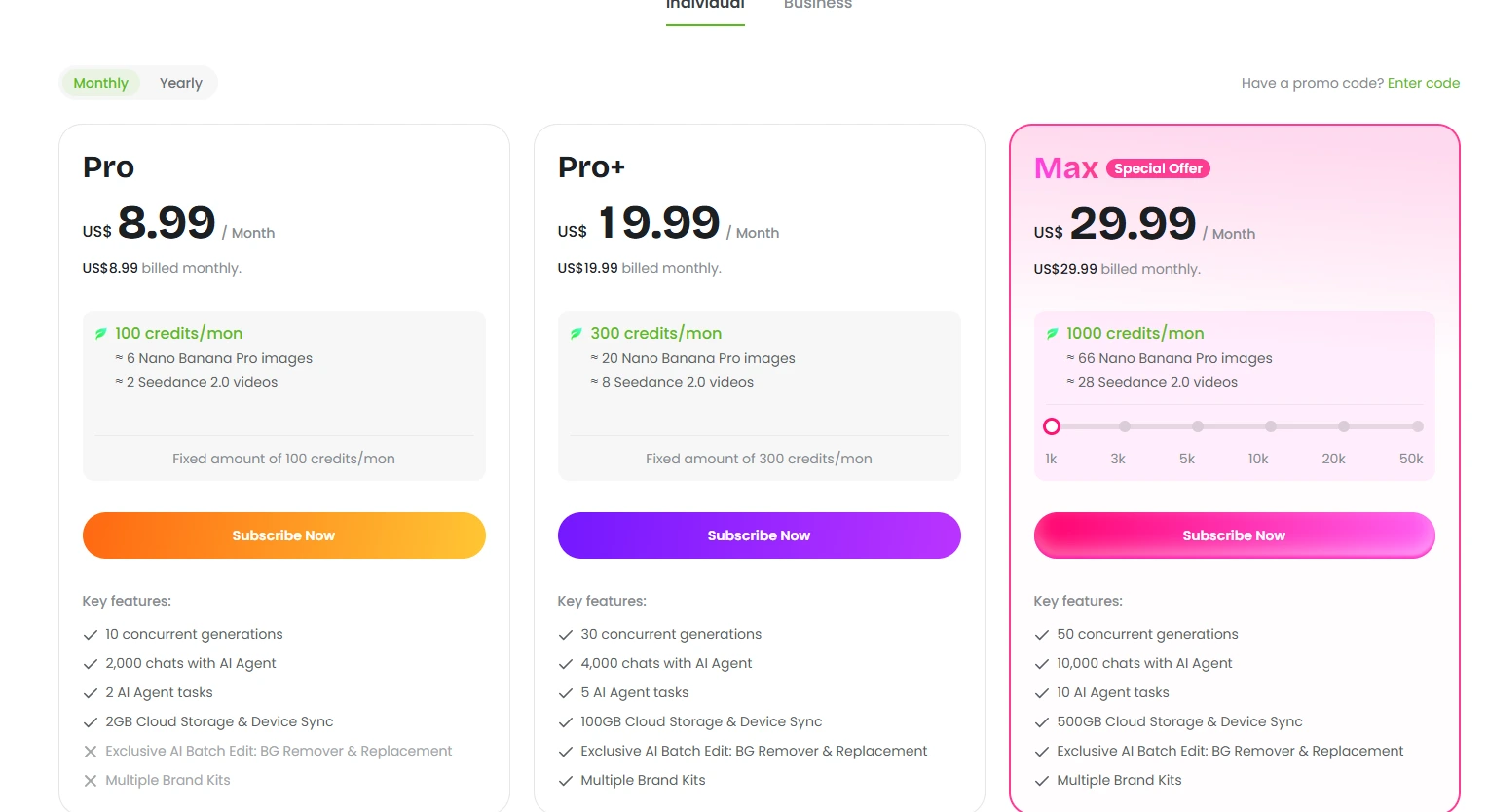
| Pricing Summary | Fotor Pro runs $8.99/month billed monthly or $3.33/month billed yearly at $39.99 a year with 100 credits a month, Pro+ is $19.99/month or $5.24/month billed yearly at $62.99 a year with 300 credits, and Max is $29.99/month or $20.99/month billed yearly at $251.92 a year with 1,000 credits. |
Fotor Pros & Cons
✅ Pros
- Batch background removal saves real hours for sellers
- Free plan exports without a watermark
- Friendly editor that a beginner can run in minutes
- Generation models from many providers under one credit system
- Credits roll over for up to five months on paid plans
- Apps and sync across web, Windows, Mac, iOS and Android
❌ Cons
- Free exports are limited to standard resolution, too soft for print or zoomable listings
- The strongest batch AI work sits behind the paid tiers
- Credit costs vary widely by model, so heavy video generation drains a balance fast
- General editing depth is a level below dedicated desktop editors
- AI Agent chats and tasks are capped per plan, so heavy agent use needs a higher tier
Alternatives to Fotor
Pixlr - Closest free browser rival, stronger on layered editing, lighter on templates and batch design work.
Photoroom - Product photo specialist with deeper batch and marketplace tools for sellers.
Canva AI - Design first platform with a bigger template library for finished marketing graphics.
Picsart - Mobile first creative suite with a stronger sticker, video and community side.
FAQs
What is Fotor?
▼Is Fotor free?
▼How much does Fotor cost?
▼What is Fotor best known for?
▼Do Fotor credits roll over?
▼Can Fotor generate images and video?
▼Is Fotor good for print work?
▼More AI Tools You Might Like

Desktop photo editor sold for one payment, known for one-click AI sky…
View Tool ↗
Browser based photo editor with layers, one click AI background removal, generative…
View Tool ↗
Adobe photo editor with layers, masking and Firefly AI tools like Generative…
View Tool ↗
AI photo editor for e-commerce that removes backgrounds, rebuilds shadows and turns…
View Tool ↗
AI creative workbench that routes one photo through many image models for…
View Tool ↗
Social creative platform for photo and video posts, packed with templates, stickers,…
View Tool ↗
Phone-first AI editor for sellers that cuts products out, adds shadows and…
View Tool ↗
Desktop AI photo repair tool that denoises, sharpens, unblurs and upscales photos,…
View Tool ↗