

Pixelcut
✓ VerifiedPhone-first AI editor for sellers that cuts products out, adds shadows and AI backgrounds, and now makes product videos and ads too.
Best For: Phone-first sellers who list products straight from the phone they shot them on
Pixelcut Quick Facts
| Founded | 2020 |
| Free Plan | Yes, with limited removals and upscales |
| Top Feature | Background removal for product photos |
| Main Limitation | Built for phone-sized selling work, not heavy catalogues |
The Verdict: Pixelcut
Pixelcut is the strongest phone-first option in this category for sellers. If your shop runs from your hand, its cutouts, shadows and templates will carry a listing day on their own, and the paid tiers are cheap enough to justify from the first week of sales.
Step up to Pro when the free limits start cutting into a listing session, and to Business when batch volume and team seats become the bottleneck. If your catalogue runs to thousands of products or your work is fine retouching, start with a bigger tool instead.
What is Pixelcut?
Pixelcut is a phone-first AI editor for people who sell things. It cuts a product out of a photo, drops it on a clean background with a rebuilt shadow, and sizes it for the marketplace, all on the phone the photo was taken with. In our guide to the best AI image editor tools it is the pick for sellers who list from a market stall, a warehouse corner or a kitchen table.
The app has grown past cutouts. Its own models handle background removal for images and video, upscaling up to 16 times and expansion past the frame, while a credit shelf rents outside models for generation, Nano Banana Pro, FLUX, Ideogram, Veo and more. On top sits a Creative Agent that takes a written prompt and plans the edit itself, plus AI Product Photos, consistent AI personas and UGC style video ads. The direction is clear: from a cutout tool toward a small creative department for solo sellers.
The ceiling is equally clear. Batch volumes are capped per month, the generative tools carry daily limits, and fine retouching or catalogue-scale automation belongs on heavier tools. The free plan also limits removals and upscales, though its exports carry no watermark. Inside its lane, a phone, a product and five minutes, very little is faster.
The Company Behind Pixelcut
Pixelcut was founded in 2020 in Oakland, California by Dominique Yahyavi and Prasanth Veerina, and went through Y Combinator the same year. It began as a set of single AI tools, background removal, upscaling and retouching, built to make hard edits easy for people selling from their phones.
The tools merged into one app as the audience grew into the tens of millions, and the scope widened from cutouts into AI product photos, personas, video and an agent that plans edits from a prompt. The company even tried a new name, Pixa, for a few months in 2026 before switching back to Pixelcut. Its own cutout and upscale models remain the core, with outside generation models rented by the credit around them.
Who is Pixelcut Best For?
Phone-first sellers who list products straight from the phone they shot them on
Pixelcut Key Features
Top Benefits of Pixelcut
How to Use Pixelcut
- Open the app or the web editor and add a product photo
- Run background removal, then pick a clean color, a template or an AI background
- Add AI Shadows so the product sits naturally in the scene
- Fix the details with retouch, the eraser or an upscale pass where the shot is small
- Export the single image, or run the set through batch export for the whole listing day
Where Pixelcut Fits: Use Cases
- Marketplace listings shot and finished on a phone
- Resale and thrift sellers cleaning up quick photos
- Product photos for small Shopify and Etsy stores
- Social ads and UGC style videos for a product launch
- Consistent AI model and persona shots for a small brand
- Batch cutouts for a week of listings in one sitting
Pixelcut Pricing & Plans
Pixelcut Review Summary
| Performance Score | B |
| Content Quality | Cutouts come out clean at listing sizes, with shadows and templates that make phone photos look studio shot. |
| Interface | Phone-first, big buttons and few decisions, with the web editor mirroring the same flow. |
| AI Technology | In-house matting and upscale models at the core, a rented shelf of outside image and video models around them, and an agent that plans edits from a prompt. |
| Purpose | Turning phone photos into listing images, product shots and short ads for online selling. |
| Compatibility | Web, Mobile, API |
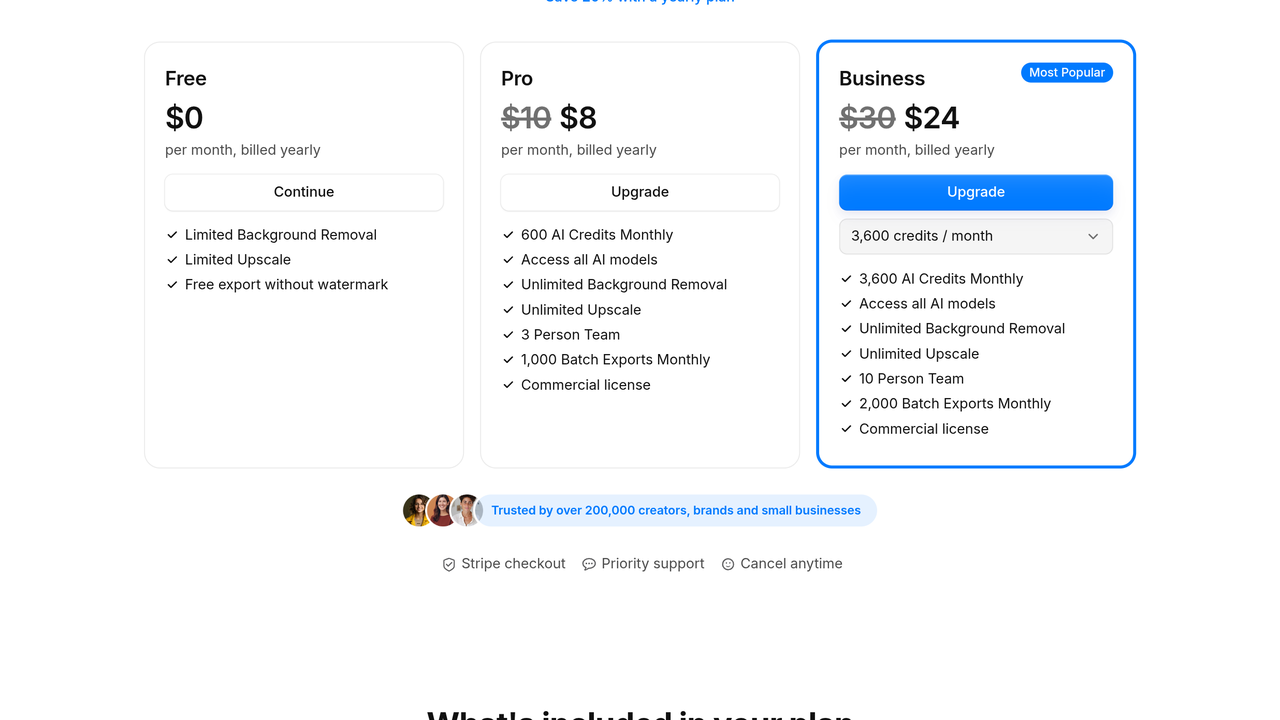
| Pricing Summary | Pixelcut is free to start, Pro runs $10/month billed monthly or $8/month billed yearly with 600 AI credits a month and 1,000 batch exports, and Business is $30/month billed monthly or $24/month billed yearly with 3,600 credits and 2,000 batch exports. |
Pixelcut Pros & Cons
✅ Pros
- Background removal quality is a genuine strength, including on video
- Phone-first flow is the fastest in this category for solo sellers
- Free plan exports without a watermark
- Paid plans are cheap and carry a commercial licence
- Batch exports and team seats cover growing shops
- Generation models from many providers sit behind one credit balance
❌ Cons
- Free plan limits how many removals and upscales you get
- Generative tools carry daily caps even on paid plans
- Heavy catalogue and API-scale work belongs on bigger tools
- Fine retouching depth is thin beside desktop editors
- Credit costs vary a lot by model, so generation spending takes watching
Alternatives to Pixelcut
Photoroom - The closest rival for product photos, deeper on catalogue batch work and its own API plans.
Fotor - Browser all-rounder with batch background removal and templates for sellers who work at a desk.
Picsart - Broader creative suite for social content, stronger on stickers, video and community.
Canva AI - Design platform sellers pair with a cutout app for finished posts and store graphics.
FAQs
What is Pixelcut?
▼Is Pixelcut free?
▼How much does Pixelcut cost?
▼How is Pixelcut different from Photoroom?
▼What are Pixelcut credits for?
▼Can I use Pixelcut for my store?
▼Does Pixelcut remove backgrounds from video?
▼More AI Tools You Might Like

Online photo editor with batch background removal, AI replace and expand tools,…
View Tool ↗
AI photo editor for e-commerce that removes backgrounds, rebuilds shadows and turns…
View Tool ↗
Browser based photo editor with layers, one click AI background removal, generative…
View Tool ↗
AI creative workbench that routes one photo through many image models for…
View Tool ↗
Desktop AI photo repair tool that denoises, sharpens, unblurs and upscales photos,…
View Tool ↗
Adobe photo editor with layers, masking and Firefly AI tools like Generative…
View Tool ↗
Desktop photo editor sold for one payment, known for one-click AI sky…
View Tool ↗
Social creative platform for photo and video posts, packed with templates, stickers,…
View Tool ↗