

Krea
✓ VerifiedAI creative workbench that routes one photo through many image models for upscaling, restyling and prompt edits in real time.
Best For: Creators who test many image models side by side and edit photos from written prompts
Krea Quick Facts
| Founded | 2022 |
| Free Plan | Yes, with daily allowances |
| Top Feature | Many models on one workbench, plus realtime generation |
| Main Limitation | Everything runs on Krea servers, and quality varies by model |
The Verdict: Krea
Krea earns its subscription the moment your work depends on more than one model. Creators testing looks, restyling photos and building repeatable generation workflows get more range here than any single-vendor tool offers, and the realtime canvas alone changes how fast ideas get tested. Pick a plan by concurrency and video needs rather than image volume, and keep a conventional editor beside it for finishing. If your work is careful retouching or client files that cannot leave your machine, Krea is a side tool, not your editor.
What is Krea?
Krea is a workbench rather than a single editor. It routes a photo through a shelf of image models, so the same picture can be upscaled by one model, restyled by a second and edited from a written prompt by a third. In our guide to the best AI image editor tools it is the entry for creators who test models against each other and want range over allegiance to one vendor. The bench holds Krea's own model family, up to native 4K generation, beside FLUX, GPT Image, Nano Banana Pro, Ideogram, Recraft and more, with video, 3D and lipsync tools in the same suite. Its Realtime Canvas generates as you type and draw, which makes exploration feel like sketching. LoRA training, node workflows and an App Builder sit on top for people building repeatable pipelines, and everything meters against one compute balance. The trade-off is consistency, exactly as our article found. A prompt edit can soften detail or drift from the original between runs, and quality swings with the model you pick. All processing happens on Krea's servers, not your machine, and there is no layered manual editing when a result needs one precise local fix. As a generating and transforming bench, though, nothing else in this category offers this much choice in one place.
The Company Behind Krea
Krea was founded in 2022 in San Francisco by Victor Perez and Diego Rodriguez, two Spanish engineers who met as students in Barcelona and left a research path at Cornell to build it. An early demo of a camera feeding a live AI restyle went viral, and the waitlist that followed became the company. The idea from the start was interface over model: give creatives every strong model in one fast, simple workspace instead of tying them to a single vendor. Investors backed that bet quickly, with a Series A led by Andreessen Horowitz in 2023 and a Series B led by Bain Capital Ventures in April 2025, 83 million dollars raised in total at a reported 500 million dollar valuation. Krea stayed small and independent, shipping its own Krea model family alongside the outside models on its shelf and growing to tens of millions of users by its own count.
Who is Krea Best For?
Creators who test many image models side by side and edit photos from written prompts
Krea Key Features
Top Benefits of Krea
How to Use Krea
- Open Krea in the browser and start from a prompt, an uploaded photo or the Realtime Canvas
- Pick the model for the job, or let the defaults run, and generate
- Send the result across the bench, upscale it, restyle it or edit it with a written prompt
- Train a LoRA when you need the same face, product or style to come back reliably
- Export the finished asset, keeping an eye on your compute balance as you go
Where Krea Fits: Use Cases
- Testing which model fits a campaign look before committing
- Realtime concept sketches and mood frames for clients
- Upscaling and rescuing photos for large format use
- Restyling product and fashion shots into new scenes
- Short AI video clips for social and ads
- Training a consistent character or product model for a series
Krea Pricing & Plans
Krea Review Summary
| Performance Score | B |
| Content Quality | Output quality tracks the model you pick, from good to the best available anywhere, with drift between runs as the standing caveat. |
| Interface | Minimal, fast and keyboard friendly, a workbench layout with a proper asset manager rather than a wizard. |
| AI Technology | Its own Krea model family beside a rented shelf of leading image, video and 3D models, all metered in one compute currency. |
| Purpose | Generating, transforming and enhancing images by routing each job to the model that does it best. |
| Compatibility | Web |
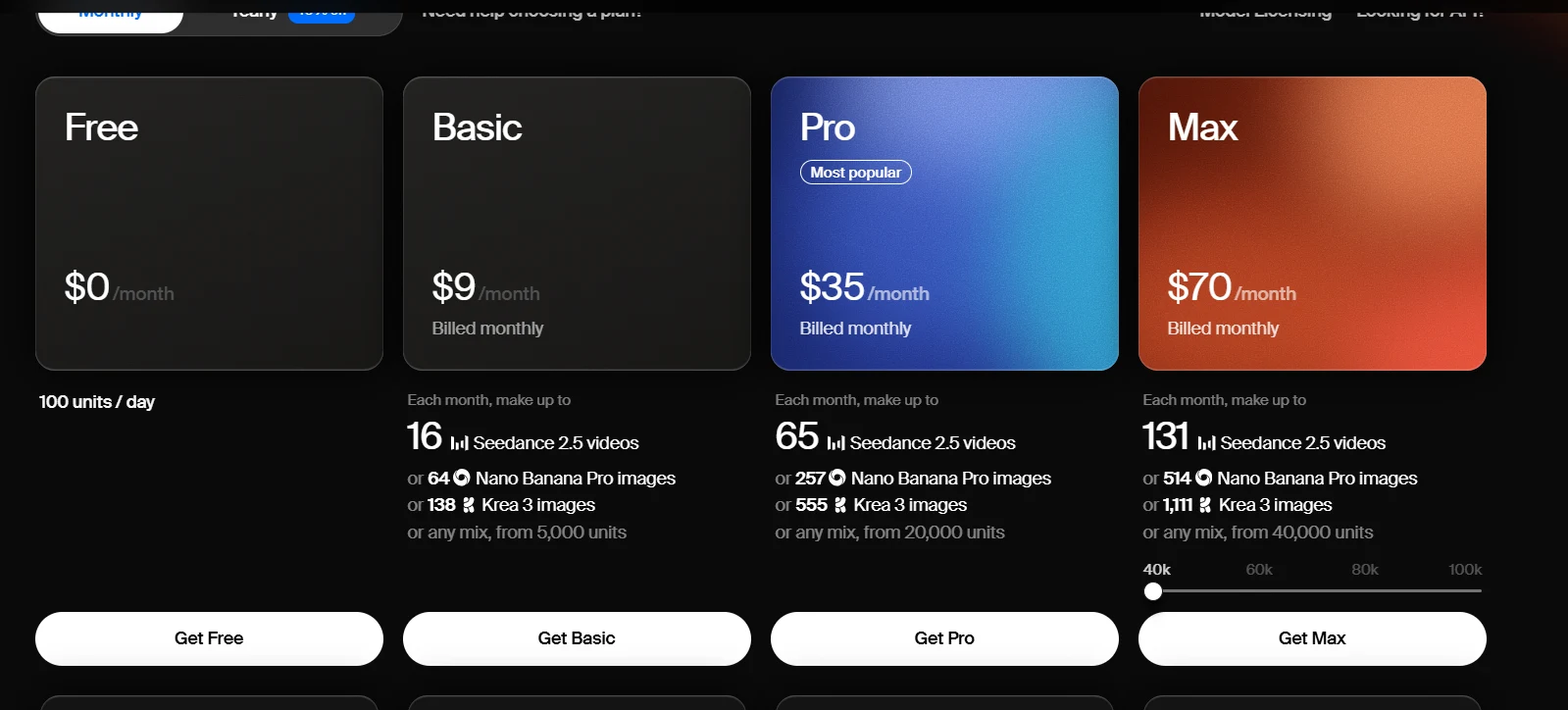
| Pricing Summary | Krea is free to start with daily allowances, Basic runs $9/month or $5.25/month billed annually with all image models, upscaling to 22K and a commercial license, Pro is $35/month or $21/month billed annually with all video models, Max is $105/month or $63/month billed annually with unlimited relaxed generations and LoRA training, and Business plans for teams run $160/month billed annually. |
Krea Pros & Cons
✅ Pros
- The widest model bench in this category, including its own Krea 3 family
- Realtime generation is genuinely faster to explore with than batch tools
- Upscaling headroom up to 22K on paid plans
- LoRA training and workflow tools reward repeat, professional use
- Free plan needs no credit card and gives real daily allowances
- Paid plans carry a commercial licence from Basic up
❌ Cons
- Results drift between runs, and quality swings with the model you pick
- Everything is processed on Krea servers, which matters for sensitive client photos
- There is no layered, manual editing for precise local fixes
- Compute units drain at very different rates per model, so costs take watching
- It is a workbench, not a finished editor, so files leave for finishing elsewhere
Alternatives to Krea
Adobe Photoshop - A single deep editor for controlled work, the opposite of Krea's many-model bench.
Pixlr - Browser editor that adds generative tools to a classic layered workflow.
Picsart - Social suite with its own model shelf, aimed at posts rather than model testing.
Fotor - Desk-friendly all-rounder with a smaller model shelf and batch tools.
FAQs
What is Krea?
▼Is Krea free?
▼How much does Krea cost?
▼What are compute units?
▼How is Krea different from Photoshop?
▼Can I use Krea for client work?
▼What is a LoRA on Krea?
▼More AI Tools You Might Like

Browser based photo editor with layers, one click AI background removal, generative…
View Tool ↗
Desktop AI photo repair tool that denoises, sharpens, unblurs and upscales photos,…
View Tool ↗
Online photo editor with batch background removal, AI replace and expand tools,…
View Tool ↗
Desktop photo editor sold for one payment, known for one-click AI sky…
View Tool ↗
AI photo editor for e-commerce that removes backgrounds, rebuilds shadows and turns…
View Tool ↗
Phone-first AI editor for sellers that cuts products out, adds shadows and…
View Tool ↗
Social creative platform for photo and video posts, packed with templates, stickers,…
View Tool ↗
Adobe photo editor with layers, masking and Firefly AI tools like Generative…
View Tool ↗