

GitHub Copilot
✓ VerifiedGitHub Copilot is Microsoft's AI coding assistant that writes, completes, and debugs code in real time inside VS Code, JetBrains, and other major IDEs.
Best For: Software developers, engineers, and students who want AI code completion and generation directly inside their coding environment
The Verdict: GitHub Copilot
GitHub Copilot Pro at $10 per month is the best-value AI coding assistant for developers who work across multiple IDEs or who need enterprise-grade GitHub integration. The completion quality, model variety, and agent mode make it a complete package for most development workflows. For teams already on GitHub, the issue-to-pull-request automation alone saves significant time on routine tasks.
The honest comparison matters here. For VS Code users specifically, Cursor offers more context window depth and stronger agentic capabilities at $10 to $20 per month. Windsurf has a stronger free tier. And Claude Code is a better fit for complex autonomous terminal tasks. Copilot wins on breadth of IDE support and enterprise compliance controls. If your team uses a mix of IDEs or has compliance requirements, Copilot is the right call. If you work exclusively in VS Code and want the best agentic experience, Cursor deserves a direct comparison first.
What is GitHub Copilot?
GitHub Copilot is an AI coding assistant built into VS Code, JetBrains, Neovim, Visual Studio, and Xcode that provides inline code completions, multi-file chat, pull request summaries, and autonomous agent mode for complex coding tasks. It was the first mainstream AI coding assistant and still holds the highest adoption numbers in the category. As of March 2026, Agent mode is generally available on VS Code and JetBrains, allowing Copilot to work autonomously across multiple files, run terminal commands, and iterate on errors without manual intervention.
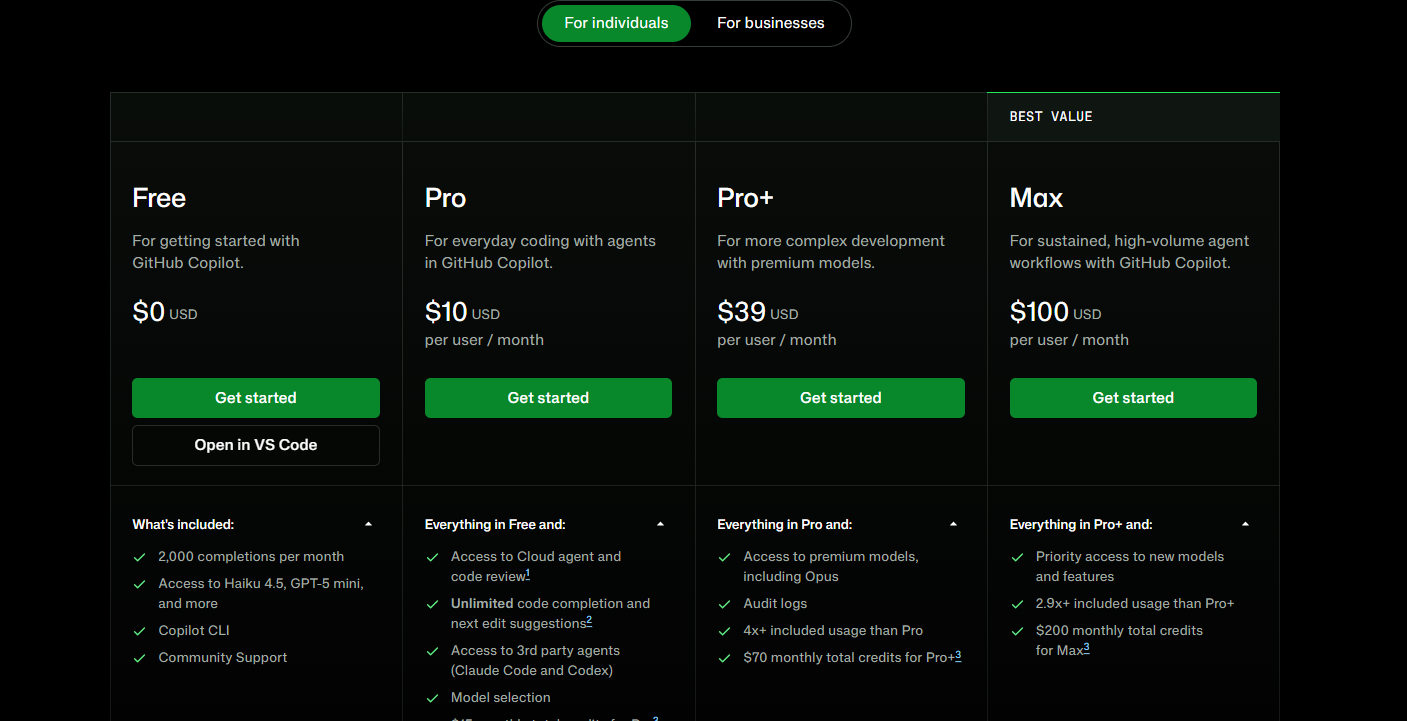
The free tier provides 2,000 code completions and 50 premium requests per month. The Pro plan at $10 per month removes the completion cap, adds unlimited Copilot Chat, and includes $15 in monthly AI Credits under the usage-based billing system introduced June 1, 2026. The Pro+ plan at $39 per month unlocks Claude Opus 4.6 and OpenAI o3 alongside all Pro features, and includes $200 in monthly AI Credits. Enterprise plans add compliance controls, SSO, and organization-wide policy management.
Copilot's model selection on Pro includes GPT-4o, Claude Sonnet 4.6, and Gemini 2.5 Pro, letting developers match the model to the task without switching tools. The GitHub integration is the most seamless available: assigning an issue to Copilot directly triggers it to write code, run tests, and open a pull request autonomously.
Who is GitHub Copilot Best For?
Software developers, engineers, and students who want AI code completion and generation directly inside their coding environment
GitHub Copilot Key Features
GitHub Copilot Pricing & Plans
GitHub Copilot Review Summary
| Performance Score | A |
| Content Quality | Code completions and multi-line suggestions are accurate and context-aware with strong performance across all major programming languages |
| Interface | Invisible by design — works as an IDE extension so suggestions appear inline as you type without breaking the coding workflow |
| AI Technology | Uses GPT-5, Claude Sonnet 4.6, and Gemini 3.1 Pro through an AI Credits system with usage-based billing since June 2026 |
| Purpose | AI code completion, generation, and agentic coding assistance inside developer IDEs and GitHub |
| Compatibility | Web, Desktop, Extension, API |
| Pricing Summary | Free plan with unlimited completions, Pro at $10 per month, Pro+ at $39 per month, Max at $100 per month, Business at $19 per user per month |
GitHub Copilot Pros & Cons
✅ Pros
- Free plan includes unlimited code completions for individuals
- Deepest IDE integration of any AI coding tool
- Access to multiple top AI models on one subscription
- Trusted by millions of developers across all experience levels
❌ Cons
- Moved to usage-based AI Credits billing in June 2026 adding cost unpredictability
- Pro plan at $10 no longer includes Opus-class models
- Enterprise plan requires GitHub Enterprise Cloud adding $21 per user to real cost
- Overage charges at $0.04 per premium request can surprise heavy agentic users
FAQs
What is GitHub Copilot used for?
▼Is GitHub Copilot free to use?
▼What platforms does GitHub Copilot support?
▼Who is GitHub Copilot best for?
▼Does GitHub Copilot offer a free trial?
▼More AI Tools You Might Like

KAYAK's conversational AI search lets you chat your way to flights, hotels,…
View Tool ↗
Tripadvisor's AI trip builder creates custom itineraries from your saves, powered by…
View Tool ↗
Free AI travel assistant that lives in WhatsApp and Messenger, answering trip…
View Tool ↗
Free AI trip planner that turns your interests and budget into a…
View Tool ↗
Free trip planner that puts your itinerary, map, bookings, and budget in…
View Tool ↗
AI trip planner backed by human travel advisors who check your itinerary,…
View Tool ↗
Personal AI travel assistant that learns your style, builds mapped itineraries, tracks…
View Tool ↗
Dubai property intelligence with building level prices, rental yields and price forecasts,…
View Tool ↗