

Canva AI
✓ VerifiedCanva is an AI-powered design platform that lets anyone create professional graphics, videos, presentations, and social media content with drag-and-drop simplicity.
Best For: Content creators, marketers, and non-designers who need professional-looking visuals fast without hiring a designer
The Verdict: Canva AI
Canva AI is the right choice for non-designers, social media managers, small business owners, and marketing teams who need professional-looking visual content without hiring a designer. The combination of AI generation and ready-to-use templates for every platform and format is more practical than any standalone image generator for this audience. At $12 per month annually, it is also one of the most affordable options that covers design, writing, and video generation in a single subscription.
The limitation is output quality ceiling. For artistic, photorealistic, or highly customized images, Canva AI's generation quality trails Midjourney, FLUX.2, and Adobe Firefly by a noticeable margin. The tool is optimized for speed and accessibility, not for pushing the boundaries of what AI-generated visuals can look like. For professional photographers, concept artists, and brand designers who need maximum visual quality, Canva AI is a starting point rather than a final destination.
What is Canva AI?
Canva AI is the suite of AI-powered design and generation tools built into the Canva platform, covering image generation, video creation, text writing, background removal, magic editing, and presentation building. Canva itself serves over 220 million users across 190 countries as of 2026, making it the most widely used design platform available. The AI tools inside Canva are accessible through the same drag-and-drop interface that makes the platform approachable for users with no design training.
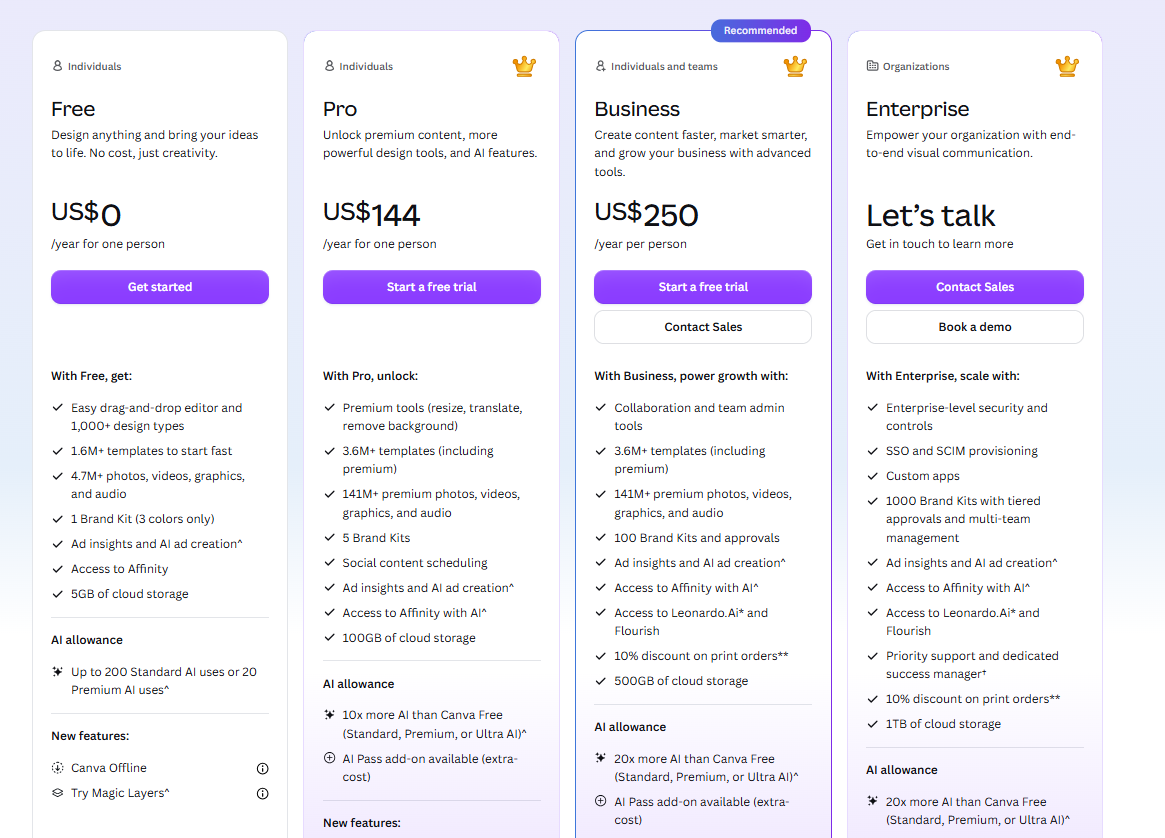
The free plan includes 50 AI credits per month for image generation and basic AI features. The Pro plan costs $18 per month on a monthly basis or $12 per month billed annually, and includes 500 AI credits per month, 140 million premium assets, 1 terabyte of storage, and a Brand Kit for maintaining consistent visual identity. Teams plans run at $25 per user per month. Magic Studio, Canva's umbrella for all AI features, now covers text-to-image, text-to-video, AI presentations, Magic Write for text generation, and background tools.
Canva AI's strongest advantage is integration depth. Every AI-generated image, video, or piece of text lands directly inside a template with correct dimensions for Instagram, LinkedIn, YouTube, or print, eliminating the resize-and-reformat step that standalone AI generators require.
Who is Canva AI Best For?
Content creators, marketers, and non-designers who need professional-looking visuals fast without hiring a designer
Canva AI Key Features
Canva AI Pricing & Plans
Canva AI Review Summary
| Performance Score | A |
| Content Quality | Design output is consistently professional with strong template quality across social, print, and presentation formats |
| Interface | Drag-and-drop editor is the most intuitive in the category — non-designers can produce polished work on the first session |
| AI Technology | Magic Studio integrates text-to-image, video generation, background removal, and layout automation into a single design workflow |
| Purpose | All-in-one AI-powered design platform for individuals, teams, and businesses creating visual content at scale |
| Compatibility | Web, Mobile, Desktop |
| Pricing Summary | Free plan with 200 AI uses per month, Pro at $15 per month or $10 per month annually, Business at $25 per user per month, Enterprise custom pricing |
Canva AI Pros & Cons
✅ Pros
- Free plan is genuinely useful with 200 monthly AI uses included
- Bundles premium assets worth thousands alongside AI at $15 per month
- Deepest template library of any design tool at 130 million plus
- Works on web, mobile, and desktop with real-time collaboration
❌ Cons
- Pro plan raised from $12.99 to $15 per month in 2026
- AI credits expire monthly and do not roll over
- Full AI suite only unlocks on Pro and above
- Business plan at $25 per user can get expensive for large teams
FAQs
What is Canva AI used for?
▼Is Canva AI free to use?
▼What platforms does Canva AI support?
▼Who is Canva AI best for?
▼Does Canva AI offer a free trial?
▼More AI Tools You Might Like

KAYAK's conversational AI search lets you chat your way to flights, hotels,…
View Tool ↗
Tripadvisor's AI trip builder creates custom itineraries from your saves, powered by…
View Tool ↗
Free AI travel assistant that lives in WhatsApp and Messenger, answering trip…
View Tool ↗
Free AI trip planner that turns your interests and budget into a…
View Tool ↗
Free trip planner that puts your itinerary, map, bookings, and budget in…
View Tool ↗
AI trip planner backed by human travel advisors who check your itinerary,…
View Tool ↗
Personal AI travel assistant that learns your style, builds mapped itineraries, tracks…
View Tool ↗
Dubai property intelligence with building level prices, rental yields and price forecasts,…
View Tool ↗