

Lido
✓ VerifiedNo-code document extraction that turns invoices, receipts, bank statements and tax forms into clean spreadsheet rows.
Best For: Small teams and bookkeepers who want document data in a spreadsheet without code
Lido Quick Facts
| Free Plan | Yes, a starter batch of free pages with no card and no expiry |
| Top Feature | Documents become Excel, Google Sheets or CSV rows with no setup code |
| Main Limitation | The Standard plan page allowance is small, and there is no mobile app yet |
The Verdict: Lido
Lido is the right pick for a small team whose finish line is a spreadsheet: no code, no training, and a free start that respects your time. Outgrow the Standard pages and the pricing jumps hard, so it suits steady small volume better than growth. Within that shape, it does its one job very well.
What is Lido?
Lido skips the API conversation entirely. You upload invoices, receipts, bank statements, purchase orders or tax forms, and it hands back clean rows in Excel, Google Sheets or CSV. In our roundup of the best AI image scanning tools it is the no-code spreadsheet pick, and for a bookkeeper or a small operations team it is the fastest route on this page from paper to numbers.
The free offer sets the tone: a batch of pages with no card and no expiry date, which is how a trial should behave. An API tool like Mindee serves builders better, but it cannot beat uploading a file and watching rows appear when the spreadsheet is the destination anyway.
Two catches keep the review honest. The Standard allowance is a small business week rather than a month once scanning becomes routine, and Lido states plainly that it does not work on mobile yet, so the paper has to reach a desk first. The Scale tier fixes the volume at a much higher price, with little middle ground between the two.
Who is Lido Best For?
Small teams and bookkeepers who want document data in a spreadsheet without code
Lido Key Features
Top Benefits of Lido
How to Use Lido
- Create a Lido account and take the free pages
- Upload an invoice, receipt or statement
- Watch the document become rows in a spreadsheet view
- Fix any field the extraction marked as doubtful
- Export to Excel, Google Sheets or CSV
- Move to a paid plan when the monthly page volume grows
Where Lido Fits: Use Cases
- Bookkeepers turning client receipts into spreadsheets
- Small businesses processing supplier invoices
- Operations teams cleaning bank statement data
- Anyone moving paper forms into Google Sheets
Lido Pricing & Plans
Lido Review Summary
| Performance Score | B |
| Content Quality | Reliable extraction into tidy spreadsheet rows across common business documents |
| Interface | A simple web app that a non-technical user can run in minutes |
| AI Technology | Document models tuned for invoices, receipts, statements and forms |
| Purpose | No-code document to spreadsheet extraction |
| Compatibility | Web app with Excel, Google Sheets and CSV export |
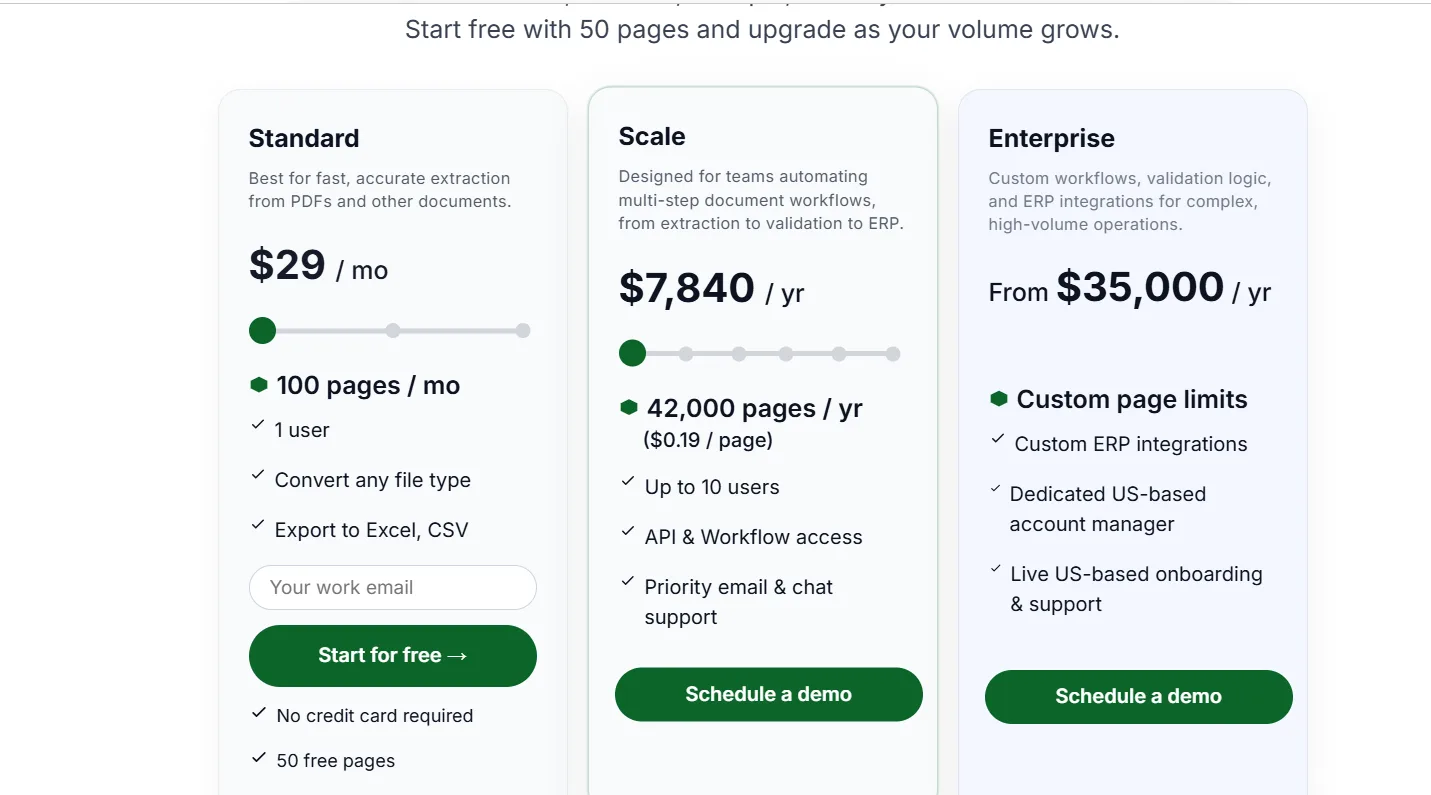
| Pricing Summary | Lido Standard costs $29 per month for 100 pages and 1 user. Scale costs $7,000 per year for 42,000 pages and up to 10 users. Enterprise starts at $35,000 per year with custom page limits. The free offer is 50 pages with no credit card, and the free pages do not expire. |
Lido Pros & Cons
✅ Pros
- The easiest route here from paper to spreadsheet
- Free pages never expire and need no card
- No code, templates or training required
- Exports match the tools small teams already use
- Handwritten documents are supported
❌ Cons
- The Standard allowance runs out fast at real volume
- No mobile app, so paper must reach a computer first
- The jump from Standard to Scale pricing is steep
- API access waits for the Scale tier
Alternatives to Lido
FAQs
Does Lido have a free plan?
▼How does Lido pricing work?
▼What formats does Lido export?
▼Can Lido read handwriting?
▼Does Lido work on mobile?
▼Is Lido secure for financial documents?
▼More AI Tools You Might Like

Developer-first document API that returns structured JSON from invoices, receipts, passports and…
View Tool ↗
Enterprise document platform for accounts payable that extracts invoice data with its…
View Tool ↗
Desktop OCR and PDF software for Windows and Mac that turns scans…
View Tool ↗
High-volume phone scanner from INTSIG with strong cleanup, OCR and file conversion…
View Tool ↗
AWS managed OCR service that extracts printed text, handwriting, tables, forms and…
View Tool ↗
Trainable document extraction that learns your invoices, orders and claims without templates…
View Tool ↗
Google Cloud document processing API with general OCR and prebuilt parsers for…
View Tool ↗
Intelligent document processing platform, now Doxis AI.dp, pairing extraction with fraud detection,…
View Tool ↗