

CapCut
✓ VerifiedCapCut is a free AI video editor with automatic captions, background removal, text-to-video generation, and a full editing suite built for short-form content creators.
Best For: Short-form content creators, TikTok and Instagram Reels producers, and beginners who need a full-featured AI video editor at no cost
The Verdict: CapCut
CapCut is the best free video editor for short-form content creators who produce TikTok, Instagram Reels, and YouTube Shorts regularly. The free plan covers a remarkable range of editing needs without payment, and the auto-caption quality is genuinely competitive with dedicated transcription tools. For solo creators on a budget, it is hard to find a better starting point at zero cost.
The Pro plan at $19.99 per month is harder to justify in 2026 given the price increase and the AI credit limits that heavy users exhaust within two weeks. The terms of service change on cloud uploads is a real consideration for professionals and agencies handling client content. If you need full video generation from scripts, tools like Pictory handle that workflow more completely. If you need cinematic AI footage, Runway ML is the better choice. For fast social editing with minimal budget, CapCut remains the practical default.
What is CapCut?
CapCut is a cross-platform video editing tool developed by ByteDance that combines traditional editing with a growing suite of AI features including auto-captions, background removal, AI video generation, voice cloning, and filler word removal. It runs on iOS, Android, Windows, Mac, and web browser, making it the most accessible AI video editor available across devices. The free plan is one of the strongest in the category and covers auto-captions in 20 plus languages, auto-cut, background removal on short clips, and 1080p export.
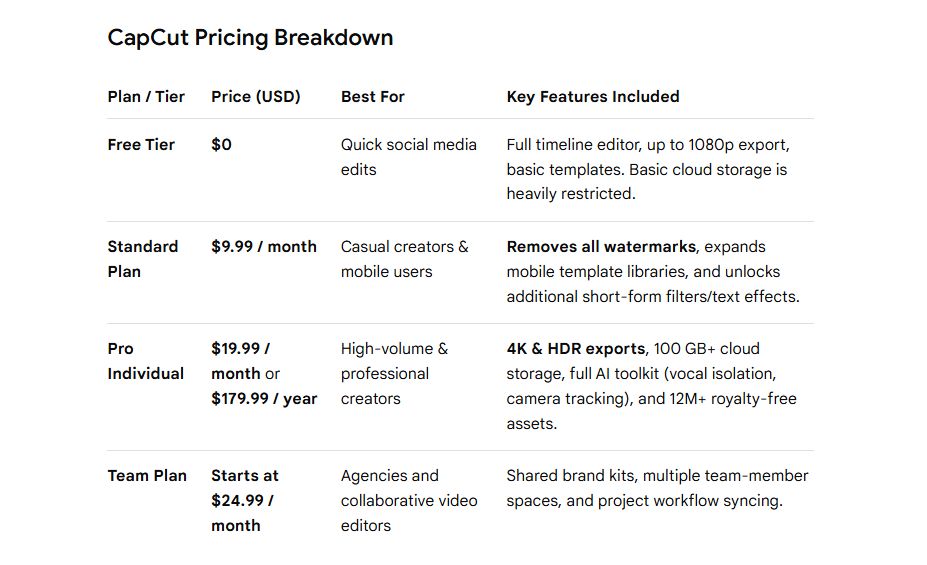
The Pro plan was repriced in 2026 and now costs $19.99 per month or $179.99 per year, with 1,200 AI points per month and 1TB cloud storage. A Standard tier at approximately $10 per month sits below Pro for creators who need watermark-free exports without the full AI toolkit. In March 2026, ByteDance rolled out Dreamina Seedance 2.0 video generation inside CapCut after a brief pause over Hollywood copyright concerns. The platform also runs on ByteDance's Seedream 5.0 model for image generation.
One important note for brand and agency users: CapCut updated its terms of service in June 2025 to grant itself a non-exclusive, worldwide, perpetual, irrevocable, sublicensable license to content uploaded to its cloud. This has prompted significant pushback from creators and legal professionals and is worth reviewing before uploading client or proprietary work.
Who is CapCut Best For?
Short-form content creators, TikTok and Instagram Reels producers, and beginners who need a full-featured AI video editor at no cost
CapCut Key Features
CapCut Pricing & Plans
CapCut Review Summary
| Performance Score | A |
| Content Quality | AI auto-captions are among the most accurate available for short-form video at any price, and the template library produces professional-looking social content quickly |
| Interface | Intuitive timeline editor that works identically across mobile and desktop with drag-and-drop simplicity designed for non-professionals |
| AI Technology | Uses AI for automatic captioning, background removal, smart cutout, text-to-video generation, and voice effects with speaker identification |
| Purpose | Full-featured AI video editing platform for short-form content creators across TikTok, Instagram Reels, YouTube Shorts, and social media |
| Compatibility | Web, Mobile, Desktop |
| Pricing Summary | Free plan with 1080p export and core AI tools, Standard at $10/month, Pro at $20/month or $15/month annually with 4K and text-to-video, Team at $25/user/month |
CapCut Pros & Cons
✅ Pros
- Free plan is the most complete of any AI video editor at no cost
- AI auto-captions are fast and accurate enough for production use
- Works across web, mobile, and desktop with shared project access
- Pro at $20 per month includes text-to-video and 4K export
❌ Cons
- Price restructured in early 2026 — Pro jumped from $8 to $20 per month surprising annual subscribers
- ByteDance ownership raises data privacy concerns for some enterprise users
- Standard plan at $10 per month lacks 4K export and full AI toolkit
- Team plan at $25 per user per month is expensive for agencies
FAQs
What is CapCut AI used for?
▼Is CapCut AI free to use?
▼What platforms does CapCut AI support?
▼Who is CapCut AI best for?
▼Does CapCut AI offer a free trial?
▼More AI Tools You Might Like

KAYAK's conversational AI search lets you chat your way to flights, hotels,…
View Tool ↗
Tripadvisor's AI trip builder creates custom itineraries from your saves, powered by…
View Tool ↗
Free AI travel assistant that lives in WhatsApp and Messenger, answering trip…
View Tool ↗
Free AI trip planner that turns your interests and budget into a…
View Tool ↗
Free trip planner that puts your itinerary, map, bookings, and budget in…
View Tool ↗
AI trip planner backed by human travel advisors who check your itinerary,…
View Tool ↗
Personal AI travel assistant that learns your style, builds mapped itineraries, tracks…
View Tool ↗
Dubai property intelligence with building level prices, rental yields and price forecasts,…
View Tool ↗