

Auphonic
✓ VerifiedAuphonic is an automated audio post-production service that normalizes loudness, reduces noise, and encodes podcast episodes to broadcast standards without manual editing.
Best For: Podcasters who want automated loudness normalization, noise reduction, and multi-platform encoding without manual audio editing
The Verdict: Auphonic
Auphonic is the best automated mastering tool for podcasters who want consistent, broadcast-ready audio without spending time on manual loudness normalization. The combination of loudness normalization to platform standards, noise reduction, and multi-speaker level balancing in one upload handles the entire post-production mastering step automatically. For podcasters who currently spend 20 to 30 minutes per episode on levels and noise cleanup in a DAW, Auphonic reduces that to the time it takes to upload a file.
The limitation compared to tools like Cleanvoice is that Auphonic focuses on mastering and leveling rather than filler word removal. If your primary editing problem is too many "ums" and awkward pauses, Cleanvoice or Descript handles that workflow better. For final-stage loudness and consistency work before publishing, Auphonic is the most focused and automated option available at the price point.
What is Auphonic?
Auphonic is an automated audio mastering and post-production service built for podcasters, broadcasters, and audio content creators who want broadcast-ready output without manual loudness normalization, noise reduction, or level balancing. The service takes a raw audio or video file and automatically applies intelligent loudness normalization to LUFS broadcast standards, reduces background noise, balances levels between multiple speakers, removes noise and hum, and can auto-publish directly to podcast platforms.
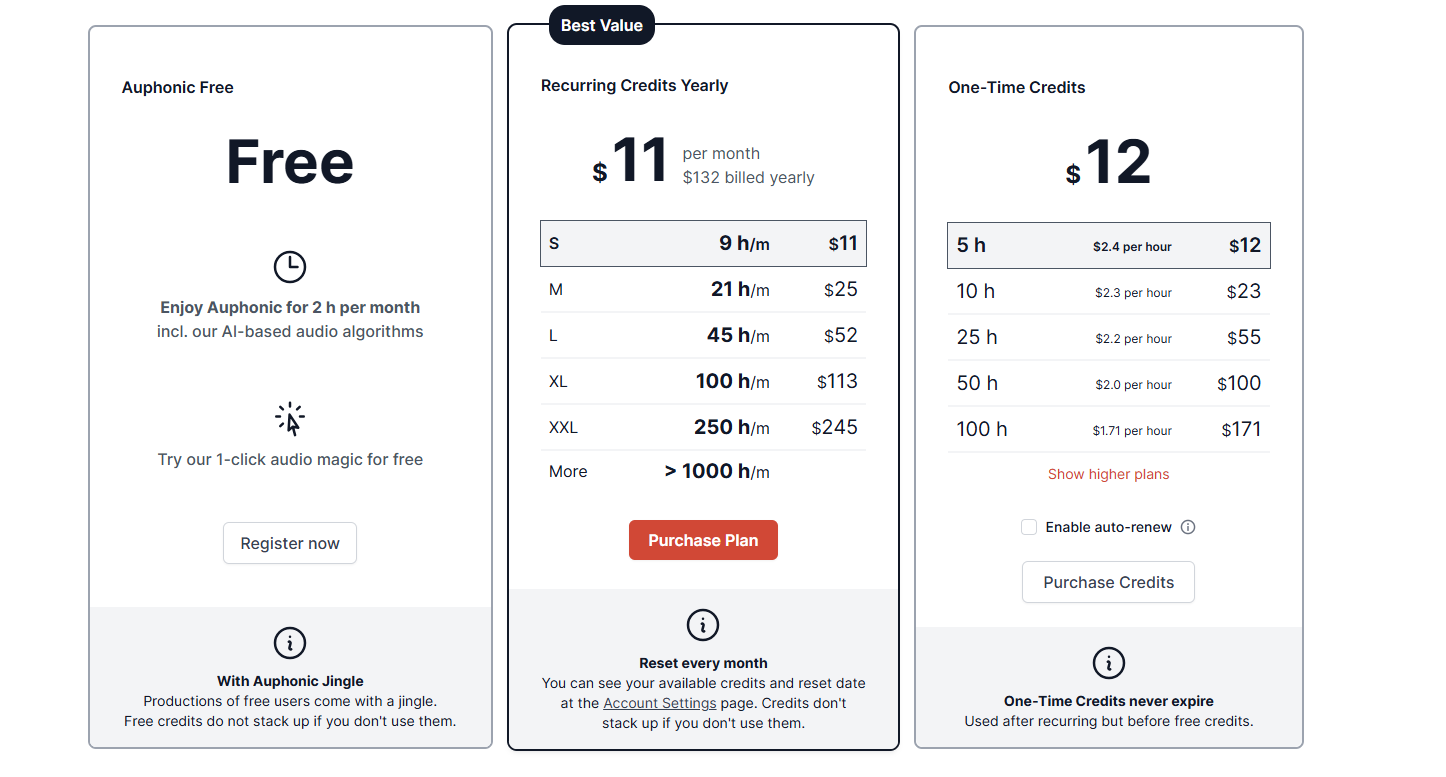
The web-based service works on audio and video files uploaded through the browser and requires no software installation. Auphonic processes using its AI algorithms on cloud servers, and the output is a finished file ready for distribution. The free plan includes 2 hours of processing per month. Paid plans run on a credit system starting at $11 per month for approximately 9 hours of processing, scaling up based on volume. Annual billing reduces the effective monthly rate. Auphonic also offers a one-time credit purchase option for users with irregular processing needs.
Auphonic integrates with podcast hosting platforms for direct publishing after processing, and supports batch processing for producers running multiple episodes simultaneously.
Who is Auphonic Best For?
Podcasters who want automated loudness normalization, noise reduction, and multi-platform encoding without manual audio editing
Auphonic Key Features
Auphonic Pricing & Plans
Auphonic Review Summary
| Performance Score | B |
| Content Quality | Loudness normalization and noise reduction are technically accurate and reliable — audio consistently meets platform standards after processing without manual adjustment |
| Interface | Functional but dated web interface that prioritizes configuration accuracy over modern UX design |
| AI Technology | Machine learning models for loudness leveling, noise classification, and multi-speaker audio separation applied automatically during cloud processing |
| Purpose | Automated audio mastering and podcast post-production for creators who want processing handled without manual DAW work |
| Compatibility | Web, API |
| Pricing Summary | Free 2 hrs/month, S plan $11/mo annually with 9 hrs, M plan $23/mo annually with 21 hrs, L plan $45/mo annually with 45 hrs, XL plan $89/mo annually with 100 hrs |
Auphonic Pros & Cons
✅ Pros
- Free plan with 2 hours monthly is genuinely useful for podcasters publishing shorter episodes
- Automates the loudness mastering step that most podcasters skip but platforms require
- Direct upload integrations with podcast hosts save significant time on distribution
- Multitrack processing handles interview podcasts with multiple guest recordings
❌ Cons
- 2-hour free monthly limit runs out within one or two standard episodes
- Interface is dated and less intuitive than Adobe Podcast or Descript
- Audio cleanup is conservative — less dramatic on problem recordings than Adobe Podcast Enhance
- No video support — audio only
FAQs
What is Auphonic used for?
▼Is Auphonic free to use?
▼What platforms does Auphonic support?
▼Who is Auphonic best for?
▼Does Auphonic offer a free trial?
▼More AI Tools You Might Like

KAYAK's conversational AI search lets you chat your way to flights, hotels,…
View Tool ↗
Tripadvisor's AI trip builder creates custom itineraries from your saves, powered by…
View Tool ↗
Free AI travel assistant that lives in WhatsApp and Messenger, answering trip…
View Tool ↗
Free AI trip planner that turns your interests and budget into a…
View Tool ↗
Free trip planner that puts your itinerary, map, bookings, and budget in…
View Tool ↗
AI trip planner backed by human travel advisors who check your itinerary,…
View Tool ↗
Personal AI travel assistant that learns your style, builds mapped itineraries, tracks…
View Tool ↗
Dubai property intelligence with building level prices, rental yields and price forecasts,…
View Tool ↗