

Julius AI
✓ VerifiedAI workspace that analyzes spreadsheets in plain English and also builds slides, reports, websites, images and video from your data and prompts.
Best For: Analysts, marketers and founders who want to chat with spreadsheets and build slides fast
The Verdict: Julius AI
Julius AI is one of the easiest ways to get real answers out of a spreadsheet without learning a formula. The chat-first design is the strength. You ask, it answers, and you get a chart you can actually use. The free plan makes it easy to test with one of your own files.
The catch is credits. Everything runs on a usage allowance, and heavy users can burn through it faster than expected. The free plan is also thin, permanent storage is reserved for the $166 Max plan, and doing so many things means it isn't the best at every one of them.
If your main job is analyzing data and building quick slides or reports, start with Plus. If you need advanced dashboards, look at Power BI. And if you mostly want a general chatbot, ChatGPT or Claude might cover you already.
What is Julius AI?
Julius AI is an AI workspace that analyzes your data through chat and turns the results into charts, slides, reports, websites, images and video. You upload a spreadsheet or connect a source like Google Drive, ask a question in plain English, and Julius answers with numbers and visuals. No formulas needed.
It started as a tool for chatting with data, and it has grown well beyond that. Today the same chat box can build a presentation, generate a report from your numbers, spin up a website or create an image. There's also a Browser Agent for web tasks and a reasoning mode for harder questions.
Who's it for? Analysts, marketers, founders and students who work in spreadsheets but don't want to write code. If you spend your day in Excel and wish you could just ask it what changed last quarter, Julius is built for that.
Who is Julius AI Best For?
Analysts, marketers and founders who want to chat with spreadsheets and build slides fast
Julius AI Key Features
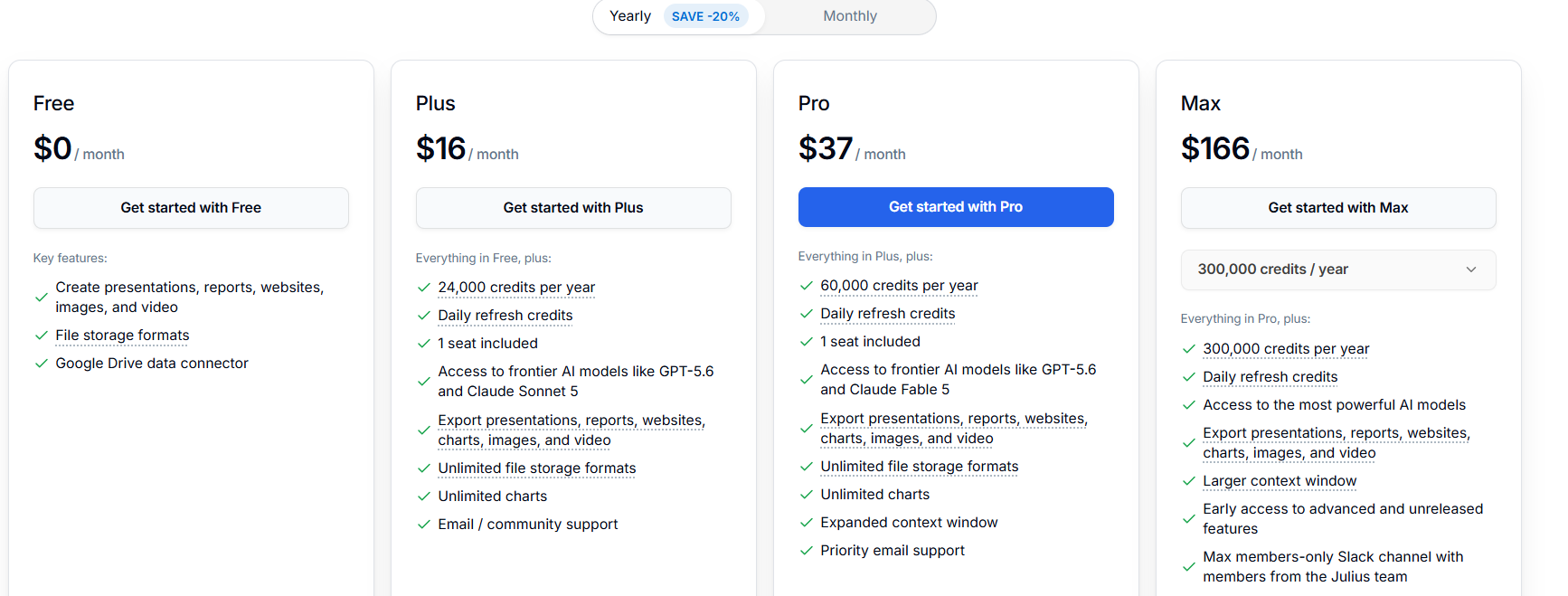
Julius AI Pricing & Plans
Julius AI Review Summary
| Performance Score | A |
| Content Quality | Charts and answers come back clean and readable, and the slides and reports are good enough for a first draft you can polish quickly. |
| Interface | The interface is a simple chat box with shortcuts for Excel, slides, websites, images and video, so beginners can start without any setup. |
| AI Technology | Julius uses its own Julius 1.2 model plus frontier models like GPT-5.6 and Claude Sonnet 5 on paid plans. |
| Purpose | Julius helps you analyze data by chatting and turn results into slides, reports, websites, images and video. |
| Compatibility | Web |
| Pricing Summary | Julius has a free plan, with Plus at $16, Pro at $37 and Max at $166 per month on yearly billing, each with a yearly credit allowance. |
Julius AI Pros & Cons
✅ Pros
- You can ask questions about a spreadsheet in plain English and get real charts back
- One workspace covers data analysis, slides, reports, websites, images and video
- A free plan lets you test it before paying
- Higher plans give access to top models like GPT-5.6 and Claude Sonnet 5
- Paid plans include unlimited charts and unlimited file storage formats
- Yearly billing saves 20%, so Plus drops to $16 a month
- Daily refresh credits mean you don't hit a hard wall if you use it every day
❌ Cons
- Usage runs on credits, so heavy users can burn through their allowance quickly
- The free plan is limited, with a Google Drive connector as its only listed data source
- Max costs $166 a month, which is steep for individuals
- Permanent file storage is locked to the Max plan
- Monthly billing costs more than the yearly price shown
- Covering so many jobs means dedicated tools may beat it in one area, like pure slide design
FAQs
What is Julius AI used for?
▼Is Julius AI free?
▼How much does Julius AI cost?
▼Can Julius AI analyze Excel files?
▼Is Julius AI better than ChatGPT for data analysis?
▼What AI models does Julius AI use?
▼Can Julius AI create presentations and websites?
▼What are Julius AI credits?
▼What are the best alternatives to Julius AI?
▼More AI Tools You Might Like

Cloud analytics platform for exploring live warehouse data, building dashboards, AI apps,…
View Tool ↗
Enterprise data platform with AI agents, Magic ETL, and credit based pricing…
View Tool ↗
BI and AI analytics platform with Ask Zia for conversational queries and…
View Tool ↗
AI analytics workspace combining SQL and Python notebooks with a conversational Hex…
View Tool ↗
Google Cloud BI platform with Gemini powered conversational analytics and a LookML…
View Tool ↗
Governed AI analytics platform with Qlik Answers and predictive modeling for enterprise…
View Tool ↗
AI analytics platform with Spotter agents for natural language search, dashboards, and…
View Tool ↗
Cloud financial management platform that automates multi entity accounting, dimensional reporting, and…
View Tool ↗