

Polymer
✓ VerifiedAI-powered business intelligence tool that turns spreadsheets and marketing data into interactive dashboards without code or a complicated setup.
Best For: Marketers, e-commerce owners and agencies who want quick dashboards without a data team
The Verdict: Polymer
Polymer is a good pick if you want dashboards quickly and don't want to learn a full BI tool. The speed is the real selling point. A messy spreadsheet becomes something you can show a client in minutes, and the AI chat makes the data feel approachable for people who avoid spreadsheets.
But it isn't Power BI. Advanced modeling is limited, AI chat responses are capped by plan, and there's no permanent free tier, so you're paying once the trial ends. Shopify costs extra too, and API access for embedding starts at $500 a month. Honestly, most people get this wrong by comparing it to enterprise BI. It's closer to a fast reporting tool for marketers.
Start with the trial and upload one real report you already build by hand. If Polymer saves you time on that one, it will pay for itself. If you need heavy data modeling or the lowest price per user, look at Power BI or Looker Studio first.
What is Polymer?
Polymer is an AI-powered business intelligence tool that turns spreadsheets and marketing data into interactive dashboards. You upload a file or connect a source like Shopify or Google Analytics, and Polymer builds charts for you. No formulas. No query language.
Here's how it works in practice. You bring in your data, the AI suggests visualizations and highlights patterns, and you adjust the layout with drag and drop. You can also type a question in the chat, something like "which campaign brought the most revenue," and Polymer answers with a chart. Then you share the dashboard by link with your team or client.
It's built for people who need answers fast and don't have a data team. Think marketers, store owners, agencies and small business teams. Developers can also use the API to add analytics inside their own apps, though that starts at $500 a month.
Who is Polymer Best For?
Marketers, e-commerce owners and agencies who want quick dashboards without a data team
Polymer Key Features
Polymer Pricing & Plans
Polymer Review Summary
| Performance Score | B |
| Content Quality | Dashboards look clean and modern, and the AI generated charts are usually good enough to share with clients after light editing. |
| Interface | The interface is simple and beginner friendly, though power users may miss deeper controls for custom data modeling. |
| AI Technology | The AI builds dashboards, explains insights and answers questions in chat, which saves real time for non-technical users. |
| Purpose | Polymer helps marketers, store owners and agencies turn raw data into shareable dashboards without coding. |
| Compatibility | Web |
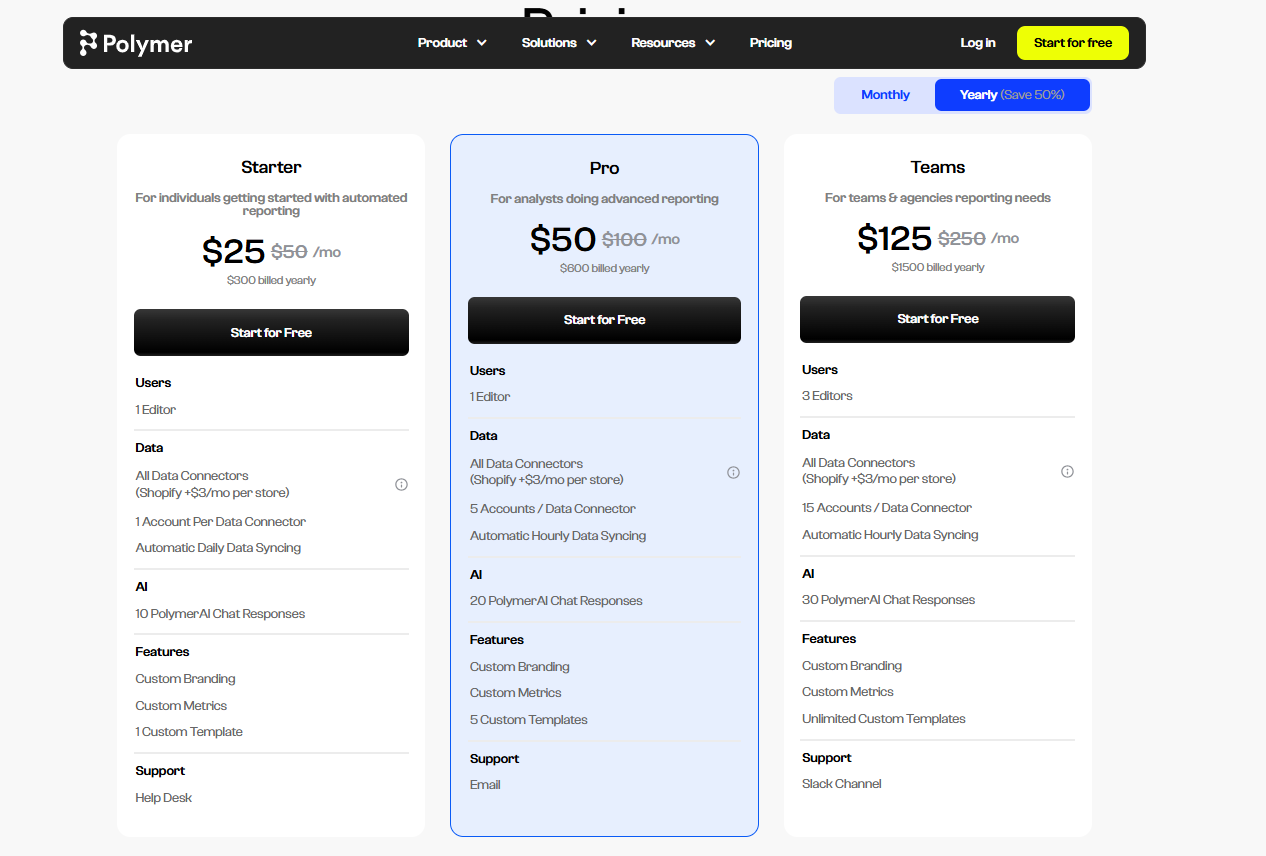
| Pricing Summary | Plans start at $25 per month billed yearly for Starter, rising to $50 for Pro and $125 for Teams, with monthly billing costing double. |
Polymer Pros & Cons
✅ Pros
- You can go from a raw spreadsheet to a working dashboard in a few minutes
- No SQL, DAX or formulas are needed to get useful charts
- The AI chat lets non-technical people ask plain questions about their numbers
- Shopify, Google Ads and Facebook Ads connections suit marketers and store owners
- Custom branding and custom metrics come with every plan, even Starter
- Yearly billing cuts the price by 50%, so Starter drops to $25 a month
- Higher plans add more accounts per connector, which suits agencies with many clients
❌ Cons
- There is no permanent free plan, only a free trial
- AI chat responses are capped at 10, 20 or 30 depending on the plan
- Shopify costs an extra $3 a month per store on top of the plan price
- Starter includes only 1 editor and 1 account per data connector
- Advanced data modeling is thinner than in Power BI or Tableau
- API access for embedding starts at $500 a month, which is a big jump from the individual plans
- There is no dedicated mobile app, so everything happens in the browser
FAQs
What is Polymer Search used for?
▼Is Polymer Search free?
▼How much does Polymer cost per month?
▼Is Polymer easier than Power BI?
▼Can Polymer connect to Google Sheets and Shopify?
▼Does Polymer have an API?
▼Is Polymer Search the same as Polymer.co?
▼What are the best alternatives to Polymer Search?
▼More AI Tools You Might Like

Cloud analytics platform for exploring live warehouse data, building dashboards, AI apps,…
View Tool ↗
Enterprise data platform with AI agents, Magic ETL, and credit based pricing…
View Tool ↗
BI and AI analytics platform with Ask Zia for conversational queries and…
View Tool ↗
AI analytics workspace combining SQL and Python notebooks with a conversational Hex…
View Tool ↗
Google Cloud BI platform with Gemini powered conversational analytics and a LookML…
View Tool ↗
Governed AI analytics platform with Qlik Answers and predictive modeling for enterprise…
View Tool ↗
AI analytics platform with Spotter agents for natural language search, dashboards, and…
View Tool ↗
Cloud financial management platform that automates multi entity accounting, dimensional reporting, and…
View Tool ↗