

Browser Use
✓ VerifiedOpen source library that lets AI agents drive a real browser from Python or TypeScript, with an optional hosted cloud.
Best For: Developers building AI agents that browse, click and extract data from websites
Browser Use Quick Facts
| Founded | 2024, by Magnus Muller and Gregor Zunic |
| Free Plan | Yes, the library is free and open source under MIT |
| Top Feature | Agents that operate a real Chrome browser from code and plain language goals |
| Main Limitation | Developer only, with no ready made product for non technical users |
The Verdict: Browser Use
Browser Use is the default starting point for developers who want agents that browse, and the free library makes that an easy call. Start local, prove the task works, then rent the cloud for the runs that earn it. Teams that would rather skip browser plumbing entirely should look at hosted infrastructure instead. Anyone happy in code will feel at home here, and the pay as you go cloud means the experiment never turns into a subscription you forgot about.
What is Browser Use?
Browser Use is an open source library that gives an AI agent a real Chrome browser to drive, so software can open pages, click through flows and pull out data the way a person would. You write the task in plain language, connect a model, and the agent works through the steps in the browser itself. It is one of the tools we track in our best AI browsers roundup at GuideAITools.
The split personality is the appeal. The library runs free on your own machine, in Python or TypeScript, with your own model keys. When runs get heavy or sites get defensive, the same project rents you cloud browsers by the minute, with stealth traffic and a hosted agent API. Against Browserbase, the other big name in this corner, Browser Use is the do it yourself end of the trade: more control, and more of the plumbing owned by you.
The limits follow from that. There is no visual product here, so non technical teammates watch from the sidelines. Agents still stumble on awkward flows and defended pages, and every step burns model tokens, so an unsupervised fleet needs budgets and logging from day one.
The Company Behind Browser Use
Browser Use began in 2024 at ETH Zurich, where data science students Magnus Muller and Gregor Zunic built the first version inside the university Student Project House. The open source library spread fast through developer communities and became one of the most starred web agent projects on GitHub, and the pair went through Y Combinator in the Winter 2025 batch as the company behind it. The library turned into infrastructure that other agent builders lean on, and work built on it, Manus included, carried it far beyond developer circles. The team, now based in San Francisco, runs the hosted cloud beside the open source project and keeps the library itself free under the MIT license.
Who is Browser Use Best For?
Developers building AI agents that browse, click and extract data from websites
Browser Use Key Features
Top Benefits of Browser Use
How to Use Browser Use
- Install the library with pip or npm and connect the model you want to drive it
- Write a task in plain language and point the agent at your local Chrome
- Watch the run, then tighten the task wording and your extraction schema
- Move heavy or stealth runs to the cloud browsers with an API key
- Add credits as usage grows and raise concurrency only when the work needs it
Where Browser Use Fits: Use Cases
- Research agents that gather prices, listings and facts across many sites
- Form filling and back office work on sites with no API
- Testing how real users move through your own web product
- Data extraction pipelines that feed spreadsheets and databases
- Agent products that need a browsing layer without building one
- Monitoring pages for changes that matter to a business
Browser Use Pricing & Plans
Browser Use Review Summary
| Performance Score | B |
| Content Quality | A developer tool judged by developer standards, with a strong documentation culture and a very public changelog. |
| Interface | Code first, in Python or TypeScript, with a cloud dashboard for keys, credits and runs rather than a visual builder. |
| AI Technology | A model agnostic agent loop over real Chrome, with tuned BU models offered beside the big provider models. |
| Purpose | Giving AI agents a working browser, from a laptop experiment to a hosted fleet. |
| Compatibility | API |
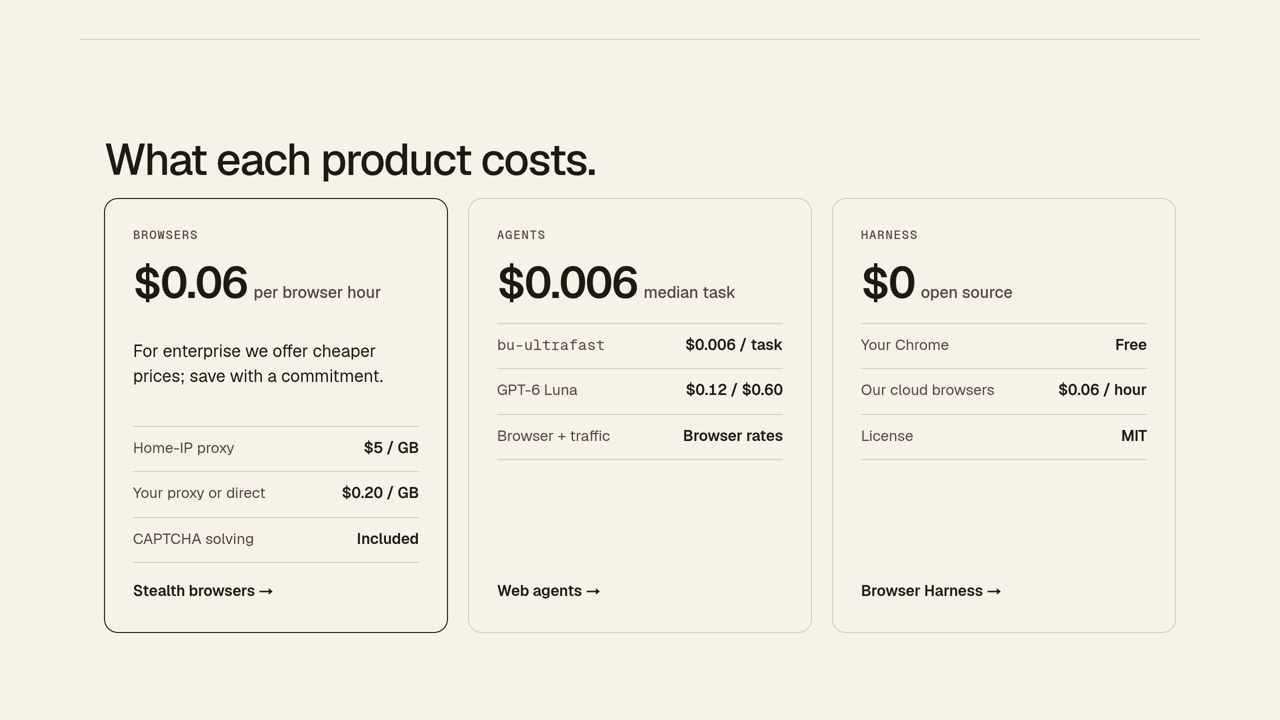
| Pricing Summary | The library is free under the MIT license, and the cloud is pay as you go with no subscription, cloud browsers at $0.06 per hour billed by the minute, credits from $5 with a $1 signup credit, home IP traffic at $5 per GB and concurrency rising with total spend from 10 browsers at once to 1,000. |
Browser Use Pros & Cons
✅ Pros
- The library itself is free and open source, with a huge developer community
- Agents work in a real browser, so modern JavaScript heavy sites behave
- Cloud pricing has no subscription and credits never expire
- Stealth options and home IP traffic help on defended sites
- Fast moving project, with the cloud and models improving in public
- Enterprise terms cover compliance needs when a pilot grows up
❌ Cons
- You need to write code, there is no point and click version
- Model costs sit on top, and a chatty agent can run up a bill quietly
- Success rates vary by site, and defended pages still break runs
- Self hosting the browsers means owning the scaling and the headaches
- Support is community led on the free side, so answers can take time
Alternatives to Browser Use
Browserbase - Hosted browser infrastructure with an SDK, for teams that would rather rent the whole stack than run a library.
Perplexity Comet - A finished AI browser for people, useful when the job needs a person in the loop rather than code.
Opera Neon - Agentic browser that takes on tasks itself, no code and no self hosting.
Fellou - Agentic browser that plans and completes multi step tasks for end users.
FAQs
What is Browser Use?
▼Is Browser Use free?
▼How much does the Browser Use cloud cost?
▼Which models can drive Browser Use agents?
▼How is Browser Use different from Browserbase?
▼Can Browser Use log in to websites?
▼Is Browser Use safe for business data?
▼More AI Tools You Might Like

AI powered browser features for previews, tab cleanup, ChatGPT access and calmer…
View Tool ↗
AI browser agent for summaries, web automation, page monitoring, SEO, email replies…
View Tool ↗
AI assistant for chatting with top models, summarizing pages, writing content and…
View Tool ↗
AI browser from the Arc team that chats across your open tabs,…
View Tool ↗
AI browser sidebar for chat, page summaries, translation, PDF reading, automation and…
View Tool ↗
Google's free browser with Gemini built in, answering across your open tabs,…
View Tool ↗
Opera's agentic browser, where AI agents research, browse and build for you…
View Tool ↗
Privacy-first browser with the Leo assistant built in, blocking ads and trackers…
View Tool ↗