

Dia
✓ VerifiedAI browser from the Arc team that chats across your open tabs, connects your work tools and starts each day with a brief.
Best For: Knowledge workers who live in tabs and want one assistant that can read them all
Dia Quick Facts
| Founded | 2019 by Josh Miller and Hursh Agrawal, as The Browser Company |
| Free Plan | Yes, the browser is free, but the free plan has no AI features |
| Top Feature | An assistant that chats with every open tab at once |
| Main Limitation | Desktop only, with no mobile or Linux version |
The Verdict: Dia
Dia is the AI browser to pick when your work spreads across more tabs than you can hold in your head. The assistant earns its place by reading what is already open and by knowing your tools, and the browser underneath is good enough that the switch does not feel like a sacrifice. Start on the trial and watch how often you ask Dia something your old browser could not answer. If the free plan tempts you, remember it drops the AI entirely, so the paid tier is the real product here.
What is Dia?
Dia is an AI browser built for knowledge work, made by the team that created Arc. A chat assistant sits in the sidebar and works with the tabs you already have open, reading across them to answer questions, compare pages and draft text in context. It is one of the tools we track in oour best AI browsers roundup at GuideAITools.
Connections to Slack, Gmail, Notion, GitHub and calendars let Dia pull project context into its answers, and a morning brief gathers what changed while you were away. Saved Skills turn repeat jobs into one-click routines, and memory learns your preferences behind controls you can pause or clear. Profiles, tab groups, split view and a built-in ad blocker cover the browser basics, and sync between machines is end-to-end encrypted.
The catch is the shape of the pricing. The free download is a browser only, with the AI held back for paying plans, and usage on those plans is metered. People who want the assistant without moving browsers often pick Sider instead, which rides on top of Chrome or Edge. Dia asks for a full switch, and rewards people whose workday really does live in tabs.
The Company Behind Dia
The Browser Company of New York was founded in 2019 by Josh Miller and Hursh Agrawal. The team made its name with Arc, a browser that rethought tabs and workspaces and picked up a loyal crowd of designers and developers. In 2025 the company stopped adding to Arc and put its energy into Dia, an AI-first browser shaped around knowledge work. Atlassian, the company behind Jira and Confluence, agreed to buy The Browser Company in September 2025, and the deal closed the following month. Dia now sits inside Atlassian's family of work tools while the same New York team keeps building it, and Arc is being retired with Dia as its replacement.
Who is Dia Best For?
Knowledge workers who live in tabs and want one assistant that can read them all
Dia Key Features
Top Benefits of Dia
How to Use Dia
- Download Dia for macOS or Windows and sign in
- Import your bookmarks, passwords and history from your old browser
- Start the free trial if you want to try the AI at full strength
- Open your usual tabs, then ask Dia in the sidebar about anything on them
- Connect tools like Slack or Gmail so answers can pull in project context
- Save a Skill when a job repeats, and run it instead of typing the same ask again
Where Dia Fits: Use Cases
- Research across a dozen tabs without losing the thread
- Meeting prep from the docs, threads and pages already open
- Drafting replies and updates in the tone of the thread in front of you
- Summarising long reports and contracts into the points that matter
- Onboarding into a project by chatting with its scattered pages
- End-of-day recaps of what moved and what is still open
Dia Pricing & Plans
Dia Review Summary
| Performance Score | B |
| Content Quality | Answers read well and stay close to the tabs they draw on, though long briefs still need a human skim before you trust them. |
| Interface | Clean and calm, closer to a notebook than a control panel, with the assistant living in the sidebar. |
| AI Technology | A built-in assistant with tab context, memory and tool connections, metered by plan rather than sold per message. |
| Purpose | Helping knowledge workers research, draft and keep up with work that spreads across many tabs and tools. |
| Compatibility | Desktop |
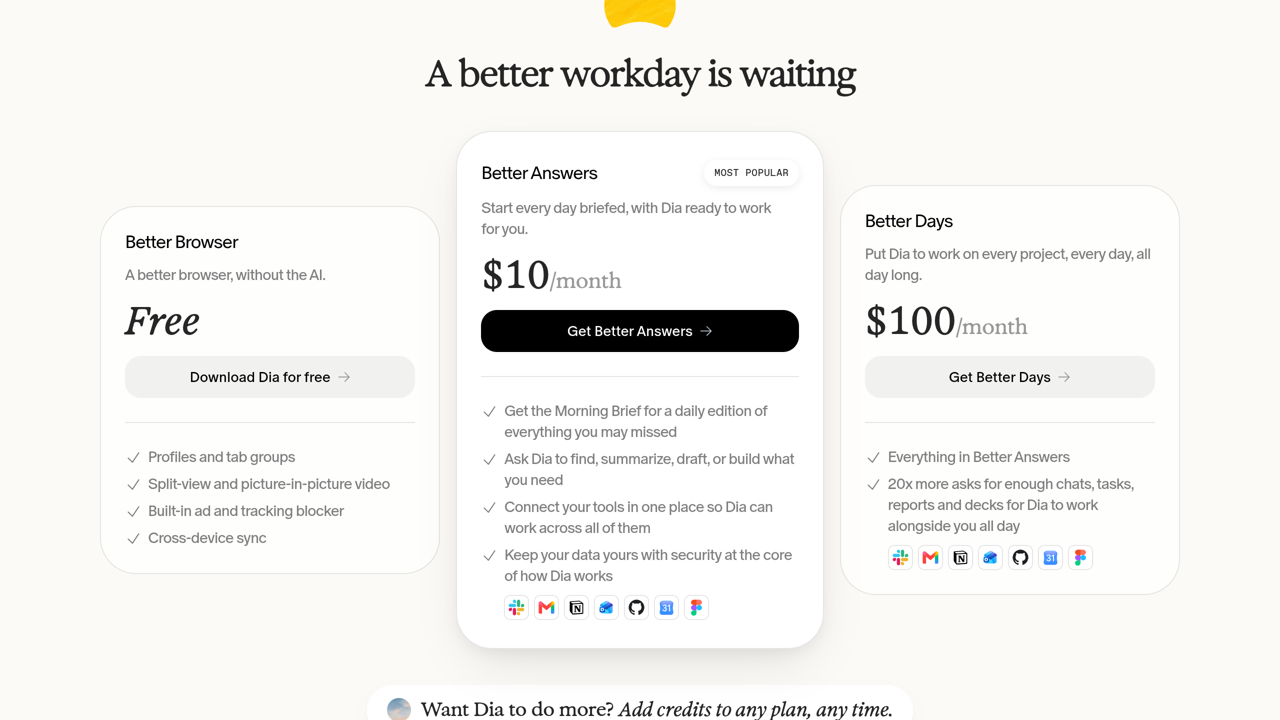
| Pricing Summary | Dia is free as a browser with no AI included, Better Answers costs $10/month for the assistant with your tabs and connected tools, Better Days costs $100/month for much higher usage, and new users start with a 14-day free trial of Better Days. |
Dia Pros & Cons
✅ Pros
- Tab-aware chat removes the copy and paste routine of normal chatbots
- The browser side is polished, with profiles, tab groups and split view
- Connected tools give answers real project context
- Data is never sold, and memory controls are easy to find
- Atlassian ownership gives a young browser a stable home
- Sync between machines is end-to-end encrypted
❌ Cons
- The free plan has no AI at all, so the headline feature needs a subscription
- Desktop only, with no app for phones and no Linux version
- AI use is metered, and heavy days can push you toward credit top-ups
- Plans and prices have changed more than once in a year
- A few Arc favourites, such as Boosts and Easels, did not come across
Alternatives to Dia
Perplexity Comet - Answer-first browser from Perplexity that researches and acts inside the same window.
Google Chrome - The default browser for most people, now with Gemini built in and every extension going.
Brave - Privacy-first browser whose Leo assistant never keeps your chats.
Sider - An AI sidebar and agent that adds assistance to Chrome or Edge instead of replacing your browser.
FAQs
What is Dia?
▼Is Dia free?
▼How much does Dia cost?
▼What is the Morning Brief?
▼Does Dia work on Windows?
▼What happened to Arc?
▼Who owns Dia now?
▼More AI Tools You Might Like

Open source library that lets AI agents drive a real browser from…
View Tool ↗
Agentic AI browser that plans multi-step tasks, shows you the workflow before…
View Tool ↗
Opera's agentic browser, where AI agents research, browse and build for you…
View Tool ↗
Google's free browser with Gemini built in, answering across your open tabs,…
View Tool ↗
AI browser from Perplexity with a built-in assistant that answers questions across…
View Tool ↗
AI assistant for chatting with top models, summarizing pages, writing content and…
View Tool ↗
Cloud platform that rents headless browsers to AI agents by the hour,…
View Tool ↗
AI browser assistant for summarizing pages, chatting with PDFs, writing, translating and…
View Tool ↗