

Streak CRM
✓ VerifiedCRM that lives inside Gmail with AI deal summaries, magic columns, and pipeline management in your inbox.
Best For: Teams that run their entire sales process inside Gmail and refuse to leave
The Verdict: Streak CRM
Streak is the best CRM for Gmail obsessed teams, and the inbox native design means adoption is nearly automatic. The AI features like magic columns and deal Q and A are genuinely useful, and unlimited records on paid plans is generous. The Gmail lock-in is absolute. If your company ever moves to Outlook, Streak becomes worthless overnight. AI credits are tight on Pro at 20 per month, and the same plan rule for whole teams removes flexibility. For committed Gmail shops, this is a joy to use. For anyone else, it is a non starter.
What is Streak CRM?
Streak is a CRM that lives inside Gmail. Instead of asking reps to open another app, it turns the inbox into a pipeline manager where deals, contacts, and tasks sit alongside the emails that created them. Teams manage the entire sales process without leaving Gmail. The platform works through a Chrome extension that adds pipeline views, deal tags, and contact sidebars directly into Gmail. AI data entry updates records from email activity, magic columns calculate things like days in stage automatically, and natural language Q and A answers pipeline questions with citations. Mail merge sends personalized campaigns with automatic follow-ups, while automations handle task creation and notifications. Everything syncs across the team in real time. Streak fits freelancers, agencies, startups, and sales teams that run on Google Workspace. Real estate, recruiting, and business development teams that live in email adopt it fastest. The free email tools hook individuals, and teams upgrade when they need shared pipelines.
Who is Streak CRM Best For?
Teams that run their entire sales process inside Gmail and refuse to leave
Streak CRM Key Features
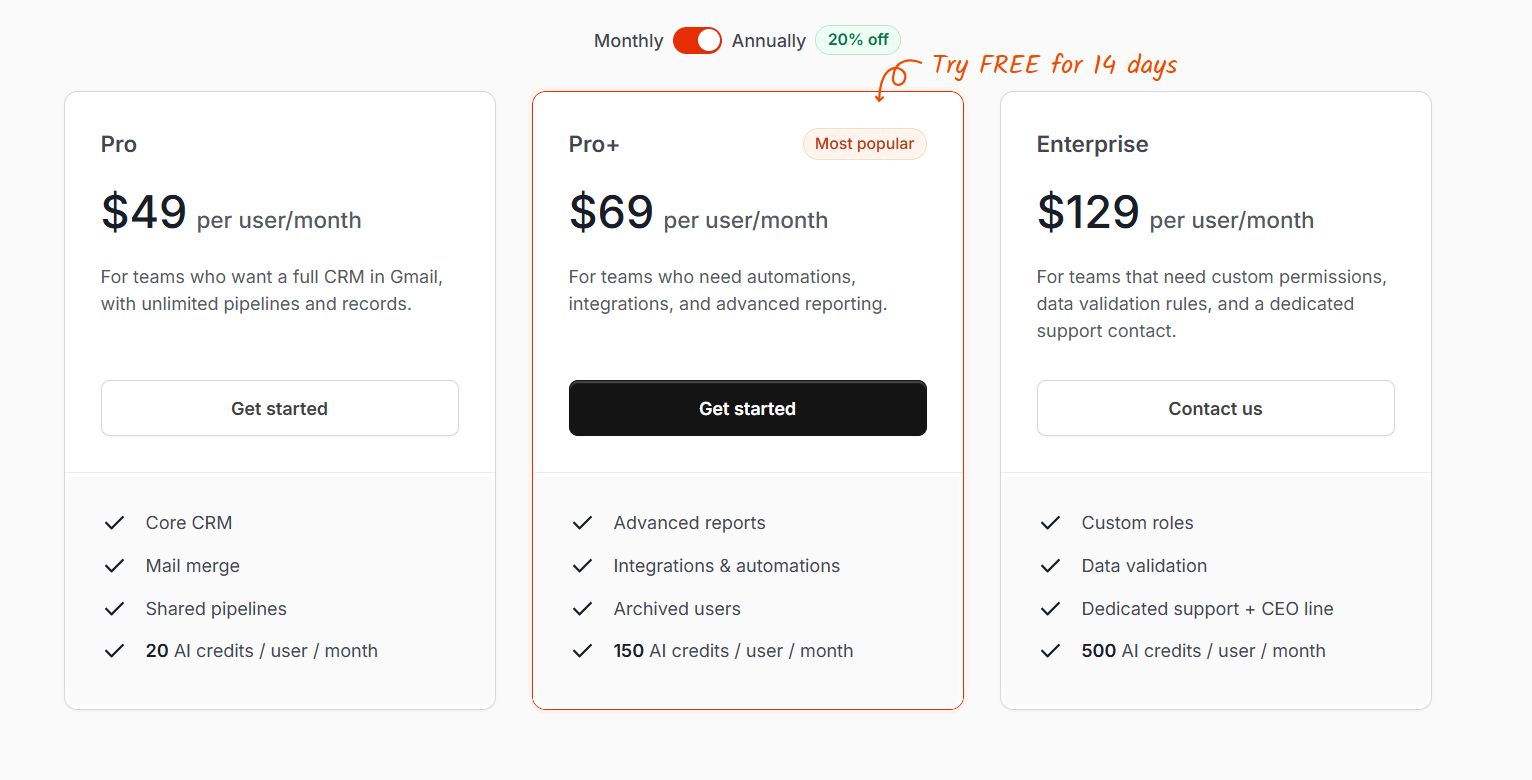
Streak CRM Pricing & Plans
Streak CRM Review Summary
| Performance Score | A |
| Content Quality | Official pricing page answers every common question with exact numbers. |
| Interface | Invisible interface, it is Gmail with superpowers added. |
| AI Technology | Credit based AI for data entry, summaries, Q and A, autofill, and pipeline creation. |
| Purpose | Let Gmail native teams run full CRM pipelines without leaving their inbox. |
| Compatibility | Web, Mobile, API, Extension |
| Pricing Summary | Starts at $49 per user per month with a free email tools tier, though AI credits cap monthly usage. |
Streak CRM Pros & Cons
✅ Pros
- Zero learning curve for Gmail users since it lives in the inbox
- Free plan includes genuinely useful email tools with no time limit
- Unlimited contacts, pipelines, and records on every paid plan
- AI pipeline creator and magic columns save real setup time
- 14 day Pro Plus trial includes 1,000 AI credits to test properly
❌ Cons
- Gmail only, useless for teams on Outlook or other email
- Free plan has no CRM pipelines, email tools only
- AI is credit capped at 20 to 500 per month with no rollover
- Every team member must be on the same plan with no mixing tiers
FAQs
How much does Streak cost?
▼Does Streak work with Outlook?
▼Does Streak have a free plan?
▼How do Streak AI credits work?
▼Can team members be on different Streak plans?
▼What is the difference between Pro and Pro Plus?
▼More AI Tools You Might Like

Automated diagram software with intelligent formatting and data driven org charts across…
View Tool ↗
Figma's whiteboard with AI generation for diagrams, flowcharts and workshop boards from…
View Tool ↗
Diagram as code platform with an AI editor that writes and fixes…
View Tool ↗
Desktop and online diagram software with AI generation, 210+ diagram types and…
View Tool ↗
Budget friendly AI diagram tool with 100+ diagram types and a flat…
View Tool ↗
Professional diagramming software with AI generation, deep shape libraries and strong team…
View Tool ↗
Fast AI flowchart and mind map generator that turns text prompts into…
View Tool ↗
Team whiteboard with AI diagram generation, turning prompts into flowcharts and diagrams…
View Tool ↗