

HubSpot Service Hub
✓ VerifiedCustomer service software built on the HubSpot CRM with a free tier. Tickets, chat, and automation tied to full customer context.
Best For: HubSpot CRM users wanting support tied to marketing and sales data
The Verdict: HubSpot Service Hub
HubSpot Service Hub is the best pick for HubSpot shops. The CRM connection is real, the free tier beats every rival's trial, and small teams can be running in an hour. I have observed that marketing-led companies love it most, because support tickets finally show up next to campaign data.
The honest weaknesses: the credit system makes AI costs unpredictable, onboarding fees sting on higher tiers, and serious support operations will miss Zendesk-grade tooling. If you live in HubSpot, this is the pick. If support is your core operation rather than a CRM add-on, choose Zendesk or Freshdesk instead.
What is HubSpot Service Hub?
HubSpot Service Hub is the customer service arm of the HubSpot CRM, and that connection is its whole pitch. Agents see every ticket alongside the contact's deals, marketing emails, and website activity. The free tier is genuinely useful, which no other major helpdesk can claim.
The platform suits businesses already living in HubSpot, where support data flowing into the CRM matters more than helpdesk depth. Setup is the fastest in the industry and the interface never intimidates. The catch is the credit system: AI resolutions burn credits fast, and the real monthly cost often lands well above the seat price.
Service Hub fits HubSpot CRM users and small teams best. Support-first organizations needing deep ticketing should look at Zendesk or Freshdesk.
Who is HubSpot Service Hub Best For?
HubSpot CRM users wanting support tied to marketing and sales data
HubSpot Service Hub Key Features
HubSpot Service Hub Pricing & Plans
HubSpot Service Hub Review Summary
| Performance Score | B |
| Content Quality | Knowledge base is simple to build and AI answers stay on brand. |
| Interface | Clean and friendly, the least intimidating enterprise-grade helpdesk. |
| AI Technology | Customer Agent resolves chats on a credit system tied to CRM data. |
| Purpose | Connect customer service to marketing and sales inside one CRM. |
| Compatibility | Web, Mobile, API |
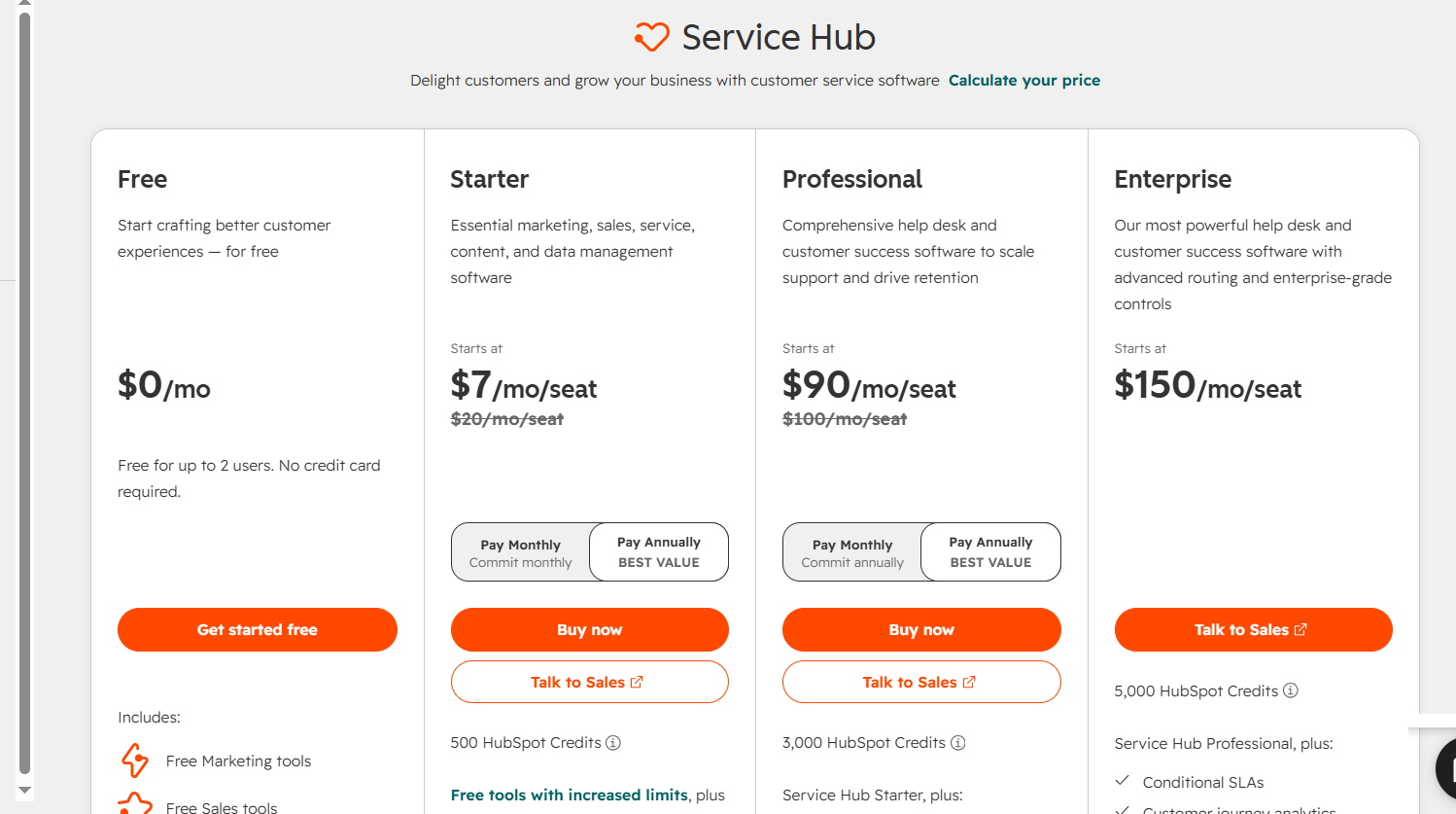
| Pricing Summary | Free tier for 2 users, paid from 20 dollars per seat monthly with AI on credits, onboarding fees on higher tiers, free trial available. |
HubSpot Service Hub Pros & Cons
✅ Pros
- Only major helpdesk with a genuinely useful free plan
- Native CRM connection shows agents deals and marketing history
- Easiest setup in the industry, running in under an hour
- Unified pricing across HubSpot products simplifies budgeting
- Strong automation available even on lower tiers
- Free tier and free trial both available to start
❌ Cons
- Customer Agent burns 50 credits per resolution so costs escalate fast
- Professional and Enterprise demand steep one-time onboarding fees
- Advanced features like custom objects are locked behind Enterprise
- Credit system confuses buyers and bills can climb quietly
- Reporting depth lags behind Zendesk for complex operations
FAQs
How much does HubSpot Service Hub cost?
▼Is HubSpot Service Hub really free?
▼What are HubSpot credits and how do they work?
▼Does HubSpot Service Hub offer a free trial?
▼What is the difference between Service Hub plans?
▼Is HubSpot Service Hub good for small businesses?
▼More AI Tools You Might Like

KAYAK's conversational AI search lets you chat your way to flights, hotels,…
View Tool ↗
Tripadvisor's AI trip builder creates custom itineraries from your saves, powered by…
View Tool ↗
Free AI travel assistant that lives in WhatsApp and Messenger, answering trip…
View Tool ↗
Free AI trip planner that turns your interests and budget into a…
View Tool ↗
Free trip planner that puts your itinerary, map, bookings, and budget in…
View Tool ↗
AI trip planner backed by human travel advisors who check your itinerary,…
View Tool ↗
Personal AI travel assistant that learns your style, builds mapped itineraries, tracks…
View Tool ↗
Dubai property intelligence with building level prices, rental yields and price forecasts,…
View Tool ↗