

Lucidchart
✓ VerifiedProfessional diagramming software with AI generation, deep shape libraries and strong team controls.
Best For: Companies that need governed, shareable diagrams across many diagram types
The Verdict: Lucidchart
Lucidchart is the all rounder this category is measured against: widest diagram coverage, correct notation, and the strongest sharing and admin controls, with AI generation as a useful layer on top. Beginners will find lighter tools faster to learn, and the AI is not the headline act, but for professional diagramming that has to hold up in a company, it is the most complete package on this list.
What is Lucidchart?
Lucidchart is professional diagramming software with AI generation added to the deepest diagram library in this category. A text prompt can produce the first draft of a flowchart or org chart, and AI assisted editing and summarization help refine it, while the manual editor underneath handles flowcharts, ER diagrams, UML class, sequence and activity diagrams, network diagrams, BPMN and value stream maps with proper notation.
Where Lucidchart separates itself is everything around the diagram. Data linked shapes and conditional formatting keep diagrams tied to source data. Real time collaboration comes with comments and granular sharing, and the admin console on higher plans gives companies control over who can see and share what. Integrations cover Microsoft 365, Google Workspace, Slack, Jira and Confluence, and Visio import makes it the standard migration path away from desktop tools.
The costs of that depth are a busier interface and annual billing figures on the pricing page. New users face more panels than a simple flowchart needs, and month to month buyers should read the billing basis carefully. For companies whose diagrams become long lived documentation, it remains the safest all round choice here.
Who is Lucidchart Best For?
Companies that need governed, shareable diagrams across many diagram types
Lucidchart Key Features
Lucidchart Pricing & Plans
Lucidchart Review Summary
| Performance Score | A |
| Content Quality | Precise, notation correct diagrams across business and technical types. |
| Interface | Powerful and complete, with a learning curve for first time users. |
| AI Technology | Prompt generation and assisted editing layered on a mature diagram engine. |
| Purpose | Professional diagramming and documentation for companies of all sizes. |
| Compatibility | Web, Mobile, API |
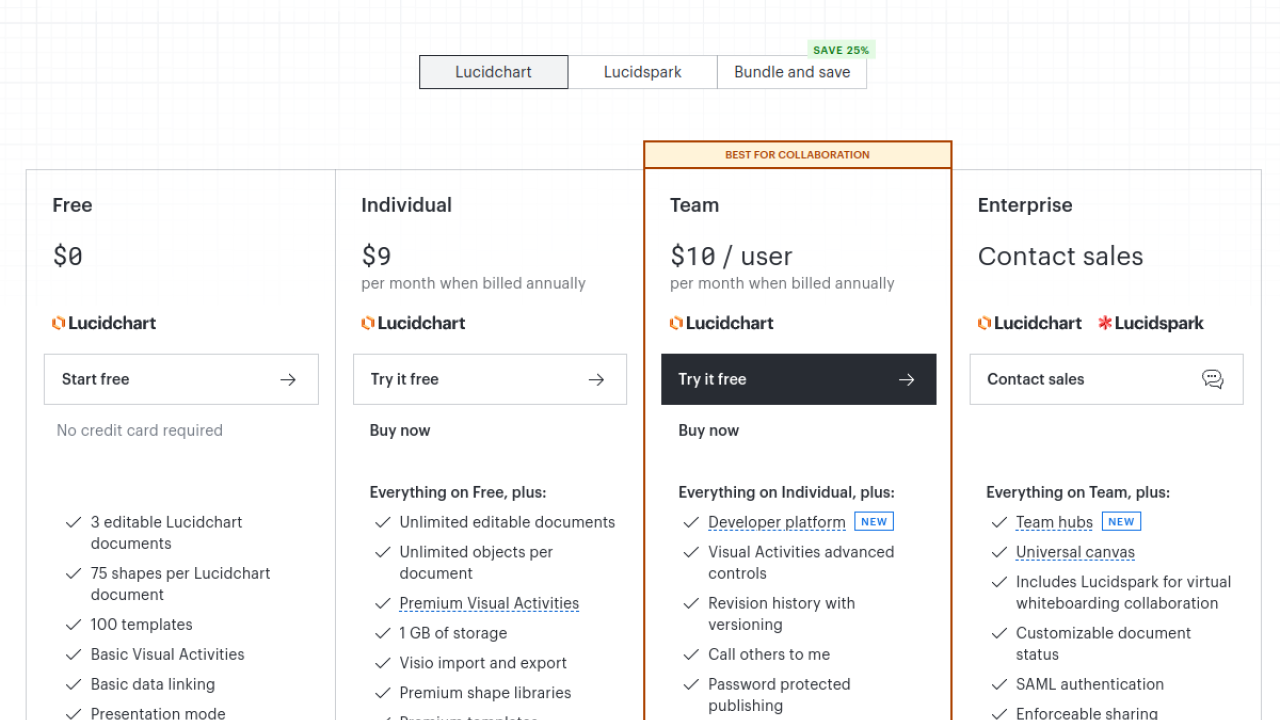
| Pricing Summary | Lucidchart starts at $9/month on annual billing for the Individual plan, with Team billed per user. |
Lucidchart Pros & Cons
✅ Pros
- The widest diagram type coverage in this category, with proper notation
- Sharing, permissions and admin controls suit company documentation
- Data linking keeps diagrams tied to live source data
- Import support makes it the natural landing spot when leaving older tools
- Mature template library for business and technical diagrams
❌ Cons
- The interface carries more panels and depth than beginners need
- AI features feel like an assistant inside a classic tool rather than the core product
- Pricing shown is on annual billing, so month to month budgeting needs care
- The free plan is limited for ongoing team work
FAQs
Is Lucidchart free to use?
▼How does Lucidchart pricing work?
▼Can Lucidchart generate a diagram with AI?
▼What diagrams does Lucidchart support?
▼Does Lucidchart import Visio files?
▼Is Lucidchart good for enterprises?
▼More AI Tools You Might Like

Automated diagram software with intelligent formatting and data driven org charts across…
View Tool ↗
Figma's whiteboard with AI generation for diagrams, flowcharts and workshop boards from…
View Tool ↗
Diagram as code platform with an AI editor that writes and fixes…
View Tool ↗
Desktop and online diagram software with AI generation, 210+ diagram types and…
View Tool ↗
Budget friendly AI diagram tool with 100+ diagram types and a flat…
View Tool ↗
Fast AI flowchart and mind map generator that turns text prompts into…
View Tool ↗
Team whiteboard with AI diagram generation, turning prompts into flowcharts and diagrams…
View Tool ↗
AI diagram tool for technical teams, creating architecture, ER and sequence diagrams…
View Tool ↗