

Miro
✓ VerifiedTeam whiteboard with AI diagram generation, turning prompts into flowcharts and diagrams on canvas.
Best For: Product and engineering teams that plan and diagram together on one board
The Verdict: Miro
Miro is the easiest recommendation for teams because the diagram generator sits inside the whiteboard they already use to think. The per member price and the shared AI credit pool are the honest costs, and diagram only buyers will overbuy. For collaborative teams, though, no tool in this category blends generation, editing and discussion as naturally.
What is Miro?
Miro is a team whiteboard that generates diagrams from text prompts directly on the canvas. A product manager can describe a user flow in a sentence and get an editable flowchart next to the workshop notes it came from. The diagramming side covers flowcharts, mind maps and org charts natively, with shape packs for ER and UML style technical diagrams, and the board also holds tables, timelines and Kanban views for planning work.
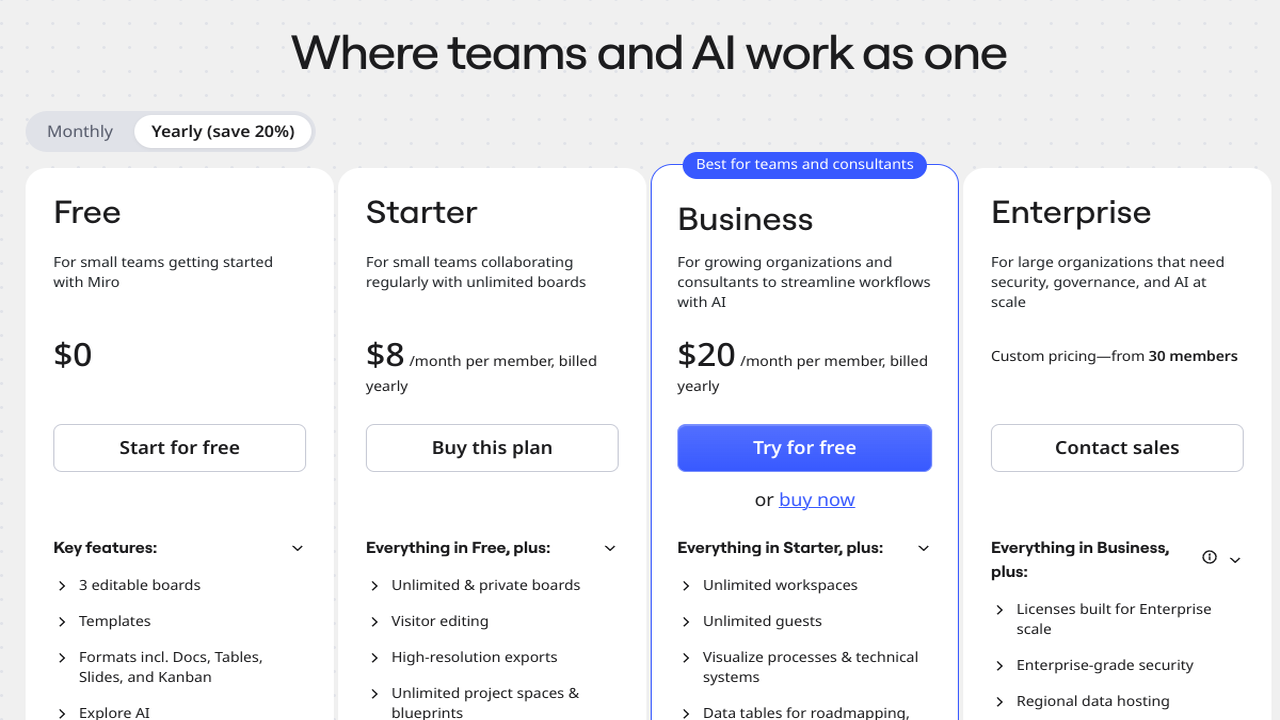
AI use is metered. Every plan includes a monthly AI credit allowance per member, small on the free plan and larger on the paid tiers, and generation shares that pool with Miro's other AI features like summaries and clustering. Paid plans are billed per member with an annual discount, and the integration library of 250+ apps connects boards to Slack, Jira, Google Workspace and the rest of a typical team stack.
Miro fits teams that plan and document together and want diagrams inside that flow rather than in a separate tool. A solo user who only needs an occasional flowchart will find the board more than the job requires, and credit use needs a little watching because it is shared across features.
Who is Miro Best For?
Product and engineering teams that plan and diagram together on one board
Miro Key Features
Miro Pricing & Plans
Miro Review Summary
| Performance Score | A |
| Content Quality | Diagrams are clean and consistent with board content, with strong templates to start from. |
| Interface | A polished infinite canvas that new users learn fast, though it can feel busy. |
| AI Technology | Prompt based diagram generation metered by monthly per member credits, plus board summaries. |
| Purpose | Collaborative planning and diagramming for teams on a shared whiteboard. |
| Compatibility | Web, Mobile, Desktop, API |
| Pricing Summary | Miro starts at $8/month per member on annual billing after a free plan with a small AI credit allowance. |
Miro Pros & Cons
✅ Pros
- Diagrams live on the same board as workshop notes and planning work
- Collaboration is the strongest in this category, with easy guest access
- Huge template and integration library reduces setup work
- AI credits are included per member on every paid plan
- Free plan is a realistic way for a team to test the workflow
❌ Cons
- AI diagram generation burns the same credit pool as other AI features
- The board can feel heavy when all you need is one simple diagram
- Per seat pricing grows quickly for large teams
- Free plan limits editable boards, which pushes active teams to paid tiers
FAQs
Is Miro free to use?
▼How does Miro pricing work?
▼Can Miro generate a diagram from text?
▼What diagram types does Miro support?
▼How many AI credits does Miro include?
▼Is Miro good for workshops as well as diagrams?
▼More AI Tools You Might Like

Automated diagram software with intelligent formatting and data driven org charts across…
View Tool ↗
Figma's whiteboard with AI generation for diagrams, flowcharts and workshop boards from…
View Tool ↗
Diagram as code platform with an AI editor that writes and fixes…
View Tool ↗
Desktop and online diagram software with AI generation, 210+ diagram types and…
View Tool ↗
Budget friendly AI diagram tool with 100+ diagram types and a flat…
View Tool ↗
Professional diagramming software with AI generation, deep shape libraries and strong team…
View Tool ↗
Fast AI flowchart and mind map generator that turns text prompts into…
View Tool ↗
AI diagram tool for technical teams, creating architecture, ER and sequence diagrams…
View Tool ↗