

Humata
✓ VerifiedAsk questions about long PDFs and get cited answers in seconds. Humata turns dense research papers and reports into conversations.
Best For: Researchers drowning in long technical papers
The Verdict: Humata
Humata is a sharp, honest tool for anyone buried in long PDFs. The cited answers build trust, the interface is refreshingly simple, and the free tier lets you prove value before paying. The weakness is the page meter: heavy readers will find the paid plans restrictive and overages sneaky. For moderate research loads it is excellent. For bulk processing, compare per page costs carefully first.
What is Humata?
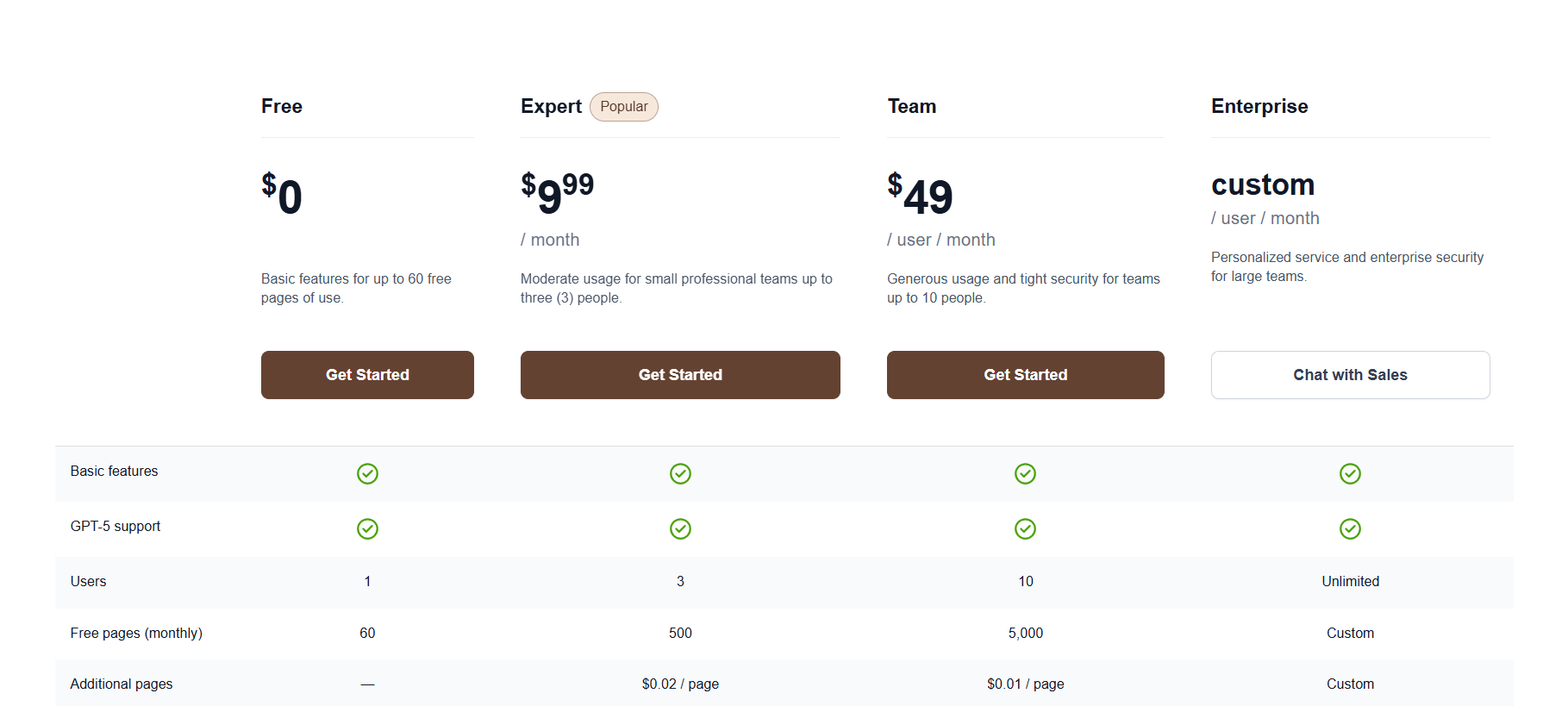
Humata is an AI assistant for long documents. You upload PDFs, ask questions in plain language, and get answers with citations to the exact pages. It is built for people whose jobs involve reading: researchers, analysts, lawyers, and students working through dense material. The product is deliberately narrow. It does one thing, document question answering, and does it cleanly. Multi file chat lets you ask a question across several papers at once, which is a genuine time saver during literature reviews. The interface stays out of your way: upload, ask, verify the citation. Pricing is where you need to pay attention. The free 60 pages per month is a fair trial, but the page based model punishes heavy users. At $9.99 per month for 500 pages plus $0.02 per extra page, a researcher processing thesis length material can outgrow Expert fast. Track your page usage in the first month before committing.
Who is Humata Best For?
Researchers drowning in long technical papers
Humata Key Features
Humata Pricing & Plans
Humata Review Summary
| Performance Score | B |
| Content Quality | Cited answers are solid on clean academic and technical PDFs. |
| Interface | Simple chat layout, upload and ask, nothing extra to learn. |
| AI Technology | Document question answering with page level citations. |
| Purpose | Extracting answers and summaries from long documents. |
| Compatibility | |
| Pricing Summary | Free 60 pages monthly, paid plans from $9.99 per month with page based overages. |
Humata Pros & Cons
✅ Pros
- Free plan includes 60 pages per month, enough to test properly
- Citations make answers verifiable
- Handles technical and academic language well
- Clean interface with no learning curve
- Team plan suits small research groups
❌ Cons
- Page based pricing gets expensive if you process hundreds of pages monthly
- Expert plan at $9.99 per month only covers 500 pages
- Overage charges of $0.02 per page add up quietly
- Smaller feature set than bigger document AI platforms
- No desktop or mobile app, web only
FAQs
Is Humata free?
▼How much does Humata cost?
▼What happens if I exceed my page limit?
▼Does Humata work with scanned PDFs?
▼Can I use Humata for legal documents?
▼Is my data private on Humata?
▼More AI Tools You Might Like

KAYAK's conversational AI search lets you chat your way to flights, hotels,…
View Tool ↗
Tripadvisor's AI trip builder creates custom itineraries from your saves, powered by…
View Tool ↗
Free AI travel assistant that lives in WhatsApp and Messenger, answering trip…
View Tool ↗
Free AI trip planner that turns your interests and budget into a…
View Tool ↗
Free trip planner that puts your itinerary, map, bookings, and budget in…
View Tool ↗
AI trip planner backed by human travel advisors who check your itinerary,…
View Tool ↗
Personal AI travel assistant that learns your style, builds mapped itineraries, tracks…
View Tool ↗
Dubai property intelligence with building level prices, rental yields and price forecasts,…
View Tool ↗