

Beautiful.ai
✓ VerifiedSmart Slides auto-format your presentations as you type, keeping every deck polished and on brand without manual design work.
Best For: Teams and professionals who need brand-consistent presentations without design skills
The Verdict: Beautiful.ai
Beautiful.ai is the best choice when design consistency matters more than generation speed. I have observed that teams producing dozens of decks a month save real time because nobody fixes formatting anymore. The brand controls alone justify the cost for marketing departments. The lack of a free plan is a genuine drawback in 2026 when competitors offer generous free tiers. And the AI generation is not as impressive as Gamma for starting from scratch. But if your problem is messy inconsistent decks rather than blank-page syndrome, Beautiful.ai solves it better than anyone.
What is Beautiful.ai?
Beautiful.ai is a web-based presentation tool that uses AI-assisted design rules to format your slides automatically. You add your content and the tool handles layout, spacing, typography, and visual consistency in real time. The core feature is Smart Slides. These are adaptive templates that rebalance themselves as you edit. Add more text and the font shrinks neatly. Swap an image and the layout adjusts. Your deck always looks clean without you touching alignment or spacing controls. Beautiful.ai fits business professionals, sales teams, and consultants who create presentations weekly and need every deck to match brand standards. The DesignerBot can generate full decks from a prompt for faster starts. There is no free plan, so you commit after the 14-day trial.
Who is Beautiful.ai Best For?
Teams and professionals who need brand-consistent presentations without design skills
Beautiful.ai Key Features
Beautiful.ai Pricing & Plans
Beautiful.ai Review Summary
| Performance Score | B |
| Content Quality | Produces clean professional slides with good design consistency, though AI-written content needs editing. |
| Interface | Intuitive drag-and-drop editor with Smart Slides that adapt automatically as you type. |
| AI Technology | DesignerBot uses generative AI for deck creation combined with rule-based design automation. |
| Purpose | Helps business professionals create polished on-brand presentations without design expertise. |
| Compatibility | Web |
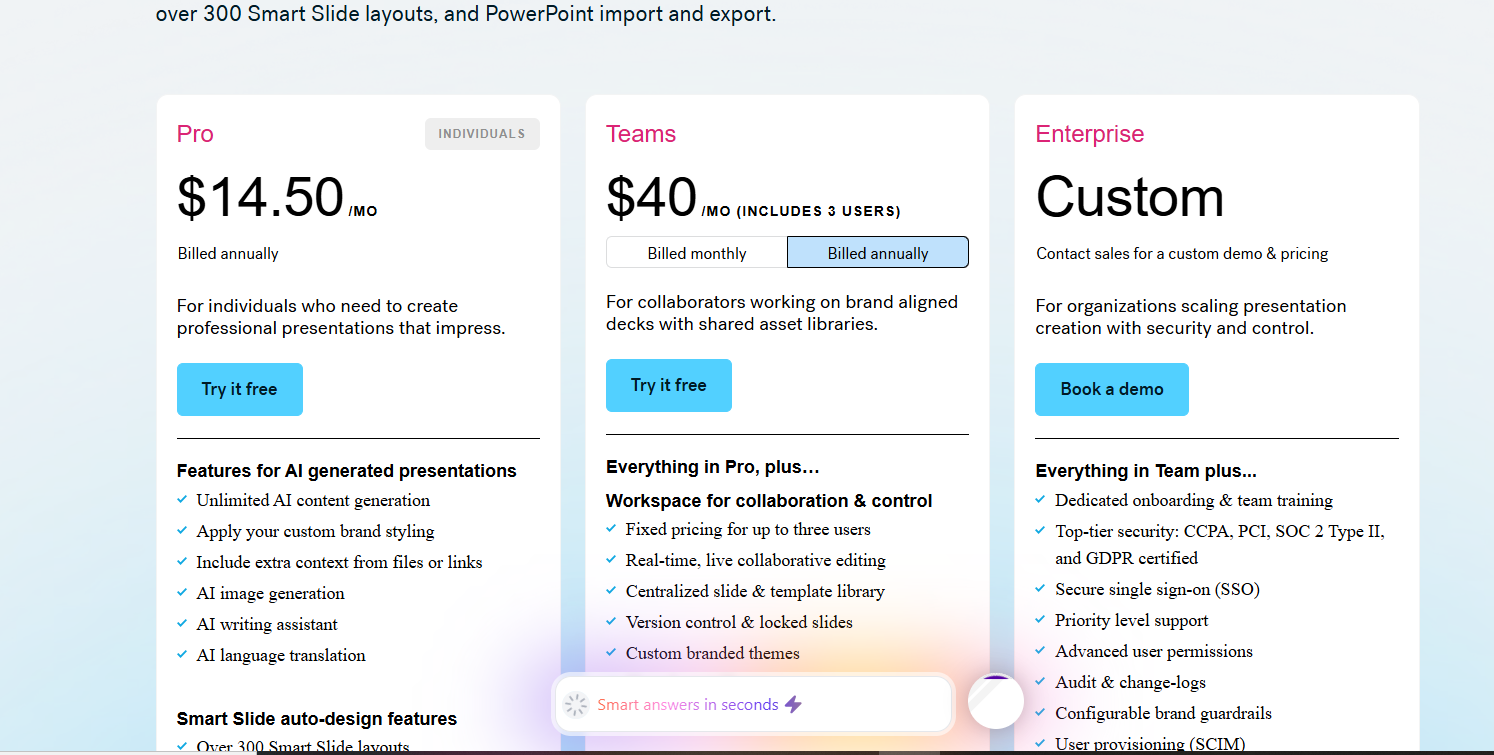
| Pricing Summary | No free tier is a drawback, but $12 a month annual pricing is fair for individuals who present regularly. |
Beautiful.ai Pros & Cons
✅ Pros
- Slides always look professional without manual formatting effort
- Brand enforcement saves hours for teams producing many decks
- PowerPoint export quality is better than most AI competitors
- Viewer analytics show real engagement data per slide
- DesignerBot creates solid first drafts from simple prompts
❌ Cons
- No permanent free plan, only a 14-day trial that requires a credit card
- Monthly billing at $45 is very expensive compared to $12 annual rate
- AI generation is weaker than Gamma for creating decks from scratch
- Design rules limit creative freedom for advanced users
- Trial auto-charges if you forget to cancel before day 14
FAQs
Is Beautiful.ai free?
▼How is Beautiful.ai different from PowerPoint?
▼Can Beautiful.ai generate presentations from a prompt?
▼Does Beautiful.ai export to PowerPoint?
▼What is the difference between Pro and Team plans?
▼Is Beautiful.ai good for sales teams?
▼More AI Tools You Might Like

Automated diagram software with intelligent formatting and data driven org charts across…
View Tool ↗
Figma's whiteboard with AI generation for diagrams, flowcharts and workshop boards from…
View Tool ↗
Diagram as code platform with an AI editor that writes and fixes…
View Tool ↗
Desktop and online diagram software with AI generation, 210+ diagram types and…
View Tool ↗
Budget friendly AI diagram tool with 100+ diagram types and a flat…
View Tool ↗
Professional diagramming software with AI generation, deep shape libraries and strong team…
View Tool ↗
Fast AI flowchart and mind map generator that turns text prompts into…
View Tool ↗
Team whiteboard with AI diagram generation, turning prompts into flowcharts and diagrams…
View Tool ↗