

Descript
✓ VerifiedDescript is an AI-powered video and podcast editor that lets you edit audio and video by editing the transcript text instead of a traditional timeline.
Best For: Podcasters, YouTubers, and content teams who want to edit video and audio by editing text rather than working on a traditional video timeline
The Verdict: Descript
Descript is the best AI video editor for podcasters, YouTubers, course creators, and marketers who produce talking-head or interview content regularly. The text-based editing workflow is genuinely faster than any traditional timeline for spoken-word content, and the Overdub voice cloning means you can fix a mispronounced word or add a missing sentence without re-recording. The Creator plan at $12 per month annually delivers serious value for individual creators.
The honest limitation is scope. Descript is not built for short-form social video the way CapCut is, and it does not produce cinematic AI footage like Runway ML. If your primary workflow is cutting TikToks or creating AI-generated video from text prompts, Descript is the wrong tool. But for anyone making long-form spoken content who wants to edit faster without learning Premiere Pro, Descript is the clearest recommendation in the video editing category.
What is Descript?
Descript is an AI-powered audio and video editing platform that pioneered text-based media editing, where you edit video and audio by editing a transcript rather than working with a traditional timeline. Import a video or audio file, Descript transcribes it automatically, and you cut, move, or delete content by highlighting and deleting text. The result is editing that takes minutes rather than hours for spoken-word content like podcasts, interviews, tutorials, and talking-head videos.
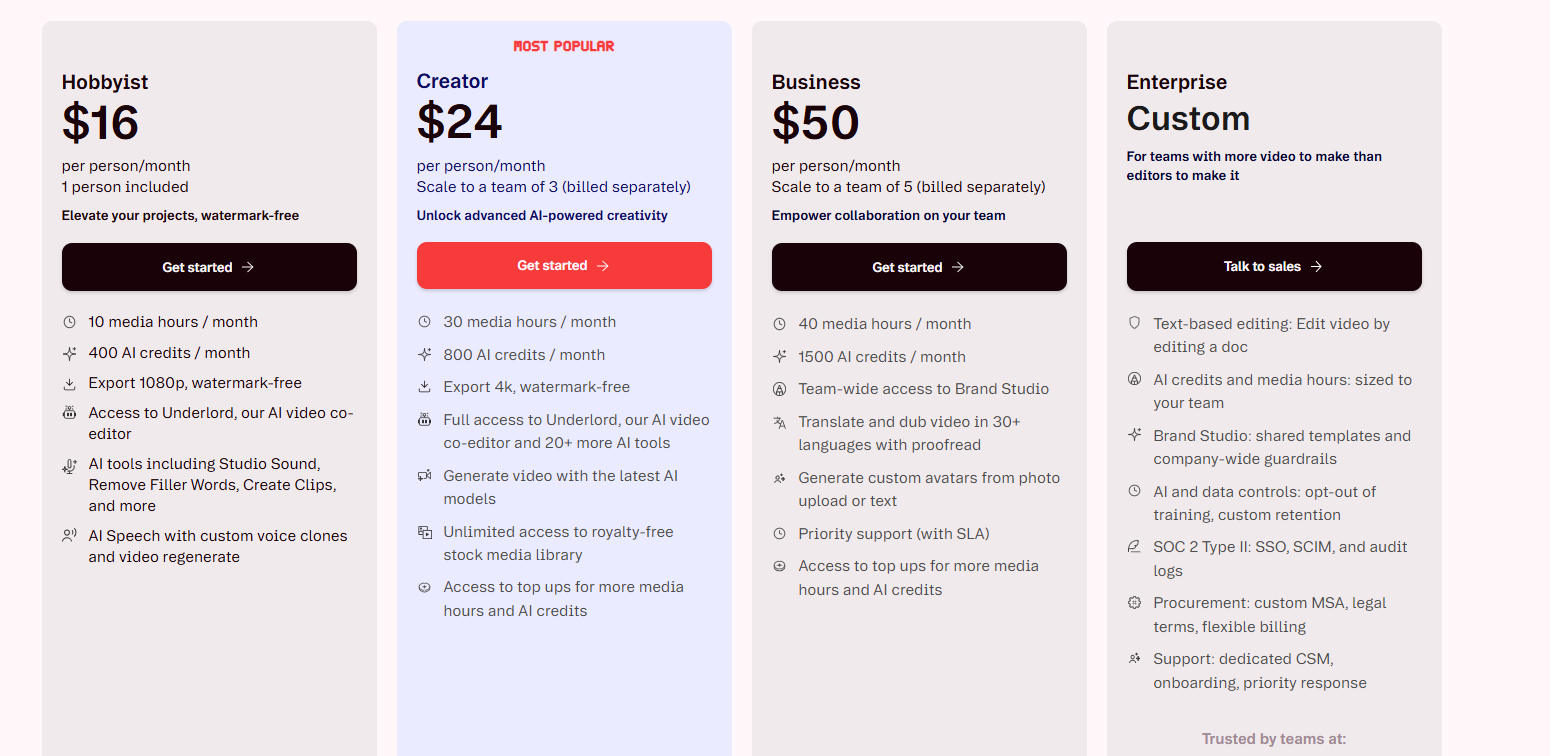
The platform combines screen recording, transcription, dynamic captions, speaker detection, filler word removal, Studio Sound audio enhancement, AI voice cloning through Overdub, and stock media access in one subscription. As of April 28, 2026, the pricing tiers are Free at $0, Creator at $15 per editor per month on monthly billing or $12 per month annually, Pro at $30 per month monthly or $24 per month annually with 4K exports and unlimited AI tools, and Business at $65 per month monthly or $50 per month annually with team collaboration and priority support.
Descript holds a 4.6 out of 5 rating across 2,000 plus G2 reviews. Users consistently report saving 60 to 70 percent of editing time on podcast and interview content compared to traditional timeline editing.
Who is Descript Best For?
Podcasters, YouTubers, and content teams who want to edit video and audio by editing text rather than working on a traditional video timeline
Descript Key Features
Descript Pricing & Plans
Descript Review Summary
| Performance Score | A |
| Content Quality | Text-based editing accuracy is high with reliable transcription and clean audio removal tools that produce broadcast-quality output |
| Interface | Unique text-document editing paradigm that makes video editing accessible to anyone who can edit a Word document |
| AI Technology | Underlord AI handles filler word detection, silence removal, clip highlighting, and scene detection automatically after transcription |
| Purpose | AI-powered text-based video and podcast editing for content creators who want faster editing without traditional timeline complexity |
| Compatibility | Web, Desktop |
| Pricing Summary | Free with 1 hour/month, Hobbyist at $16/month annually, Creator at $24/month annually with full AI tools, Business at $50/month annually |
Descript Pros & Cons
✅ Pros
- Text-based editing is the most intuitive approach for non-video-editors
- Studio Sound noise removal is one of the best in the category at any price
- Filler word removal saves significant editing time on podcast workflows
- Free plan available with 1 hour of transcription per month
❌ Cons
- Creator plan at $24 per month for annual billing is on the high end for solo creators
- Media hour caps are the real bottleneck — not feature access
- Pricing has changed three times in 18 months creating trust issues
- Business plan at $50 per month per user gets expensive for larger teams
FAQs
What is Descript used for?
▼Is Descript free to use?
▼What platforms does Descript support?
▼Who is Descript best for?
▼Does Descript offer a free trial?
▼More AI Tools You Might Like
VoxCPM2 is an open-source voice generation model for voice design, controllable voice…
View Tool ↗
Qwen3 TTS is a browser-based voice platform for text to speech, voice…
View Tool ↗
MiniMax Audio creates natural speech and cloned voices with multilingual TTS, voice…
View Tool ↗
VoiceKeep is an AI voice platform for voice cloning, audiobooks, multi-voice conversations…
View Tool ↗
WellSaid creates professional AI voiceovers with licensed voice actors, custom voice models,…
View Tool ↗
Synthesys creates, clones and transforms AI voices for voiceovers, dubbing, avatars, ads…
View Tool ↗
Inworld AI creates real-time voices with voice cloning, multilingual speech, voice design…
View Tool ↗
Hume AI creates expressive speech with voice cloning, emotional TTS, voice design…
View Tool ↗