

Thunderbit
✓ VerifiedThunderbit is an AI-powered web scraping browser extension that extracts website data directly into spreadsheets and databases without writing CSS selectors.
Best For: Sales reps, recruiters, and growth marketers needing to extract web data into Google Sheets, Airtable, or Notion without technical coding.
The Verdict: Thunderbit
Thunderbit is an exceptional productivity boost for anyone who spends hours copying data from websites into spreadsheets. The browser extension makes capturing single directory pages ridiculously easy. I have observed that its automated subpage scraper pulls buried email addresses with impressive accuracy.
Honestly, most people get this wrong by treating it like an enterprise proxy API. If you need to scrape millions of pages through rotating residential networks, this is the wrong software. Thunderbit is built for quick business intelligence rather than massive developer data pipelines.
If your team lives inside Google Sheets or Notion and needs clean web data without writing code, this platform is well worth the $15 starter fee. It turns hours of manual data entry into a one-minute task.
What is Thunderbit?
Thunderbit removes the technical barriers that stop non-developers from collecting web data. Instead of writing brittle XPath expressions or inspecting source code, you install a browser extension. You highlight what you want, and the AI agent formats the information into a tidy table.
The software connects straight into your daily productivity stack. In my practical testing, piping live product listings directly into Airtable or Notion takes only two clicks. It handles messy pagination across hundreds of pages, saving hours of manual copy-pasting.
This tool targets recruiters, sales reps, and growth operators who need fast lead lists. You don't need a computer science degree to pull phone numbers or catalog pricing. You get a visual scraping agent that works directly inside your Chrome or Edge browser.
Who is Thunderbit Best For?
Sales reps, recruiters, and growth marketers needing to extract web data into Google Sheets, Airtable, or Notion without technical coding.
Thunderbit Key Features
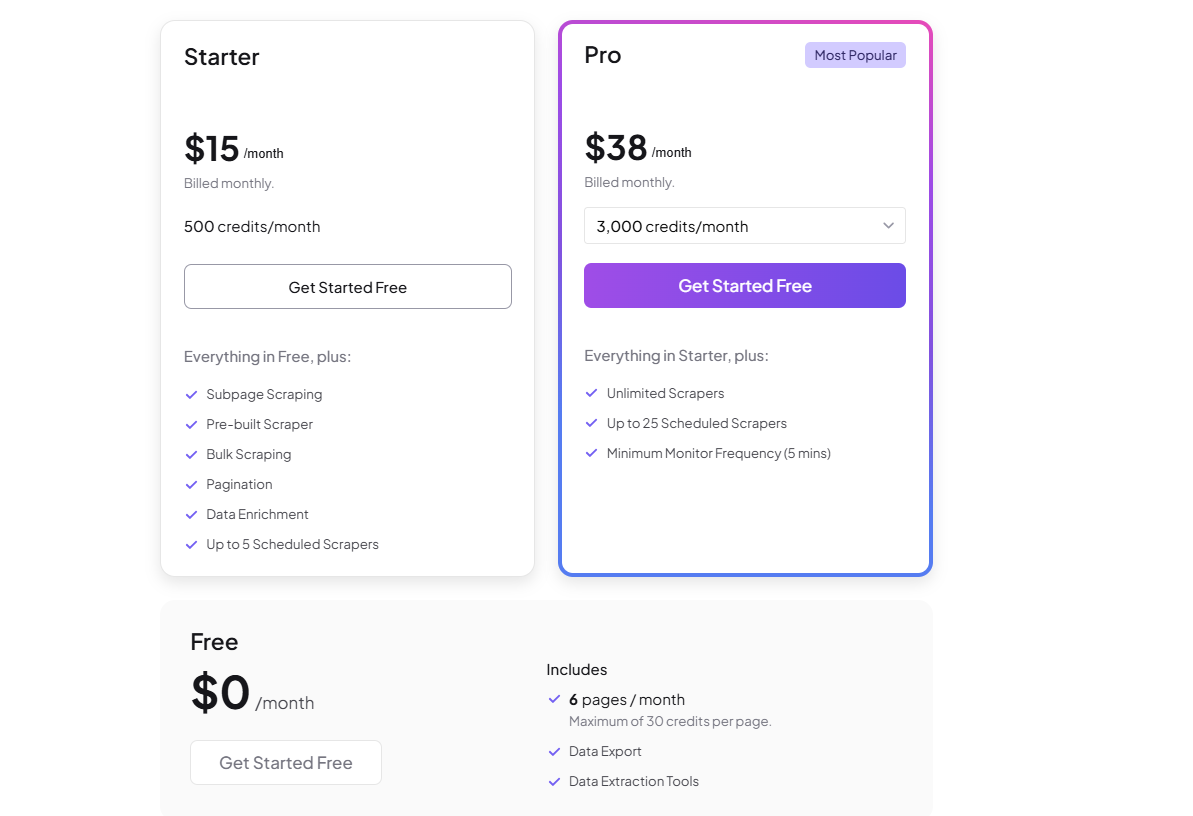
Thunderbit Pricing & Plans
Thunderbit Review Summary
| Performance Score | A- |
| Content Quality | The AI extraction logic accurately converts messy web pages into clean spreadsheet rows |
| Interface | The browser extension provides an intuitive point-and-click experience tailored for non-developers |
| AI Technology | Uses visual layout understanding and language models to detect tables and lists automatically |
| Purpose | Thunderbit eliminates manual data entry by extracting web content directly into business databases |
| Compatibility | Web, Chrome, Edge, API |
| Pricing Summary | Free plan available, with paid tiers starting at $15 per month for 500 credits |
Thunderbit Pros & Cons
✅ Pros
- Completely removes the frustration of inspecting DOM elements and writing custom CSS selectors
- Direct connections to Notion and Airtable populate your databases without third-party webhooks
- Browser extension makes testing extraction rules on live pages remarkably fast
- Scheduled monitoring alerts you to competitor pricing changes or job board updates automatically
- Free tier lets you test the visual extraction workflow without entering payment details
❌ Cons
- Free tier is strictly limited to six pages per month with a cap of thirty credits per page
- Scraping deeply nested subpages across large catalogs consumes monthly credits very fast
- Bulk scraping caps out at 2000 URLs per job on standard paid subscriptions
- Lacks advanced anti-bot evasion networks needed to bypass aggressive enterprise web firewalls
- Data history on the free tier is permanently deleted after only 14 days
FAQs
What is Thunderbit used for?
▼Is Thunderbit free to use?
▼How much does Thunderbit cost?
▼Can Thunderbit scrape multiple pages automatically?
▼What apps can Thunderbit export data to?
▼Do I need to know coding or CSS selectors to use Thunderbit?
▼More AI Tools You Might Like

KAYAK's conversational AI search lets you chat your way to flights, hotels,…
View Tool ↗
Tripadvisor's AI trip builder creates custom itineraries from your saves, powered by…
View Tool ↗
Free AI travel assistant that lives in WhatsApp and Messenger, answering trip…
View Tool ↗
Free AI trip planner that turns your interests and budget into a…
View Tool ↗
Free trip planner that puts your itinerary, map, bookings, and budget in…
View Tool ↗
AI trip planner backed by human travel advisors who check your itinerary,…
View Tool ↗
Personal AI travel assistant that learns your style, builds mapped itineraries, tracks…
View Tool ↗
Dubai property intelligence with building level prices, rental yields and price forecasts,…
View Tool ↗