

Web Scraper
✓ VerifiedWeb Scraper is a visual point-and-click scraping platform that replaces complex Python scripts with a fully managed cloud infrastructure and browser extension.
Best For: Non-technical operations teams and analysts who need to scrape clean data from complex ecommerce and real estate sites without writing a single line of code.
The Verdict: Web Scraper
Web Scraper provides an incredibly solid bridge between rigid pre-built scrapers and heavy Python development. The native data parser is a fantastic feature that cleans up messy text (like removing currency symbols) before the data hits your spreadsheet. I have observed that their pre-built Amazon and Zillow templates save hours of initial setup time.
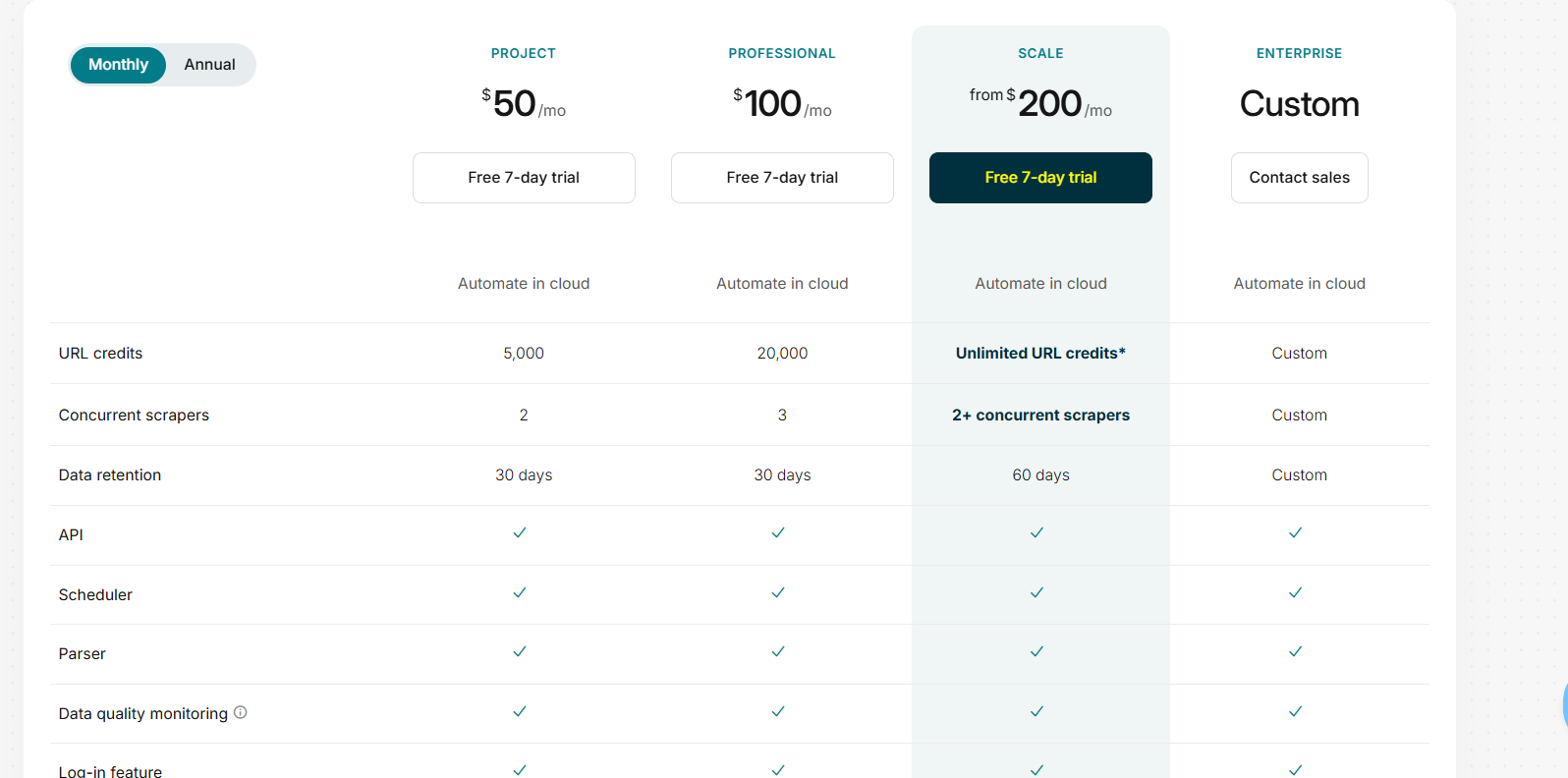
Honestly, most people get this wrong by assuming all features are included in the base $50 plan. If you want API access or automated exports to Google Sheets and Amazon S3, you must upgrade to the $200 Scale tier. The base plan forces you to manually download CSV files.
If you have a non-technical team that needs to scrape complex JavaScript websites reliably, this platform is an excellent investment. It completely removes the need to hire a developer just to pull real estate listings or ecommerce prices.
What is Web Scraper?
Web Scraper completely replaces the need to build a custom data extraction pipeline from scratch. Instead of managing headless browsers and proxy rotation, you install their Chrome extension. You click on the headlines, prices, and images you want to extract, and the cloud engine handles the rest automatically.
The platform excels at managing massive data jobs for non-technical teams. In my practical testing, setting up pagination and subpage extraction takes minutes using their visual sitemap builder. The cloud infrastructure automatically bypasses aggressive firewalls like Cloudflare and Datadome without any manual configuration.
This tool targets operations teams, market researchers, and lead generators. It removes the engineering bottleneck from daily web research. You get enterprise-grade data extraction powered entirely through a visual point-and-click interface.
Who is Web Scraper Best For?
Non-technical operations teams and analysts who need to scrape clean data from complex ecommerce and real estate sites without writing a single line of code.
Web Scraper Key Features
Web Scraper Pricing & Plans
Web Scraper Review Summary
| Performance Score | B+ |
| Content Quality | The visual selector accurately maps complex nested structures into clean tabular columns |
| Interface | The browser extension requires a slight learning curve but ultimately replaces complex code editors perfectly |
| AI Technology | Focuses heavily on managed infrastructure and visual mapping rather than generative language models |
| Purpose | Web Scraper bridges the gap between raw Python development and rigid no-code automation platforms |
| Compatibility | Web, Chrome |
| Pricing Summary | Starts at $50 per month for cloud automation following a 7-day free trial |
Web Scraper Pros & Cons
✅ Pros
- The visual browser extension makes setting up pagination and nested subpage scraping incredibly easy
- No code data formatting cleans up messy price symbols and currency text before the data hits your database
- Prebuilt marketplace templates save massive amounts of time for standard targets like Amazon and eBay
- Data quality control alerts prevent silent pipeline failures when a target website suddenly changes its layout
- Includes a generous seven day free trial without requiring a credit card upfront
❌ Cons
- Base Project plan limits extraction strictly to 5,000 URL credits which burns quickly on large catalogs
- Residential proxies for aggressive targets require an expensive add-on on top of the base subscription
- Only the expensive Scale tier unlocks the API and direct export integrations to cloud storage buckets
- Image downloading features are completely locked behind the $100 per month Professional tier
- Visual selection can sometimes break if the target website uses heavily randomized dynamic CSS classes
FAQs
What is Web Scraper used for?
▼Is Web Scraper free to use?
▼Does Web Scraper bypass Cloudflare and CAPTCHAs?
▼Can Web Scraper handle JavaScript websites?
▼How much does Web Scraper Cloud cost?
▼Can I export scraped data to Google Sheets?
▼More AI Tools You Might Like

KAYAK's conversational AI search lets you chat your way to flights, hotels,…
View Tool ↗
Tripadvisor's AI trip builder creates custom itineraries from your saves, powered by…
View Tool ↗
Free AI travel assistant that lives in WhatsApp and Messenger, answering trip…
View Tool ↗
Free AI trip planner that turns your interests and budget into a…
View Tool ↗
Free trip planner that puts your itinerary, map, bookings, and budget in…
View Tool ↗
AI trip planner backed by human travel advisors who check your itinerary,…
View Tool ↗
Personal AI travel assistant that learns your style, builds mapped itineraries, tracks…
View Tool ↗
Dubai property intelligence with building level prices, rental yields and price forecasts,…
View Tool ↗