

Jimdo
✓ VerifiedJimdo is an intuitive website builder that offers AI-guided setup, built-in SEO tools, and affordable plans for personal sites and small businesses.
Best For: Small local businesses, freelancers, and personal brands who need a fast, simple website without overwhelming technical options.
The Verdict: Jimdo
Jimdo is an excellent solution for non-technical business owners who prioritize speed, simplicity, and mobile optimization over deep creative control. The AI onboarding process removes the initial paralysis of staring at a blank screen, allowing you to get a functional, SEO-friendly site live in an afternoon.
Honestly, most people get this wrong by expecting massive ecommerce scalability from this platform. If you need to sell digital products or manage a catalog of thousands of physical items, the rigid store features will frustrate you. But if your primary goal is to establish a polished, fast-loading digital business card that helps local customers find your services on Google, this builder is incredibly practical and cost-effective.
What is Jimdo?
Jimdo is a streamlined website builder that utilizes guided AI onboarding to help absolute beginners launch a digital presence quickly. Rather than starting from a blank canvas, you answer a few questions about your business goals, and the system automatically structures a working draft. It focuses heavily on producing clean, mobile-responsive layouts that look professional on any smartphone screen right out of the box.
The platform offers two distinct editing paths: the AI-driven builder for maximum speed, and the Creator editor, which allows experienced users to inject custom code and manually adjust design elements. For local businesses exploring reliable hosting solutions, the inclusion of free SSL security, integrated contact forms, and custom email forwarding across all premium tiers provides a solid foundational toolkit.
This software heavily targets independent freelancers, personal brands, and small service providers who need a website by tomorrow. You avoid the overwhelming complexity of traditional content management systems while still gaining access to advanced SEO settings to help rank on Google. It acts as an affordable, straightforward bridge between having no website and establishing a legitimate online brand.
Who is Jimdo Best For?
Small local businesses, freelancers, and personal brands who need a fast, simple website without overwhelming technical options.
Jimdo Key Features
Jimdo Pricing & Plans
Jimdo Review Summary
| Performance Score | B |
| Content Quality | The AI-guided setup provides strong structural starting points for non-technical users |
| Interface | The block-based editor prevents beginners from accidentally breaking mobile layouts |
| AI Technology | Built-in onboarding assistants generate the initial site draft from a few questions |
| Purpose | Jimdo offers an incredibly fast path to publishing a clean, responsive small business website |
| Compatibility | Web |
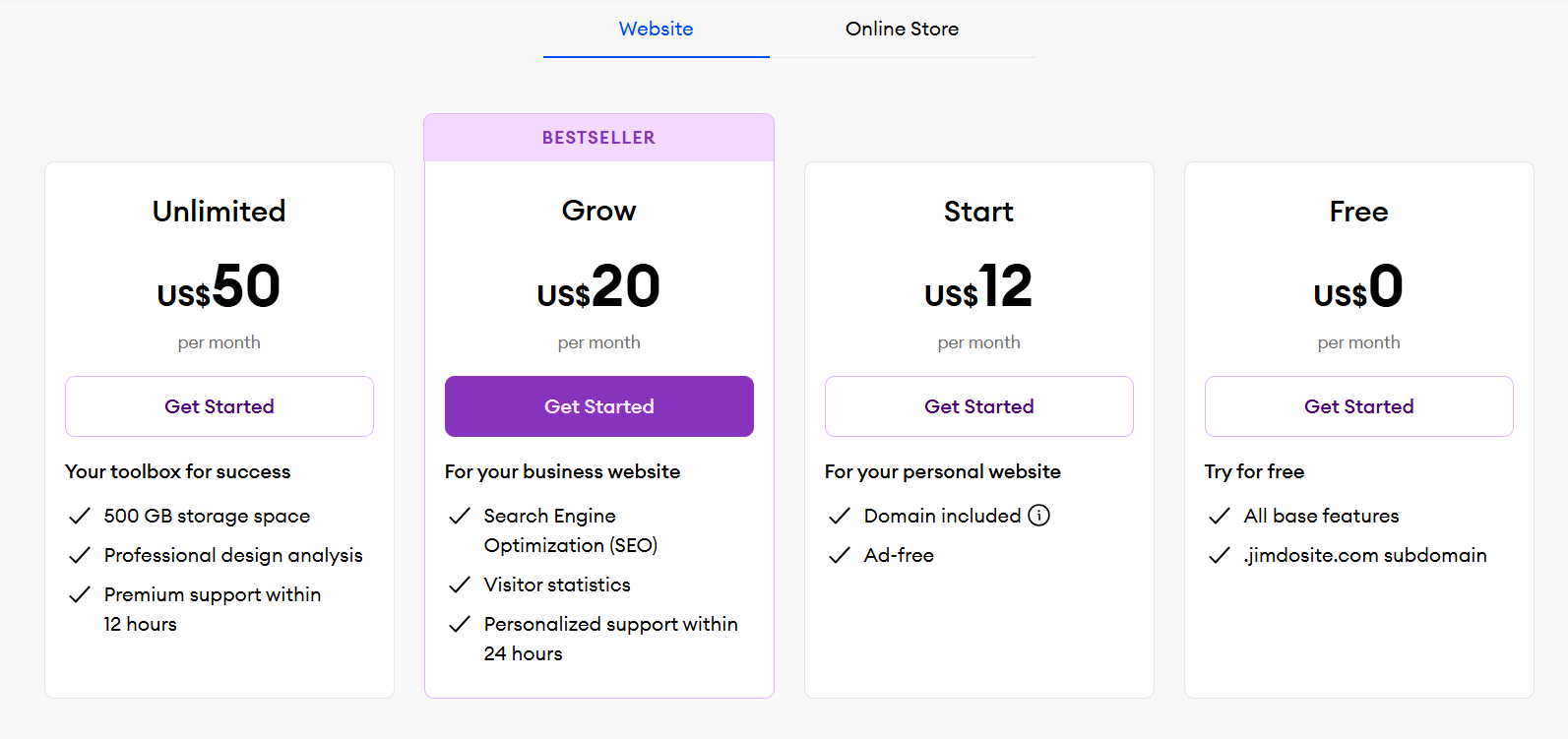
| Pricing Summary | Plans start from a free testing tier up to $50 per month for unlimited storage |
Jimdo Pros & Cons
✅ Pros
- Setup process is incredibly fast, turning a single prompt into a functional draft within minutes
- Free plan provides a risk-free way to test the builder indefinitely on a subdomain
- Modern templates look clean and are highly responsive across all mobile devices
- Advanced SEO tools guide beginners through search optimization basics automatically
- Zero hidden transaction fees charged by Jimdo on store sales
❌ Cons
- Free plan restricts you to a maximum of five pages and 500 MB of storage space
- Selling digital products like PDF downloads is completely unsupported by the platform
- You cannot import or export product data directly if you decide to migrate elsewhere
- Visual design flexibility feels rigid compared to true drag-and-drop freehand canvases
- Priority support within 12 hours is locked exclusively behind the most expensive Unlimited tier
FAQs
What is Jimdo used for?
▼Is Jimdo free to use?
▼Can I use my own domain name on Jimdo?
▼How much does Jimdo cost per month?
▼Is Jimdo actually good for SEO?
▼Can I sell digital products on Jimdo?
▼Can I add custom code to my Jimdo website?
▼More AI Tools You Might Like

KAYAK's conversational AI search lets you chat your way to flights, hotels,…
View Tool ↗
Tripadvisor's AI trip builder creates custom itineraries from your saves, powered by…
View Tool ↗
Free AI travel assistant that lives in WhatsApp and Messenger, answering trip…
View Tool ↗
Free AI trip planner that turns your interests and budget into a…
View Tool ↗
Free trip planner that puts your itinerary, map, bookings, and budget in…
View Tool ↗
AI trip planner backed by human travel advisors who check your itinerary,…
View Tool ↗
Personal AI travel assistant that learns your style, builds mapped itineraries, tracks…
View Tool ↗
Dubai property intelligence with building level prices, rental yields and price forecasts,…
View Tool ↗