

Nicepage
✓ VerifiedNicepage is a desktop and online website builder that creates responsive layouts and exports clean HTML, WordPress themes, and Joomla templates.
Best For: Freelance web developers and agencies wanting offline site design with direct WordPress theme exports.
The Verdict: Nicepage
Nicepage is a fantastic option for web designers who want to escape the subscription traps of closed platforms. The ability to work completely offline, design freely, and export production ready WordPress themes saves massive amounts of development time.
Honestly, most people get this wrong by treating it like a standard beginner builder. The freehand editor gives you enough rope to hang yourself if you ignore responsive design rules. But if you want full ownership of your site files and love hosting on your own servers, this tool provides immense practical value.
What is Nicepage?
Nicepage is a hybrid website builder that lets you create responsive websites through desktop software or a web browser. Unlike cloud only builders that lock you into proprietary hosting, this platform focuses heavily on code portability. You can design your pages visually and export the entire project as raw HTML, a WordPress theme, or a Joomla template.
The editor operates much like graphic design desktop software. You can drag and drop text, images, and buttons anywhere on the screen without being confined to rigid grid boxes. In my practical testing, this freehand approach gives you total visual freedom, but it requires you to manually check each mobile breakpoint to make sure text does not overlap.
This software targets freelance web developers, digital agencies, and WordPress site creators who want to speed up their layout workflows. You avoid the monthly costs of locked in hosting platforms by exporting your finished files directly to your own servers. It gives you the rapid workflow of a visual builder paired with the freedom of open source web development.
Who is Nicepage Best For?
Freelance web developers and agencies wanting offline site design with direct WordPress theme exports.
Nicepage Key Features
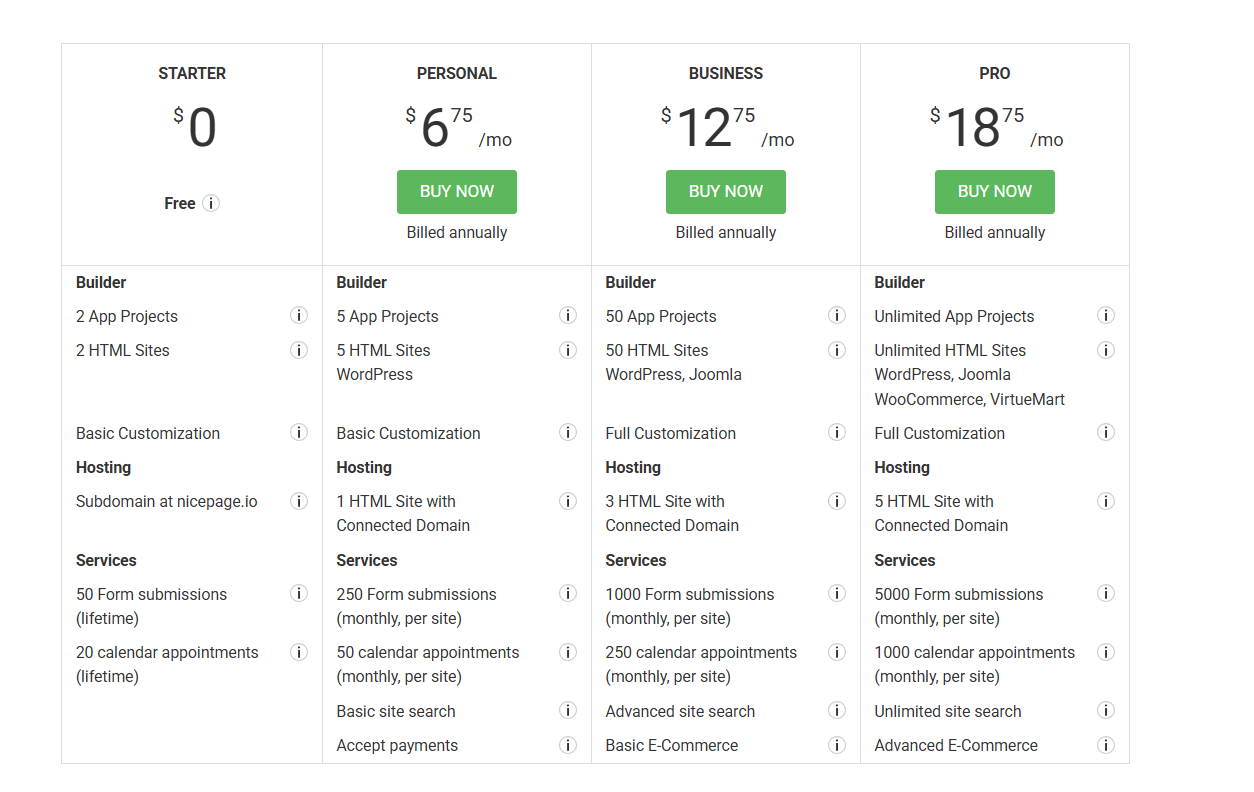
Nicepage Pricing & Plans
Nicepage Review Summary
| Performance Score | B |
| Content Quality | The generated templates provide strong starter designs that can be heavily customized |
| Interface | The editor combines graphic design freehand controls with traditional web settings |
| AI Technology | Built in generators assemble layouts and content blocks from basic prompts |
| Purpose | Nicepage lets designers build websites locally and export themes for major platforms |
| Compatibility | Web, Desktop, Extension |
| Pricing Summary | Plans start from a free testing tier up to $18.75 per month for unlimited professional exports |
Nicepage Pros & Cons
✅ Pros
- Desktop offline mode lets you design websites without an active internet connection
- Full code export allows hosting your completed websites on any external web server
- Direct theme creation for WordPress eliminates the need to code PHP templates by hand
- Perpetual lifetime license options exist alongside standard annual subscriptions
- Free plan provides basic offline building and HTML export testing
❌ Cons
- Visual canvas freedom makes it easy for beginners to accidentally break mobile layouts
- The user interface feels cluttered with technical settings and menus
- Free plan restricts projects to two sites on a branded subdomain
- Generated code can occasionally include extra container markup
- Customer support response times can be slow for users on lower tiers
FAQs
What is Nicepage used for?
▼Is Nicepage free to use?
▼How much does Nicepage cost per month?
▼Can I use Nicepage offline on my computer?
▼Does Nicepage work with WordPress?
▼Do I have to pay monthly for Nicepage?
▼Can I host my Nicepage website on any hosting provider?
▼More AI Tools You Might Like

KAYAK's conversational AI search lets you chat your way to flights, hotels,…
View Tool ↗
Tripadvisor's AI trip builder creates custom itineraries from your saves, powered by…
View Tool ↗
Free AI travel assistant that lives in WhatsApp and Messenger, answering trip…
View Tool ↗
Free AI trip planner that turns your interests and budget into a…
View Tool ↗
Free trip planner that puts your itinerary, map, bookings, and budget in…
View Tool ↗
AI trip planner backed by human travel advisors who check your itinerary,…
View Tool ↗
Personal AI travel assistant that learns your style, builds mapped itineraries, tracks…
View Tool ↗
Dubai property intelligence with building level prices, rental yields and price forecasts,…
View Tool ↗