

Webflow
✓ VerifiedWebflow is a visual web development platform that lets designers build custom, production ready websites without writing code.
Best For: Professional web designers and creative agencies needing absolute control over pixel perfect layouts.
The Verdict: Webflow
Webflow is the absolute best choice for designers who demand total control over their web layouts. The ability to build complex animations and relational CMS structures visually saves hundreds of hours in development time. In my practical testing, the code it generates is incredibly clean, which heavily boosts organic search engine rankings.
Honestly, most people get this wrong by treating it like a beginner friendly drag and drop tool. The learning curve is brutal if you do not understand basic web design principles like the box model. But if you are willing to learn the interface, you will never want to use a rigid template builder again.
What is Webflow?
Webflow is a visual web development platform that lets designers build custom websites without touching a code editor. You manipulate a visual canvas, and the software automatically translates those actions into production ready HTML, CSS, and JavaScript. It bridges the massive gap between graphic design prototyping and live web hosting.
The interface looks much more like professional design software than a standard template builder. You control padding, flexbox layouts, and typography with exact pixel precision. I have observed that traditional block builders restrict your creativity, but this platform gives you absolute structural freedom.
This tool targets professional designers, marketing teams, and creative agencies. You do not need to hire front end developers to turn a Figma mockup into a functional site. It handles all the underlying Amazon Web Services hosting and security internally automatically.
Who is Webflow Best For?
Professional web designers and creative agencies needing absolute control over pixel perfect layouts.
Webflow Key Features
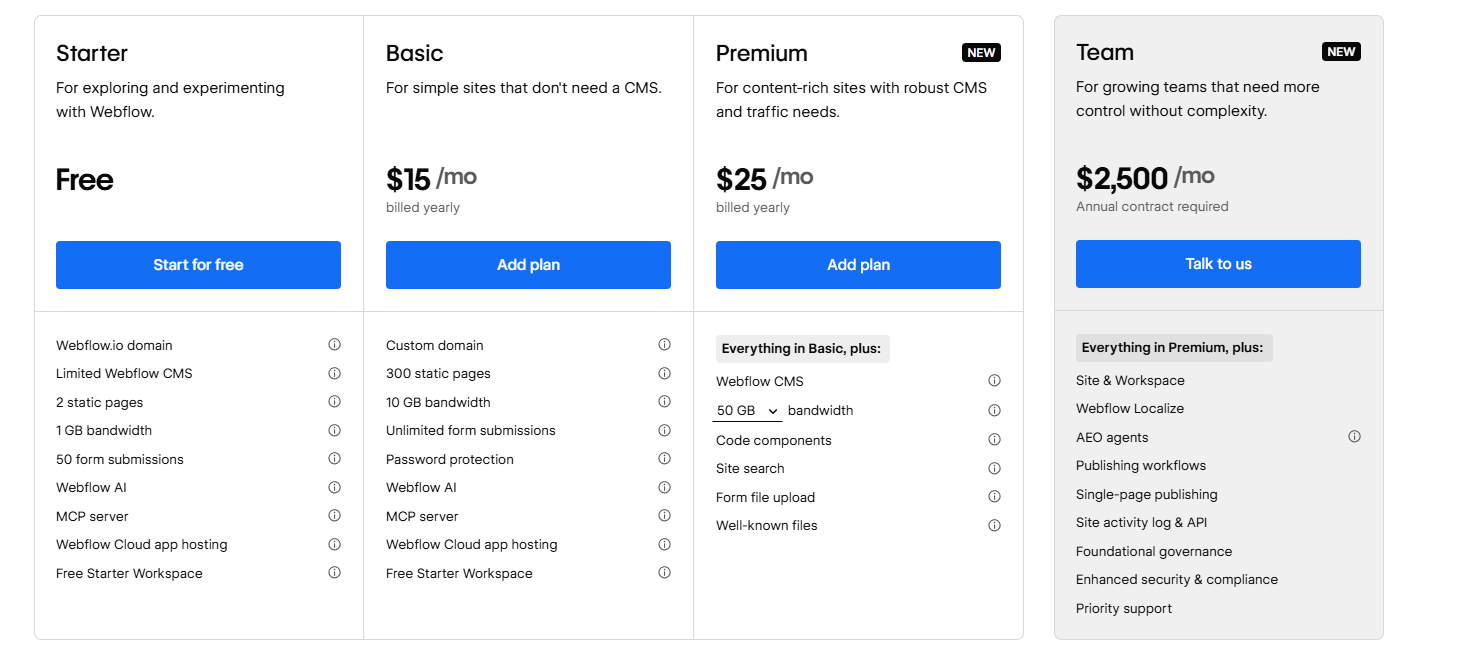
Webflow Pricing & Plans
Webflow Review Summary
| Performance Score | A |
| Content Quality | The AI features provide solid starter text while giving total control to human editors |
| Interface | The designer canvas mimics professional design software like Figma and Photoshop |
| AI Technology | Built in assistants help write copy and optimize pages for answer engines |
| Purpose | Webflow turns visual designs directly into production ready website code instantly |
| Compatibility | Web |
| Pricing Summary | Plans start from a free testing tier up to $2,500 per month for enterprise teams |
Webflow Pros & Cons
✅ Pros
- Generates extremely clean background code that ranks exceptionally well on search engines
- Provides absolute pixel level control over every single visual layout element
- CMS structure handles complex relational databases much better than basic builders
- Included high speed AWS hosting eliminates the need to manage external web servers
- Figma integration drastically reduces the turnaround time from mockup to live site
❌ Cons
- Learning curve feels incredibly steep for users without basic CSS box model knowledge
- Pricing structure across different workspaces and site plans gets very confusing fast
- Exporting dynamic CMS content to host elsewhere is completely restricted by the platform
- Ecommerce functionality limits payment gateways mostly to Stripe and PayPal options
- Monthly team collaboration seats increase total operating costs significantly for agencies
FAQs
What is Webflow used for?
▼Is Webflow free to use?
▼What platforms does Webflow support?
▼Who is Webflow best for?
▼Does Webflow offer a free trial?
▼How much does Webflow cost per month?
▼Can I host a Webflow site anywhere else?
▼More AI Tools You Might Like

KAYAK's conversational AI search lets you chat your way to flights, hotels,…
View Tool ↗
Tripadvisor's AI trip builder creates custom itineraries from your saves, powered by…
View Tool ↗
Free AI travel assistant that lives in WhatsApp and Messenger, answering trip…
View Tool ↗
Free AI trip planner that turns your interests and budget into a…
View Tool ↗
Free trip planner that puts your itinerary, map, bookings, and budget in…
View Tool ↗
AI trip planner backed by human travel advisors who check your itinerary,…
View Tool ↗
Personal AI travel assistant that learns your style, builds mapped itineraries, tracks…
View Tool ↗
Dubai property intelligence with building level prices, rental yields and price forecasts,…
View Tool ↗