

Cleanvoice AI
✓ VerifiedCleanvoice AI is an automated podcast editing tool that removes filler words, mouth sounds, dead air, and background noise from recordings with AI processing and generates transcripts and show notes.
Best For: Podcasters and interview content creators who want filler word removal and audio cleanup automated without learning audio editing software
The Verdict: Cleanvoice AI
Cleanvoice AI is the right tool for podcasters and content creators who spend significant time manually editing out filler words and cleaning up home recordings. The non-destructive review workflow, where you see every proposed edit before it is applied, is the feature that makes it practical for professional use. Getting a first pass of filler word removal from a 45-minute episode done in minutes rather than hours is a genuine time saving.
The honest limitation is that Cleanvoice handles common, predictable noise problems well but does not replace professional audio repair for badly compromised recordings. Intermittent noises like dogs barking, doorbells, or sudden construction that appear unpredictably are less reliably removed than steady hum or fan drone. For severe noise problems, iZotope RX is still the more surgical tool. For typical podcast home recordings, Cleanvoice hits the right balance of automation and quality at its price point.
What is Cleanvoice AI?
Cleanvoice AI is an automated podcast audio editing tool that removes filler words, background noise, mouth sounds, and dead air from voice recordings using AI. It is purpose-built for podcasters, video creators, and content teams who want to reduce editing time without learning a traditional audio editor. The process is straightforward: upload an audio or video file, Cleanvoice analyzes the recording, detects and marks filler words and problem sounds, shows you a reviewable timeline before applying changes, and exports the cleaned file.
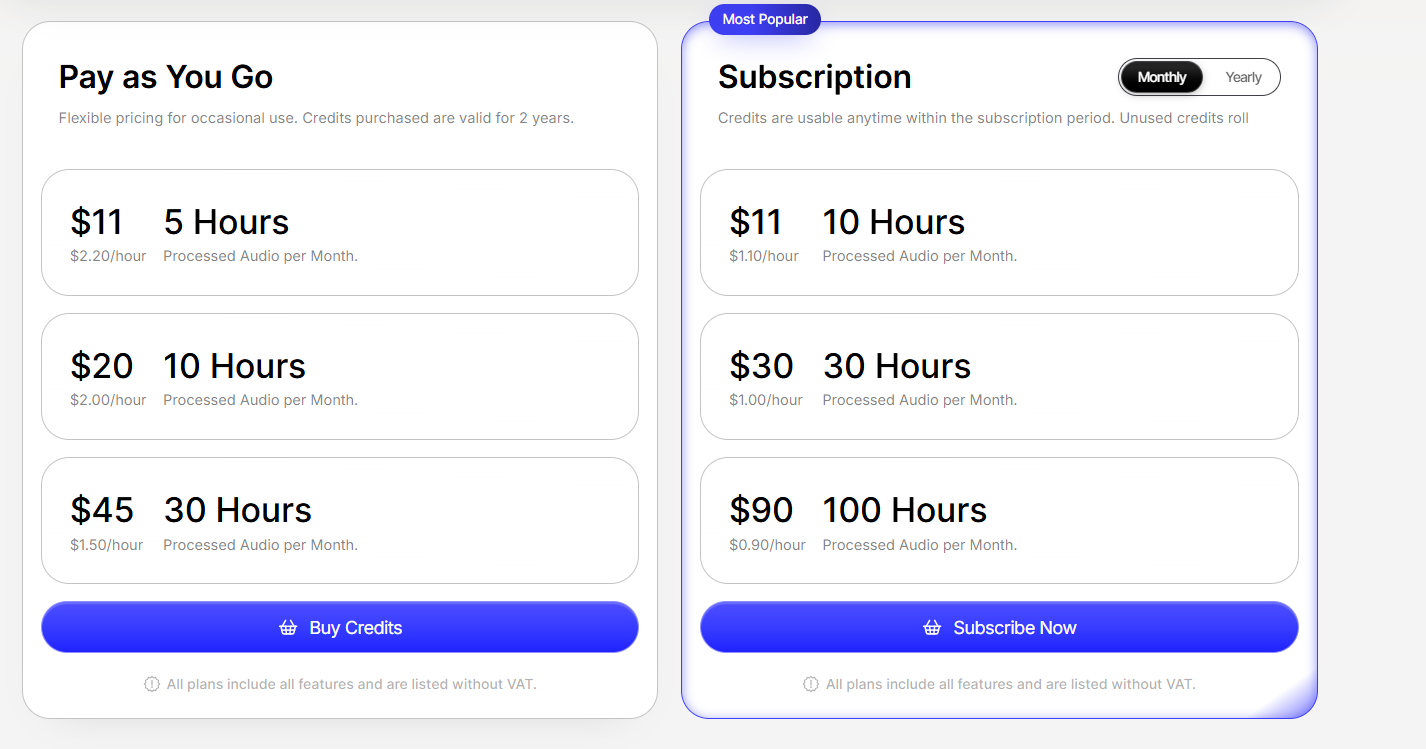
The platform handles common home recording problems including air conditioning hum, computer fan noise, room echo, street noise, and keyboard clicking. It also generates transcriptions, summaries, and show notes from the processed audio. Pricing is based on processing hours rather than a monthly seat cost. The entry plan at $11 per month covers 10 hours of audio processing, scaling up to $90 per month for unlimited processing. A free trial provides 30 minutes of processing to evaluate accuracy before subscribing. Cleanvoice supports multiple languages for filler word detection beyond English.
Who is Cleanvoice AI Best For?
Podcasters and interview content creators who want filler word removal and audio cleanup automated without learning audio editing software
Cleanvoice AI Key Features
Cleanvoice AI Pricing & Plans
Cleanvoice AI Review Summary
| Performance Score | B |
| Content Quality | Filler word removal accuracy is strong on standard English and works across multiple languages with consistent results on clean recordings |
| Interface | Simple web upload interface with preview functionality before final export — low learning curve for non-technical podcasters |
| AI Technology | AI models trained on diverse speech patterns for filler detection, noise classification, and pause identification with multitrack processing capability |
| Purpose | Automated filler word removal and audio cleanup for podcast and interview content creators who want faster post-production |
| Compatibility | Web |
| Pricing Summary | 30-minute free trial, Starter $11/mo with 10 hours, Standard $30/mo with 30 hours, Pro $90/mo with 100 hours, annual saves roughly 17%, pay-as-you-go from $11 for 5 hours |
Cleanvoice AI Pros & Cons
✅ Pros
- 30-minute free trial with no credit card required — enough to test on a real episode
- Filler word removal works across multiple languages and accents
- Multitrack processing handles multiple guest recordings in a single workflow
- Unused credits roll over up to 3x the monthly limit for variable publishing schedules
❌ Cons
- No permanent free plan — trial only, then paid from $11 per month
- Web-only no desktop app or mobile processing
- Less comprehensive than Descript which includes transcript editing and video support
- AI edit decisions on filler words occasionally remove intentional pauses
FAQs
What is Cleanvoice AI used for?
▼Is Cleanvoice AI free to use?
▼What platforms does Cleanvoice AI support?
▼Who is Cleanvoice AI best for?
▼Does Cleanvoice AI offer a free trial?
▼More AI Tools You Might Like

KAYAK's conversational AI search lets you chat your way to flights, hotels,…
View Tool ↗
Tripadvisor's AI trip builder creates custom itineraries from your saves, powered by…
View Tool ↗
Free AI travel assistant that lives in WhatsApp and Messenger, answering trip…
View Tool ↗
Free AI trip planner that turns your interests and budget into a…
View Tool ↗
Free trip planner that puts your itinerary, map, bookings, and budget in…
View Tool ↗
AI trip planner backed by human travel advisors who check your itinerary,…
View Tool ↗
Personal AI travel assistant that learns your style, builds mapped itineraries, tracks…
View Tool ↗
Dubai property intelligence with building level prices, rental yields and price forecasts,…
View Tool ↗